Reactivation of a loan account refers to restoring a lapsed credit facility back to an active operational status. When a borrower misses their scheduled monthly Equated Monthly Instalment (EMI) repayments, non-banking financial companies (NBFCs) like Bajaj Finance temporarily freeze the account. This administrative freeze stops all further credit transactions, wallet withdrawals, or top-up disbursements to protect the system from added risk.
Once you clear the total outstanding default amount, the account undergoes a formal validation loop. The internal accounting desk checks the ledger entries to ensure that all principal parts, penal interests, and banking bounce charges are fully settled. After confirming these details, they lift the restrictions and mark the contract as operationally active.
What are the conditions to reactivate a defaulted loan account
An overdue loan profile cannot be restored to good standing through simple requests. Borrowers must systematically fulfill distinct financial and operational conditions established by the internal credit risk board of Bajaj Finance:
- Complete outstanding clearance: You must pay the full overdue EMI balance up to the current date. Part-payments will not trigger the automated account unfreezing systems.
- Liquidation of penal surcharges: All accumulated daily penal interest penalties and technical NACH mandate bounce fees must be paid off.
- Successful bank mandate validation: Your existing linked personal bank account must hold a valid, active NACH debit mandate to ensure that future monthly installments can clear smoothly without fresh transactional hitches.
What is the step-by-step process to reactivate your account online
If you have accumulated funds to cover your overdue debt, you can use the secure digital infrastructure provided by Bajaj Finance to process your reactivation request. Following this structured sequence ensures your files move quickly through the backend clearance desks:
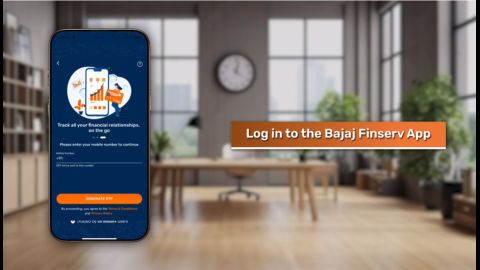
- Access the dashboard: Log in to the official customer portal or smartphone application using your registered mobile number and a secure verification One-Time Password (OTP).
- Verify current liabilities: Navigate to the active loans section and open your latest statement of account to check the exact overdue sum down to the last paisa.
- Execute the payment: Select the overdue payment tab and use digital channels like net banking, Debit Card, or Unified Payments Interface (UPI) to clear the entire outstanding balance.
- Log a formal request: Go to the Help and Support portal, enter your unique transaction reference code, and submit a service request under the 'Account Reactivation' category.
- Monitor status updates: Save your tracking ticket number to follow the digital ledger updates until your main account screen changes from 'Overdue' or 'Suspended' back to 'Active'.
How does loan account reactivation differ from account foreclosure
While both financial activities require the borrower to make lump-sum payments to clear outstanding loan balances, they serve completely different purposes in the credit management lifecycle:
| Operational parameter | Account reactivation process | Loan foreclosure process |
|---|---|---|
| Primary objective | To clear temporary default entries and restore the active loan contract back to its normal ongoing monthly billing routine. | To pay off the entire outstanding principal ahead of schedule, closing the credit contract permanently. |
| Payment magnitude | Requires a smaller remittance covering only the missed EMIs, daily penal interests, and minor bank bounce penalties. | Requires a substantial lump-sum payment equal to the total remaining principal balance of the loan. |
| Future billing impact | Regular monthly NACH auto-debits will automatically resume running on your scheduled due dates until maturity. | All future monthly billing cycles are terminated immediately, and the automated bank debit mandate is canceled. |
| Final documentation | The system generates an updated statement of account reflecting regular standing with no extra closure papers. | The borrower receives an official No Dues Certificate (NDC) that confirms the complete termination of the debt liability. |