













An OTP will be sent to this number for verification

You may have a pre-approved offer
Enter required loan against property amount
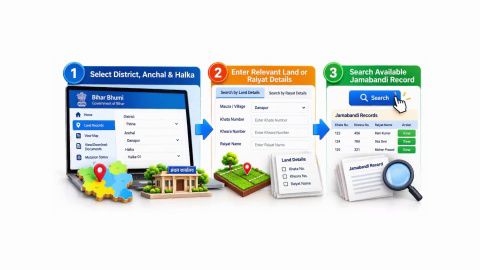
Bihar Bhumi Jankari - Land Records Portal, Benefits, Check Jamabandi Online
In summary
Bihar Bhoomi Jankari helps you examine registered property transactions and related registration records in Bihar. The Prohibition, Excise and Registration Department provides online services for searching property documents, viewing MVR details and retrieving available registration records.
- You can search registered property documents using details such as registration office, date, deed number and party name.
- The portal provides MVR services to check the minimum value of land based on its location.
- You can access available registered document records and web copies through the portal.
- The portal's registered-document data is available up to 15th December 2024.
- Documents registered from 16th December 2024 onwards can be accessed through the certified-copy module of the eNibandhan portal.
- The search facility includes records from online registration, post-computerisation and pre-computerisation periods.
- Bihar Bhoomi Jankari is different from BiharBhumi, which provides revenue land records and services such as Jamabandi and mutation.
- A registered document search does not independently establish clear ownership or confirm that a property has no outstanding liabilities.
Before buying or financing a property, check the registered transaction history and compare the available documents with the ownership records, Jamabandi and relevant revenue documents. Resolve missing transactions or discrepancies before making a financial commitment.
What is Bihar Bhoomi Jankari?
Bihar Bhoomi Jankari is an online property registration information portal maintained by the Prohibition, Excise and Registration Department of the Government of Bihar. It helps citizens search and access information about registered property transactions.
The portal provides services such as:
- View MVR: Helps you check the Minimum Value Register rates applicable to land based on its location.
- View registered document: Allows you to access available information about registered property documents.
- View web copy: Provides access to available web copies of registered documents.
- Advance search: Allows you to search property records using different identifiers and registration details.
- Search by party name: Helps locate registered records using the name of a buyer, seller or other party.
- Search by serial number: Helps retrieve records using the relevant registration serial number.
The portal provides access to registration records from three broad periods:
| Registration period | Record category |
| Before 2005 | Pre-computerisation records |
| 2006 to 2015 | Post-computerisation records |
| 2016 onwards | Online registration records |
The department has clarified that registered-document data on the Bhoomi Jankari portal is available only up to 15th December 2024. Information relating to documents registered from 16th December 2024 onwards is accessible through the certified-copy module of the eNibandhan portal.
For example, if you want to examine a sale deed registered in Patna in 2022, you can use the relevant search facility on Bhoomi Jankari. If the deed was registered in January 2025, you should use the eNibandhan certified-copy service instead.
Bhoomi Jankari is different from BiharBhumi. The latter is maintained by the Revenue and Land Reforms Department and provides services such as online Jamabandi, mutation, land revenue payment and Land Possession Certificate (LPC).
If you are reviewing property records before financing, also check the ownership documents, revenue records and existing mortgage details. These checks are relevant when considering Bajaj Finance Loan Against Property, which involves legal and property verification.
Need funds against an eligible property? Check eligibility for a loan against property to explore your borrowing options.
Sources:
- Bihar Bhoomi Jankari – Official Registration Portal
- BiharBhumi – Revenue and Land Records Portal
How can you search property records on Bihar Bhoomi Jankari?
You can search available registered property records through the official Bhoomi Jankari portal. The advance search facility allows you to use different registration and property identifiers to locate relevant documents.
Follow these steps:
- Open the official Bihar Bhoomi Jankari portal.
- Select the Advance Search option.
- Choose the relevant registration period, such as online registration, post-computerisation or pre-computerisation.
- Select the registration office.
- Enter the registration date range, where required.
- Provide the property location and other available identifiers.
- Enter details such as the deed number, serial number, khata number, plot number or party name, depending on the search option.
- Review the entered information.
- Submit the search request.
- Examine the matching records displayed by the portal.
- Select the relevant record to view the available document details or copy.
The portal also provides separate options for searching by party name and serial number. Choose the search method based on the information available to you. If the document was registered on or after 16th December 2024, use the certified-copy module on the eNibandhan portal instead of relying on the historical Bhoomi Jankari database.
Last reviewed: 30th October, 2026
Source: Bihar Bhoomi Jankari – Official Advance Search
What details are required to search property records on Bihar Bhoomi Jankari?
The search facility requires information that helps identify the relevant registration record and property. The details you need depend on the search option selected. The official advance search facility includes the following fields.
| Required information | Why it matters |
| Registration office | Identifies the office where the document was registered. |
| Registration date range | Narrows the search to the relevant period. |
| Property location | Helps identify the land or property being searched. |
| District or circle | Helps narrow the administrative location. |
| Mauja | Identifies the relevant revenue village. |
| Deed number | Helps locate a specific registered document. |
| Serial number | Helps retrieve the record using its registration serial number. |
| Khata number | Helps identify the relevant landholding record. |
| Plot number | Helps identify the specific land parcel. |
| Party name | Helps search records using the buyer's or seller's name. |
| Father or husband's name | Provides an additional identifier for the party, where requested. |
| Land type and area | Helps narrow the search based on the property's classification and extent. |
Last reviewed: 30th October, 2026
Keep the registered sale deed and available property records ready before starting the search. For rural land, verify the Mauja, khata and plot details against the relevant revenue records.
An incorrect deed number, registration office or property identifier can return incomplete or unrelated search results. Compare the information with the original registered document before relying on a search result.
Source: Bihar Bhoomi Jankari portal
What services are available on Bihar Bhoomi Jankari?
Bihar Bhoomi Jankari provides different facilities to help you examine registered property records and related valuation information.
The main services include:
| Service | What it helps you do |
| View MVR | Check the minimum value of land based on its location. |
| View Flat MVR | Access the applicable minimum valuation information for flats. |
| View registered document | Examine available registered property document records. |
| View web copy | Access the available web copy of a registered document. |
| Advance search | Search records using registration and property details. |
| Search by party name | Locate registered documents using the name of a party. |
| Search by serial number | Find a record using its registration serial number. |
| Agreement report | Access the available agreement-related registration information. |
| Digitisation project tracker | Check information about the document digitisation project. |
Last reviewed: 30th October, 2026
The availability of a service or document depends on the registration period and the records maintained on the portal. For documents registered from 16th December 2024 onwards, use the eNibandhan certified-copy module as instructed by the department.
Source: Bihar Bhoomi Jankari – Official Portal
How can you check MVR on Bihar Bhoomi Jankari?
The Minimum Value Register (MVR) provides the minimum valuation information used for land and property registration in the relevant area. You can use the MVR service on Bihar Bhoomi Jankari to examine the applicable minimum value based on the property's location and other details.
Follow these steps:
- Open the official Bihar Bhoomi Jankari portal.
- Select View MVR or View Flat MVR, depending on the property type.
- Choose the relevant district and registration office.
- Enter the property location and other details requested by the portal.
- Select the relevant land or property category.
- Submit the details to view the available MVR information.
- Check the displayed valuation details for the relevant location.
For example, Rahul, aged 42, plans to purchase a plot in Muzaffarpur. Before proceeding with registration, he checks the MVR applicable to the property's location. He can use this information as a reference when reviewing the minimum valuation for registration purposes.
The MVR should not be treated as a guaranteed market selling price. The actual transaction value may differ depending on the property's location, condition, characteristics and prevailing market conditions.
Source: Bihar Bhoomi Jankari – View MVR
How can you download or verify a registered document on Bihar Bhoomi Jankari?
You can retrieve available registered document information and web copies through the relevant service on Bihar Bhoomi Jankari. The retrieval process depends on the registration period and the type of copy required.
Follow these steps:
- Open the official Bihar Bhoomi Jankari portal.
- Select View Registered Document or View Web Copy.
- Choose the applicable search option.
- Enter the registration office and document details requested by the portal.
- Provide the deed number, registration date or other identifiers, where applicable.
- Submit the search details.
- Select the matching document record.
- View or retrieve the available document copy.
- Check the document details against the original registration information.
The portal's registered-document database is available only up to 15th December 2024. If you need a certified copy of a document registered from 16th December 2024 onwards, use the certified-copy module of the eNibandhan portal.
A web copy and a certified copy may serve different purposes. If you need a document for a legal proceeding, property transaction or loan application, confirm the type of copy accepted by the receiving authority.
Sources:
- Bihar Bhoomi Jankari – Official Portal
- eNibandhan – Bihar Registration Portal
What if you cannot find a property document on Bihar Bhoomi Jankari?
If you cannot find a registered property document, first check whether the registration date falls within the portal's available data period. You should also verify the registration office, deed number and other property identifiers.
You can examine the following possible reasons.
| Possible reason | What you should check |
| Document registered after 15th December 2024 | Use the certified-copy module on eNibandhan. |
| Incorrect registration office | Verify the Sub-Registrar Office where the deed was registered. |
| Incorrect deed or serial number | Compare the details with the original document. |
| Wrong registration date | Check the registration date mentioned in the deed. |
| Incorrect party name | Try the name as recorded in the registered document. |
| Incorrect property identifiers | Verify the Mauja, khata and plot number. |
| Older record not available online | Contact the relevant registration office for guidance on historical records. |
Last reviewed: 30th October, 2026
For example, Vivek, aged 46, wants to retrieve a sale deed registered in Gaya in February 2025. He searches for the document on Bhoomi Jankari but cannot find it. Since the department's portal notice states that records after 15th December 2024 are available through the eNibandhan certified-copy module, he should use that service instead.
If the record is still unavailable, contact the relevant registration office with the deed details and registration acknowledgement.
Source: Bihar Bhoomi Jankari – Official Portal Notice
Does Bihar Bhoomi Jankari prove ownership of a property?
Bihar Bhoomi Jankari does not independently establish clear legal ownership of a property. It helps you examine available registered property transactions and retrieve relevant registration records.
A registered sale deed is an important document in a property transaction, but you should examine the complete ownership chain and relevant revenue records before making a purchase.
The main documents serve different purposes.
| Document | What it helps establish |
| Registered sale deed | Details of a registered property transfer. |
| Bihar Bhoomi Jankari record | Available information about registered property transactions. |
| Jamabandi | Recorded landholding, khata, khesra, area and land revenue details. |
| Mutation record | Changes recorded in revenue records following a transfer or other eligible event. |
| Encumbrance-related records | Relevant registered transactions identified through the available registration search. |
| Land map | Location, boundaries and survey-related details of a land parcel. |
| Legal title review | Assessment of ownership history, claims and supporting documents. |
Last reviewed: 30th October, 2026
A Jamabandi entry does not automatically establish undisputed legal ownership. Similarly, a registered document search does not reveal every possible unregistered claim or dispute.
If you are purchasing land in Bihar, compare the registered sale deed with the available Jamabandi, mutation records and relevant land documents. Resolve discrepancies before completing the transaction.
Sources: BiharBhumi – Jamabandi FAQ
How does Bihar Bhoomi Jankari matter for a loan against property?
Bihar Bhoomi Jankari helps you examine registered property transactions that may form part of the documentation reviewed when you apply for a loan against property. It supports property verification but does not independently determine ownership or loan eligibility.
Consider Nishant, aged 43, who owns a commercial property in Patna and wants funds to expand his business. Before applying, he checks the available registered transaction records through Bhoomi Jankari and reviews the property's Jamabandi and mutation details through BiharBhumi.
During the loan against property application process, he also provides the registered sale deed and other property documents requested by the lender.
If the available records show an earlier registered mortgage, Nishant should obtain the relevant loan-closure and mortgage-release documents if the previous loan has been repaid.
Bajaj Finance Loan Against Property assesses eligible properties through legal, technical and valuation checks. The applicant's income, credit profile and repayment capacity are also reviewed. Bajaj Finance offers loan amounts of up to ₹15.50 crore, with repayment tenures of up to 15 years, subject to eligibility and property assessment. Before deciding how much to borrow, compare loan against property interest rates and use the loan against property EMI calculator to estimate your repayment commitment. Once you have reviewed your property and existing mortgage records, you can check your loan against property eligibility with Bajaj Finance to explore your borrowing options.
Frequently Asked Questions
Applications and property records
Fees and verification
Ownership and financing
Is Bihar Bhoomi Jankari the same as BiharBhumi?
No. Bhoomi Jankari focuses on registered property documents and registration information. BiharBhumi provides revenue and land-record services such as Jamabandi, mutation, land revenue payment and Land Possession Certificate.
How can I search a registered sale deed on Bihar Bhoomi Jankari?
Open the official portal and use the Advance Search, party name or serial number search facility. Enter the registration office, registration date and available property or deed details to locate the relevant record.
Can I search an old property document on Bihar Bhoomi Jankari?
The portal provides search options for pre-computerisation records before 2005, post-computerisation records from 2006 to 2015 and online registration records from 2016 onwards. The availability of a specific record depends on the portal's digitised data.
Can I download a registered sale deed from Bihar Bhoomi Jankari?
You can access available registered document records and web copies through the portal's relevant services. If you need a certified copy, check the applicable facility and requirements. Documents registered from 16th December 2024 onwards are accessible through the certified-copy module of eNibandhan.
How can I check MVR on Bihar Bhoomi Jankari?
Open the official portal and select View MVR or View Flat MVR. Enter the required location and property details to view the available minimum valuation information.
Does Bihar Bhoomi Jankari prove ownership of land?
No. It provides access to available registered property transaction information. You should also review the registered title documents, Jamabandi, mutation records and other relevant property documents to assess ownership.
Can I check an existing mortgage through Bihar Bhoomi Jankari?
You can search available registered property documents that may include mortgage-related transactions. However, the search does not independently establish whether a mortgage has been discharged. Check the relevant release document and lender confirmation where required.
Loan Against Property for different budget
Check your pre-approved offer now
Loan Against Property for Professionals




Find your nearest branch

What do our customers say about us
customers
Play Store rating
reviews
Anita Das
04 March 2026
The loan against property process was smooth and transparent. Interest rates were competitive, and the documentation requirements were minimal. The team provided clear guidance at every step, making the entire experience hassle-free. Highly recommended for quick approvals and reliable support.
Aashish
04 March 2026
The loan disbursal was quick, and the customer support team handled all my queries with patience and clarity. Flexible EMIs made it easy to manage monthly expenses. Overall, a great experience, especially for salaried individuals seeking a loan against property.
Prakash
04 March 2026
I had a great experience transferring my existing loan against property. The process was quick and hassle-free, and I saved significantly with the lower interest rate. The customer service team was supportive throughout. Highly recommended for anyone considering a balance transfer.
Yogesh Singh
04 March 2026
Clear guidance, quick approval, and flexible repayment options made purchasing my new house much easier than expected. The team managed the entire process professionally and ensured smooth coordination at every stage. Overall, a very satisfying experience, and I would recommend their home loan services to others.
Related articles


Watch our videos

Know the tax benefits on your loan against property

What are the documents required for a Loan Against Property?

What are the types of property eligible for Loan Against Property

What is the eligibility criteria for a Loan Against Property
Bajaj Finance app for all your financial needs and goals
Trusted by 50 million+ customers in India, Bajaj Finance App is a one-stop solution for all your financial needs and goals.
You can use the Bajaj Finance App to:
- Apply for loans online, such as Instant Personal Loan, Home Loan, Business Loan, Gold Loan, and more.
- Invest in fixed deposits and mutual funds on the app.
- Choose from multiple insurance for your health, motor and even pocket insurance, from various insurance providers.
- Pay and manage your bills and recharges using the BBPS platform. Use Bajaj Pay and Bajaj Wallet for quick and simple money transfers and transactions.
- Apply for Insta EMI Card and get a pre-qualified limit on the app. Explore over 1 million products on the app that can be purchased from a partner store on Easy EMIs.
- Shop from over 100+ brand partners that offer a diverse range of products and services.
- Use specialised tools like EMI calculators, SIP Calculators
- Check your credit score, download loan statements and even get quick customer support—all on the app.
Download the Bajaj Finance App today and experience the convenience of managing your finances on one app.
Disclaimer
1. Bajaj Finance Limited (“BFL”) is a Non-Banking Finance Company (NBFC) and Prepaid Payment Instrument Issuer offering financial services viz., loans, deposits, Bajaj Pay Wallet, Bajaj Pay UPI, bill payments and third-party wealth management products. The details mentioned in the respective product/ service document shall prevail in case of any inconsistency with respect to the information referring to BFL products and services on this page.
2. All other information, such as, the images, facts, statistics etc. (“information”) that are in addition to the details mentioned in the BFL’s product/ service document and which are being displayed on this page only depicts the summary of the information sourced from the public domain. The said information is neither owned by BFL nor it is to the exclusive knowledge of BFL. There may be inadvertent inaccuracies or typographical errors or delays in updating the said information. Hence, users are advised to independently exercise diligence by verifying complete information, including by consulting experts, if any. Users shall be the sole owner of the decision taken, if any, about suitability of the same.