








Support available Online, on call, or at branches
Get answers instantly without waiting on call:
Enter mobile and OTP · No password needed · No branch visit needed
In Summary
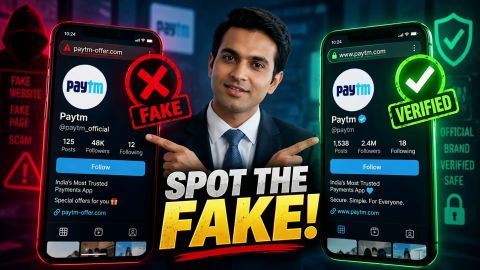
Spot fake lookalike websites and impersonation scams
Fraudsters create social media profiles that use the Bajaj Finance name and logo, then contact people about loans, jobs or emergencies and ask for money or personal details. Check a profile’s picture, age, contact details and requests before you respond. If a profile asks for money, an OTP or card details, stop responding and report it.
- Check the profile picture, posts and when the account was created.
- Look at the contact details listed, and compare them with the official website.
- Do not pay for a loan, job registration, verification or interview.
- Never share your OTP, card details or account details.
- Report the profile to the platform, and report any loss without delay.
What is a fake Bajaj Finance profile?
A fake Bajaj Finance profile is a social media account created to look like the company or one of its employees. It copies the Bajaj Finance name, logo and style so that people trust it and respond. The profile may claim to be a customer care team, a loan officer, a recruiter or a page that announces offers.
The aim of these accounts is to collect personal details or money from the people who respond. They can look convincing, because the logo, the wording and the profile photos are often copied from the real brand. A profile that looks official is not proof that it is genuine.
Fake profiles usually appear in a few forms:
- Fake company page: An account that uses the Bajaj Finance name and logo and posts offers, giveaways or loan announcements.
- Fake employee profile: A personal account that claims to work at Bajaj Finance and contacts people directly.
- Fake customer care account: A profile that replies to complaints on social media and moves the conversation to a private chat.
- Fake recruiter profile: An account that offers jobs, interviews or training in the name of the company.
Your own details are what these profiles are after. A person who responds may be asked for a mobile number, an email address, card details or money.
How do fraudsters use fake profiles?
Fraudsters use fake profiles to collect contact details and personal information, then use them to approach people with loan offers, job offers or emergencies. The first contact often looks harmless, such as a friendly message, a comment on your post or a reply to a complaint. The request for money or details comes later, once you have started to trust the profile.
Fraudsters collect information in several ways:
- Public details: They read the friend lists, about sections and posts that people leave visible on their profiles.
- Direct messages: They contact you privately about a loan, a job or an offer, and ask you to share details to continue.
- Replies to complaints: They respond to public posts about a problem and offer to help in a private chat.
- Links and forms: They send links to forms or pages that ask for personal and payment details.
Once they have your details, they may use them to make a request that looks believable. The request usually falls into one of these cases:
| Approach | What the fraudster may say | What they may ask for |
|---|---|---|
| Loan offer | A loan is approved and only a fee is needed to release it. | A processing fee, a deposit or card details. |
| Job offer | A job or interview is available after registration. | A registration, verification or interview fee. |
| Emergency | A relative or friend urgently needs money. | An immediate payment or a transfer. |
| Account problem | Your account or EMI card has a problem that needs fixing. | Your OTP, card details or mobile number. |
They may also press you for your EMI card details or mobile number. This information can be used to commit fraud against you, for example to attempt a payment or to approach you again as someone you trust.
Be careful with any message that asks you to act urgently or to pay before you receive a service. Fraudsters create pressure so that you act before you check. Stop, do not pay, and verify the request through an official channel before you respond.
How to spot a fake Bajaj Finance profile
You can spot a fake profile by checking a few details on the account. No single sign proves a profile is fake, so check several together.
| What to check | What may indicate a fake profile |
|---|---|
| Profile picture | No picture, a stolen picture or a distorted logo. |
| Posts and engagement | Few posts, copied posts or followers and comments that look unreal. |
| Account age | A recently created account. An older account can also be fake or hacked, so do not rely on age alone. |
| Contact details | A generic email address such as Gmail or Yahoo, or a website that is not the official one. |
| Requests | A demand for money, an OTP, card details or personal information. |
| Older posts | Posts that do not match the company, or posts that were recently deleted. |
Compare any website or email address with the contact details on the official Bajaj Finance website before you trust it.
How to check whether an offer or contact is genuine
Verify every offer, cashback claim or product claim on the official website before you respond. If a profile contacts you about a loan, a job or an EMI, check the claim through an official channel.
- Use the contact details on the official website, not the ones sent to you.
- Do not click on links in messages from profiles you cannot verify.
- Treat any recruiter or offer that asks for a fee for registration, verification or interview scheduling as a warning sign.
- Contact Bajaj Finance through Reach Us if you are unsure.
How to protect yourself on social media
Limit what strangers can see about you, because fraudsters use public details to approach you.
- Do not share personal information with a profile unless you have verified it.
- Set your privacy settings so that only close contacts can see your friend list, about section and posts.
- Never share your OTP, card details or account details with anyone.
- Check a profile’s older posts before you trust it.
What to do if you have shared details or paid money
Act quickly if you have shared details or made a payment, and keep a record of everything.
- Stop responding to the profile.
- Take screenshots of the profile, the messages and any payment details.
- Contact your bank at once if you shared card or account details, or if you made a payment.
- Report the profile to the social media platform.
- Report the fraud on the National Cyber Crime Reporting Portal or through the cyber crime helpline 1930.
- Contact Bajaj Finance through Reach Us if the profile used its name.
Change any password you shared, and check your accounts for transactions you do not recognise.
Portal support made simple — Explore below
Frequently Asked Questions
Identifying Fake Bajaj Finance Profiles
Social Media Fraud & Safety
How can I tell whether a Bajaj Finance social media profile is real?
Check the profile picture, the posts, the age of the account and the contact details it lists, and compare them with the official website. No single sign proves a profile is fake, so check several together and do not respond to requests for money or an OTP.
Does Bajaj Finance ask for an OTP or payment on social media?
Bajaj Finance does not need your OTP, card details or a payment through a social media profile. Treat any such request as a warning sign, stop responding and report the profile.
What should I do if a profile asks me to pay for a loan or a job?
Do not pay. A demand for a fee before a loan, job or interview is a common sign of fraud. Stop responding and report the profile to the platform.
What should I do if I have already shared my details?
Contact your bank at once if you shared card or account details, and change any password you shared. Report the profile to the platform and report the fraud on the National Cyber Crime Reporting Portal or through helpline 1930.
How do I report a fake profile?
Use the report option on the social media platform, and contact Bajaj Finance through Reach Us if the profile used its name. Keep screenshots of the profile and messages.
More Articles

Disclaimer
While care is taken to update the information, products, and services included in or available on our website and related platforms/websites, there may be inadvertent inaccuracies or typographical errors or delays in updating the information. The material contained in this site, and on associated web pages, is for reference and general information purpose and the details mentioned in the respective product/service document shall prevail in case of any inconsistency. Subscribers and users should seek professional advice before acting on the basis of the information contained herein. Please take an informed decision with respect to any product or service after going through the relevant product/service document and applicable terms and conditions. In case any inconsistencies observed, please click on reach us.
*Terms and conditions apply.