











An OTP will be sent to this number for verification

You may have a pre-approved offer
Enter required home loan amount
In summary
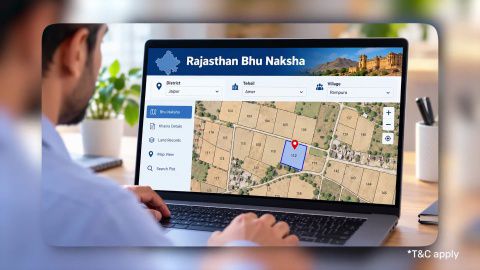
Rajasthan Bhu Naksha - How to Download & View Land Records
Last updated: Oct 2026
Bhunaksha Rajasthan and the Jamabandi answer different questions, and a sound purchase needs both to agree. The Jamabandi says who owns the land and how much. The map says where it lies and what shape it has.
- 2 records: the Jamabandi Nakal (owner, Khasra, area, land type) and the Bhu Naksha (boundary, shape, neighbours)
- Gap test: (Jamabandi area − map area) ÷ Jamabandi area × 100
- Example: 0.20 hectare on the Jamabandi and 0.17 hectare on the map is a 15% gap
- Lenders ask for a certified Nakal, not a plain printout
Agricultural land needs a land-use conversion order before residential construction
Never pay on the Jamabandi area alone. Ask the Patwari or Tehsil office to explain any gap first, and get the answer in writing before you transfer money.
What does Bhunaksha Rajasthan show that the Jamabandi does not?
It shows where the plot sits: its boundary, shape, neighbouring plots and map area. The Jamabandi shows who owns it and the recorded area.
| Question | Jamabandi Nakal (Apna Khata) | Bhu Naksha |
|---|---|---|
| Who owns the land? | Yes | No |
| What is the recorded area? | Yes | Shows map area |
| What shape is the plot? | No | Yes |
| Who are the neighbours? | No | Yes |
| What land type is it? | Yes | No |
Each record covers what the other cannot. Use the Jamabandi for rights and the map for location.
Show more
Show less
How do I check Bhunaksha Rajasthan for a Khasra number?
Five steps take you from the portal to a downloaded map.
- Open the Bhu Naksha portal of the Rajasthan Revenue Department.
- Select the district, tehsil and village.
- Enter the Khasra number, which is the plot number.
- Read the map, which highlights the plot with its boundary, shape, area and adjacent plots.
- Download the map as a PDF for your file.
Read the Khasra number from your Jamabandi, not from the seller's message. A one-digit error opens a different plot.
Show more
Show less
How do I compare the map area with the Jamabandi area?
Convert both to one unit, then compute the gap as a percentage of the Jamabandi area.
Formula used: Gap % = (Jamabandi area − map area) ÷ Jamabandi area × 100.
Check the unit first. Local measures such as the bigha differ between districts, so confirm the conversion with the tehsil office. A gap needs an explanation from the Patwari or Tehsil office before you pay.
Trade-off: a small gap can come from map scale or rounding, but a larger gap can mean the seller already sold a strip or a neighbour has encroached. Paying first and asking later leaves you with the loss.
Show more
Show less
Is the land agricultural or residential?
Read the land type on the Jamabandi before you read anything else. Agricultural (khatedari) land needs a land-use conversion, called Avasiya Parivartan, before you can build a home on it.
Ask the seller for the conversion order and check that its Khasra number matches. Land in a master plan zone follows the zone rules, so confirm them with the local development authority.
Show more
Show less
Home loan for professionals
A worked example: a 15% gap on 0.20 hectare
Consider Mahesh, a 46-year-old trader in Jodhpur with a household income of Rs. 1.1 lakh a month and a CIBIL Score of 744, buying a plot advertised at Rs. 30 lakh for 0.20 hectare.
Formula used: Price for actual area = asking price ÷ Jamabandi area × map area.
| Item | Value |
|---|---|
| Jamabandi area | 0.20 hectare |
| Bhu Naksha area | 0.17 hectare |
| Gap | 15% |
| Asking price | Rs. 30,00,000 |
| Price for 0.17 hectare | Rs. 25,50,000 |
Mahesh checked Bhunaksha Rajasthan for the Khasra number on the Jamabandi. The Patwari confirmed that 0.03 hectare had been sold earlier. Mahesh renegotiated to Rs. 25.5 lakh, saving Rs. 4.5 lakh.
Show more
Show less
What do lenders need for a Rajasthan property?
Lenders need a certified Jamabandi Nakal and, for converted land, the conversion order. A plain Apna Khata printout is a reference, not a certified document.
| Loan feature | Detail |
|---|---|
| Interest rate | From 7.25% p.a.*, subject to credit assessment |
| Loan amount | Up to Rs. 15 crore* |
| Tenure | Up to 32 years |
Approval timelines can extend where the map and the Jamabandi disagree, and minimum property value thresholds can differ by city. Check your home loan eligibility once Bhunaksha Rajasthan and the Jamabandi agree. Read home loan fees and charges and check your eligibility before you commit.
Show more
Show less
Frequently Asked Questions
Records and terms
After the purchase
What is the difference between Khasra and Khata in Rajasthan?
Khasra is the plot number, the unique identifier of one piece of land. Khata is the account number that groups all the plots one person owns in a village. One Khata can hold more than one Khasra number. When you compare records, match the Khasra number first, then confirm the Khata and the owner's name.
Can I use the Bhu Naksha PDF as proof of ownership?
No. The map shows where a plot lies and its boundary, not who owns it. Ownership comes from the certified Jamabandi Nakal. Keep the map PDF as supporting evidence of location and boundary, and use it to spot gaps. A lender will still ask for the certified Nakal. Never treat a map alone as title.
How do I track mutation after buying in Rajasthan?
Apply for Dakhil Kharij (mutation) on the Apna Khata portal or through an e-Mitra centre. Submit the registered sale deed details, the Khasra and Khata numbers and your Aadhaar. Track the status on the portal. Until the mutation is recorded, the Jamabandi still shows the previous owner, which can delay a loan.
Why does the bigha size differ between districts?
The bigha is a local measure, and its size in square metres differs by district, for example between Jaipur and Jodhpur. Records that quote bigha cannot be compared across districts without conversion. Ask the tehsil office for the local conversion, and compare areas in hectares or square metres to avoid errors.
Home Loan in Different Cities

Home Loan in Mumbai

Home Loan in Ahmedabad

Home Loan in Bangalore

Home Loan in Chennai

Home Loan in Delhi

Home Loan in Hyderabad

Home Loan in Cochin

Home Loan in Noida

Home Loan in Pune
Home Loan for different budget
Check your pre-approved offer now
Our Calculators






What do our customers say about us
customers
Play Store rating
reviews
Amit Shiva
Reviewed on
Smooth and transparent home loan process. The interest rates were competitive, and documentation was minimal. The team guided me clearly at every step, making my first home purchase stress-free. Highly recommended for quick approvals.
Sandeep Kulkarni
Reviewed on
The loan disbursal was fast, and the customer support team was extremely patient with all my queries. Flexible EMIs helped me manage my monthly expenses easily. A great experience for salaried homebuyers.
Ritika Agarwal
Reviewed on
I had a great experience while transferring my existing home loan. The process was quick, and I saved significantly with the lower interest rate. Customer service was helpful throughout. Highly recommended for balance transfers.
Manoj Verghese
Reviewed on
Clear guidance, quick approval, and flexible repayment options made buying my new house easier than expected. The team handled everything professionally. Very satisfied and would definitely recommend their home loans
Find your nearest branch

More Articles




Watch our videos

Documents required to get a Bajaj Finserv Home Loan

Tips to increase your Home Loan eligibility

Things you need to know about pre-approved home loan

Things you need to know before applying for a Home Loan

How does Repo Rate affect your Home Loan

Download App
Now request money from your friends and family and make instant payments.

- Choose from personal, business, gold loans and more
- Pay utility bills, use UPI, get FASTag and more
- Buy over 1 million products on No Cost EMI
- Buy stocks, mutual funds and invest in FD
Disclaimer
1. Bajaj Finance Limited (“BFL”) is a Non-Banking Finance Company (NBFC) and Prepaid Payment Instrument Issuer offering financial services viz., loans, deposits, Bajaj Pay Wallet, Bajaj Pay UPI, bill payments and third-party wealth management products. The details mentioned in the respective product/ service document shall prevail in case of any inconsistency with respect to the information referring to BFL products and services on this page.
2. All other information, such as, the images, facts, statistics etc. (“information”) that are in addition to the details mentioned in the BFL’s product/ service document and which are being displayed on this page only depicts the summary of the information sourced from the public domain. The said information is neither owned by BFL nor it is to the exclusive knowledge of BFL. There may be inadvertent inaccuracies or typographical errors or delays in updating the said information. Hence, users are advised to independently exercise diligence by verifying complete information, including by consulting experts, if any. Users shall be the sole owner of the decision taken, if any, about suitability of the same.