Mobile Phone Benchmark Scores Explained - AnTuTu and Geekbench Guide

Mobile Phone Benchmark Scores Explained - AnTuTu and Geekbench Guide

This guide covers what benchmark scores mean, how AnTuTu and Geekbench differ, and how to run the AnTuTu test yourself.

Get pre-approved loan offer

Quick approval | Flexible Tenure Options | Zero Approval Fees

What is a mobile phone benchmark score?

A benchmark score shows how a phone performs under a series of stress tests, letting you compare devices using a consistent measurement rather than marketing claims.


  • A benchmark score comes from an app that pushes a phone to its performance limit through a set of tests, then converts the result into a number
  • Scores are relative, not absolute. Each benchmarking app uses its own scale, so a score only means something when compared against another device tested on the same benchmark
  • Two devices can only be meaningfully compared if they were tested using the same benchmark app, not two different ones
  • Most benchmarks focus on hardware speed, covering areas such as processor calculations, RAM handling, graphics performance and, in some tools, web browsing speed

AnTuTu vs Geekbench - Which score is more accurate?

AnTuTu and Geekbench measure different parts of a phone's performance, so which one is "more accurate" depends on what you are trying to evaluate.


AspectAnTuTuGeekbench
What it measuresCPU, GPU, memory (RAM and storage) and UX (app launch speed, responsiveness)CPU and memory only
Score formatSingle overall scoreSeparate single-core and multi-core scores
Best forBroad, all-round performance comparison, including gaming and graphicsComparing raw processor performance, task by task
Real-world readReflects overall smoothness and gaming capabilitySingle-core reflects everyday "snappiness"; multi-core reflects multitasking

Neither score is more accurate in an absolute sense. Single-core performance tends to reflect how responsive a phone feels day to day, since most everyday tasks run on a single core, while AnTuTu's broader test gives a fuller picture of gaming and multitasking performance. Both should be read as indicators rather than guarantees, since real-world performance also depends on software: the same chip can score differently across two different ROMs or skins on identical hardware. Scores can also be manipulated, as manufacturers have previously been found adjusting device behaviour specifically to score higher when a benchmarking app is detected running, so treat benchmark scores as one data point rather than the final word on performance.
What do AnTuTu score ranges mean for your phone?

AnTuTu scores vary sharply by chip generation and price segment, so they are best read relative to current-generation devices rather than as fixed numbers.


Score rangeSegmentExample devices
Below 500,000Entry-levelrealme C100X (380,571), Infinix Smart 20 4G (366,645)
500,000 to 1,000,000Budget to lower mid-rangeSamsung Galaxy A27 5G (845,601), POCO M8 (862,268)
1,000,000 to 2,000,000Mid-range to upper mid-rangeMotorola Edge 70 (1,402,932), OnePlus Nord 5 (1,481,616)
2,000,000 to 3,000,000FlagshipSamsung Galaxy S25 (2,185,567), OnePlus Nord 6 (2,366,913)
Above 3,000,000Top-tier flagshipSamsung Galaxy S26 Ultra (3,905,605), OPPO Find X9 Ultra (4,033,382)

These ranges shift over time as new chipsets launch, so a score considered flagship-level today may look mid-range within a couple of years. It is more useful to compare a phone's score against other devices launched around the same time than against a fixed benchmark figure.

How to run the AnTuTu benchmark test on your android phone?

Running the AnTuTu test yourself takes only a few minutes and gives you a device-specific score you can compare against similar phones.


  1. Download the AnTuTu Benchmark app from the Google Play Store, or from AnTuTu's official website if it is not listed in your region
  2. Open the app and grant any permissions it requests, such as storage access, so it can complete all test categories
  3. Close other running apps to avoid affecting the result, then tap the Test button to start
  4. Wait for the app to run through its CPU, GPU, memory and UX tests, which usually takes a few minutes
  5. Review the final score along with the category-wise breakdown once the test finishes

Keep the phone sufficiently charged and avoid running the test on a device that is already warm, since thermal throttling can temporarily lower the result.

Save more with Smart Savings Calculator

Combine the best offers, EMI plans, and exclusive vouchers with Smart Savings Calculator to save big.

20k+ people used their offers at the store

Shop smart with Easy EMIs

Bajaj Finance puts you in control of your shopping. See if you are eligible for a loan and get instant approval in just a few steps. Once approved, go to any of 1.5 lakh+ partner stores across India. Pick from over 1 million products from 550+ leading brands. Pay in Easy EMIs with 50+ flexible options that fit your budget. Enjoy a fast, seamless, and stress-free shopping experience—with more freedom and more savings.

Why use the Smart Savings Calculator

Bajaj Finance’s Smart Savings Calculator helps you unlock maximum savings every time you shop at partner stores. It brings together all available brand, dealer, and scheme offers—so you can see your total savings instantly and shop smarter with Easy EMIs.


1. Dealer offers - Grab exclusive in-store deals at over 1.5 lakh partner stores across India. Enjoy local discounts and special prices you will not find online.

2. Brand offers - Access limited-time discounts from top brands across electronics, appliances, and more. Discover brand-specific savings selected just for you.

3. Bajaj offers - Unlock exclusive Bajaj Finance deals on popular products—available only to our customers. More rewards, more value.

4. Scheme offers - Take advantage of time-sensitive offers on select EMI schemes. Get extra benefits after paying just 3 EMIs—visible during EMI selection at checkout.


Calculate your extra savings today!

Compare with similar products

vivo Y19

vivo Y19

4.5

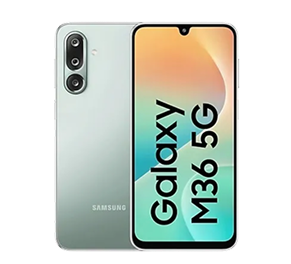
Samsung Galaxy M36 5G

Samsung Galaxy M36 5G

4.5

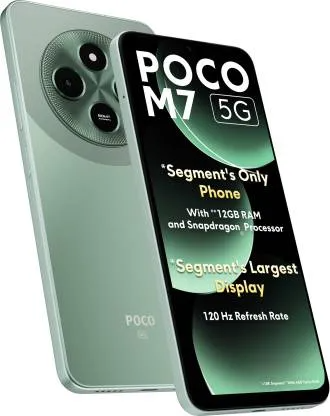
Poco M7 5G

Poco M7 5G

4.4

EMIs starting from

Rs. 1,083/month

Rs. 1,502/month

Rs. 831/month

Front camera

8 MP, f/2.0, (wide)

13MP (wide)

Motorised pop-up 32 MP, f/2.0, 26mm (wide), 1/2.8", 0.8µm Motorised pop-up 8 MP, 17mm (ultrawide)

Screen size

6.88-inch

6.7-inch

6.85-inch

RAM

6GB/8GB

6GB

8GB

Internal storage

256GB

128GB

128GB

Processor

Qualcomm SM4450 Snapdragon 4 Gen 2 (4 nm)

Exynos 1380 S5E8835

Qualcomm SDM675 Snapdragon 675 (11 nm)

Explore other smartphones

FAQs

General

EMI details

What are good AnTuTu scores for a new phone?

Yes, you can easily upgrade to a new smartphone with Bajaj Finance's Easy EMI options. Whether you already have the Insta EMI Card or are new to it, here is how you can get started:

If you have the Bajaj Finance Insta EMI Card:

  • Explore smartphones on Bajaj Mall: Choose from top brands offering models with powerful processors, high-resolution cameras, and long-lasting batteries.
  • Visit a partner store: Check out the latest phones in person at any of 1.5 lakh partner stores across 4,000 cities.
  • Use your Insta EMI Card at checkout: Convert the total cost into Easy EMIs that fit your monthly budget.
  • Zero down payment on select models: Bring home your smartphone without paying anything upfront.


If you do not have an Insta EMI Card:

Check your Insta EMI Card eligibility online using your mobile number and OTP. If eligible, you can apply instantly and start shopping for your favourite smartphone easily and affordably.

Show More Show Less

Disclaimer

1. Bajaj Finance Limited (“BFL”) is a Non-Banking Finance Company (NBFC) and Prepaid Payment Instrument Issuer offering financial services viz., loans, deposits, Bajaj Pay Wallet, Bajaj Pay UPI, bill payments and third-party wealth management products. The details mentioned in the respective product/ service document shall prevail in case of any inconsistency with respect to the information referring to BFL products and services on this page. 

2. All other information, such as, the images, facts, statistics etc. (“information”) that are in addition to the details mentioned in the BFL’s product/ service document and which are being displayed on this page only depicts the summary of the information sourced from the public domain. The said information is neither owned by BFL nor it is to the exclusive knowledge of BFL. There may be inadvertent inaccuracies or typographical errors or delays in updating the said information. Hence, users are advised to independently exercise diligence by verifying complete information, including by consulting experts, if any. Users shall be the sole owner of the decision taken, if any, about suitability of the same.