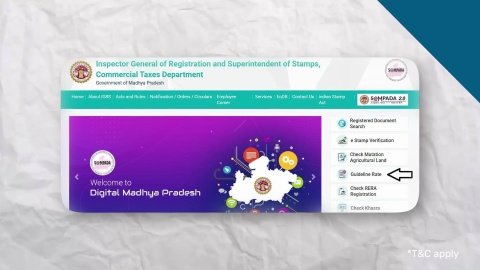
IGRS Madhya Pradesh (MP) Guide - MPIGRS Portal (SAMPADA)

MPIGR (Inspector General of Registration and Stamps, Madhya Pradesh) is the official online portal for property registration, document services, and stamp duty management in Madhya Pradesh, governed by the Registration and Stamps Department. The portal facilitates digital services aimed at improving transparency and efficiency, often referred to as IGRS MP or SAMPADA.
Home Loan
2 min read
11 August 2023

Madhya Pradesh has embraced innovation in property transactions through the Integrated Grievance Redressal System (IGRS) MP. This guide provides insights into the functions of IGRS MP such as calculating stamp duty, conducting online document searches, and accessing registered documents.

What is IGRS MP?

IGRS MP is a digital platform designed to streamline property transactions, documentation processes, and grievance redressal. By providing online services, the platform simplifies traditional property dealings, allowing citizens to navigate property-related activities with ease.

How to calculate stamp duty

Stamp duty calculation is a pivotal step in property transactions, and IGRS MP simplifies this process. The portal has a stamp duty calculator that assists you in determining the applicable stamp duty based on factors such as property type, location, and transaction value. This tool ensures transparency and enables you to make well-informed financial decisions. You can also use our stamp duty calculator to check the stamp duty charges on your property.

How to use the IGRS Madhya Pradesh portal online search option

IGRS MP introduces an efficient online document search feature, enabling users to retrieve specific property-related documents. By inputting essential details like property registration numbers or party names, individuals can access crucial information without the need for physical document retrieval. This feature expedites property research and verification.

Stamp duty and registration charges in Madhya Pradesh

Gender Stamp Duty Rate Registration Charges
Male 7.50% 3%
Female 7.50% 3%
Joint (Male+Male) 7.50% 3%
Joint (Male+Female) 7.50% 3%
Joint (Female+Female) 7.50% 3%


Please note that these rates are subject to change. It is essential to verify the current rates with the local authorities or the official website of the Madhya Pradesh government before any property transaction.

Document required for property registration

Below is the list of documents required for property registration:

  1. Sale Deed
  2. Title Deed
  3. Encumbrance Certificate
  4. Property Tax Receipts
  5. Khata Certificate
  6. Sale Agreement (if applicable)
  7. Identity and Address Proof
  8. Passport Size Photographs
  9. PAN Card (for high-value transactions)
  10. No Objection Certificate (NOC, if applicable)
  11. Power of Attorney (if needed)
  12. Proof of Stamp Duty and Registration Fees
  13. Occupancy Certificate (for new properties)
  14. Completion Certificate (for properties under construction)

Steps for online property registration on IGRS MP

To register property online in Madhya Pradesh through the IGRS MP portal, follow these steps:

  1. Visit the IGRS MP website: Access the official website and navigate to the property registration section.
  2. Create an account: Register yourself by providing basic details like name, email ID, and contact number. Once done, log in to your account.
  3. Select property registration: Choose the 'Property Registration' option and fill in details like property location, type, and owner details.
  4. Upload documents: Submit required documents such as sale deed, ID proof, and property papers online.
  5. Pay the fees: Make the payment for registration charges via online methods like net banking or UPI.
  6. Schedule an appointment: After payment, schedule an appointment for document verification at the Sub-Registrar’s office.
  7. Visit the sub-registrar's office: On the appointment day, visit the office for document verification and biometric authentication.

Steps for offline property registration on IGRS MP

For offline property registration in Madhya Pradesh through the IGRS MP process, follow these steps:

  1. Visit the sub-registrar’s office: Locate the nearest Sub-Registrar’s office in your area for property registration.
  2. Obtain required forms: Collect the necessary forms for property registration from the office or download them from the official IGRS MP website.
  3. Fill the application form: Complete the application form with details of the property, buyer, and seller, including the property’s market value, ownership information, and transaction details.
  4. Gather documents: Ensure all necessary documents, such as the sale deed, property title papers, ID proofs, and passport-size photographs of the buyer and seller, are ready.
  5. Pay the registration fee: Submit the applicable stamp duty and registration fee at the designated bank or through a challan.
  6. Submit documents: Visit the Sub-Registrar's office and submit the completed application along with the required documents.
  7. Biometric verification and registration: Both parties must be present for biometric verification and sign the sale deed. After this, the Sub-Registrar will register the property.
  8. Receive registered documents: Collect the registered property documents after completion.

Please verify the specific requirements with your local sub-registrar office or authority, as they may vary by location and type of transaction.

Checking registered documents online

The IGRS portal lets you verify their registered documents online. This feature provides access to digital copies of registration records, reducing the risk of misplacing physical documents and offering a secure method for property ownership validation.

You can follow the below steps to check registered documents online on the IGRS MP portal:

  1. Visit the IGRS MP website
  2. Register or log in
  3. Select ‘Document Search’ or ‘Search Document’
  4. Enter document details (e.g., document number, property info)
  5. Click ‘Search’ to retrieve documents
  6. View or download the documents in PDF format
  7. Verify document details
  8. Optionally, save or print the documents
  9. Logout securely when done

The importance of property registration in Madhya Pradesh

  1. Legal ownership: Officially records the buyer's ownership, offering legal recognition and protection.
  2. Prevention of disputes: Helps avoid future property-related disputes by establishing clear ownership rights.
  3. Fraud prevention: Reduces the risk of fraud or illegal possession by providing a public record of ownership.
  4. Transparency: Ensures transparency in real estate transactions, as ownership details are easily verifiable.
  5. Legal security: Unregistered properties have no legal standing, increasing the risk of disputes or complications.
  6. Revenue for state: Contributes to state income through stamp duty and registration fees.
  7. Lower legal risks: Registered properties face fewer legal challenges during sales, transfers, or inheritance.
  8. Compliance: Ensures compliance with legal and financial obligations, offering peace of mind to property buyers.

Be sure to follow the portal's current interface and instructions for the most up-to-date process.

Stamp duty and registration fees payment process

IGRS MP simplifies the payment of stamp duty and registration charges through its online payment system. Follow the below steps for the stamp duty and registration fees payment:

  1. Visit the IGRS MP website
  2. Register or log in
  3. Select "e-Payment’
  4. Enter transaction details
  5. Choose payment method
  6. Make the payment securely
  7. Generate and save the payment receipt
  8. Verify the payment
  9. Logout securely when done

How can I get a copy of my documents online

Through the portal, users can request and obtain certified copies of their registered documents online. This feature is critical for legal documentation, property verification, and maintaining personal records.

Encumbrance Certificate (Madhya Pradesh)

In Madhya Pradesh, an Encumbrance Certificate is an important legal document that provides information about the encumbrances or financial liabilities on a particular property. It essentially serves as a proof of free title/ownership or a record of transactions related to the property over a specific period. Here are some key points about the Encumbrance Certificate in Madhya Pradesh:

  1. Purpose: The primary purpose of an Encumbrance Certificate is to establish the ownership and legal status of a property. It helps potential buyers or lenders verify whether the property is free from any legal disputes, mortgages, or outstanding loans.
  2. Issuing authority: In Madhya Pradesh, the Sub-Registrar's Office is responsible for issuing Encumbrance Certificates. Each district has one or more Sub-Registrar Offices, and you should visit the office that has jurisdiction over the property in question.
  3. Information included: An Encumbrance Certificate typically contains details of all transactions involving the property during a specific period. This includes details of sale deeds, mortgages, leases, and other encumbrances. It provides a chronological history of transactions related to the property.
  4. Validity: The certificate is usually issued for a specific period, such as the past 15 years. However, you can request a certificate for a shorter or longer period, depending on your requirements.
  5. Application process: To obtain an Encumbrance Certificate in Madhya Pradesh, you need to visit the Sub-Registrar's Office in the district where the property is located. You will need to fill out an application form, pay the required fees, and provide details about the property for which you are requesting the certificate.
  6. Fees: There is a fee associated with obtaining an Encumbrance Certificate, and the fee amount may vary based on the period for which you request the certificate.
  7. Processing time: The processing time for issuing an Encumbrance Certificate can vary, but it typically takes a few days to a few weeks.
  8. Use cases: An Encumbrance Certificate is often required during property transactions, such as buying or selling a property, applying for a home loan, or when seeking a building permit.
  9. Verification: Once you obtain the certificate, it's essential to carefully review the information to ensure it accurately reflects the property's transaction history. Any discrepancies should be addressed with the Sub-Registrar's Office.
  10. Online application: In some states, including Madhya Pradesh, there may be provisions for applying for Encumbrance Certificates online through the official portal of the Registration and Stamp Department. You can check the official website or visit the Sub-Registrar's Office for information on the online application process.

Types of Encumbrance Certificate (EC)

In Madhya Pradesh, the Inspector General of Registration and Stamps (IGRS) department oversees the issuance of Encumbrance Certificates (ECs) and handles stamp duties. There are two main types of ECs available in Madhya Pradesh, similar to other states:

  1. Form 15 EC: Form 15 EC provides a comprehensive record of various property transactions, including lease agreements, sales, gifts, releases, mortgages, partitions, and more. It serves as essential documentation for property buyers and loan providers. Accurate details must be provided when completing this form to obtain a comprehensive EC.
  2. Form 16 EC: Form 16 EC, also known as Nil EC, is issued by the sub-registrar's office. This type of EC certifies that the property in question is not subject to any registered transactions or encumbrances during the specified period. It is typically used to confirm that the property is free from any ongoing legal disputes or financial liabilities.

These ECs play a crucial role in property transactions and legal matters in Madhya Pradesh, helping individuals verify property ownership, transaction histories, and legal statuses. Property buyers, sellers, and legal professionals often rely on the information provided in these ECs to ensure the transparency and legality of property dealings.

Please note that the specific procedures and requirements for obtaining an Encumbrance Certificate may change over time, so it's advisable to contact the local Sub-Registrar's Office or visit the official website of the Madhya Pradesh Registration and Stamp Department for the most up-to-date information and guidelines.

How to apply for an Encumbrance Certificate (EC)

To apply for an Encumbrance Certificate (EC) in India, follow these steps:

  1. Visit the local Sub-Registrar's Office where the property is located
  2. Obtain and fill out Form 22 (EC application form) with property details
  3. Submit required documents, including property records and identification proof
  4. Pay the application fees
  5. The Sub-Registrar's Office will verify the information and process your application
  6. Once approved, collect your EC from the office
  7. Some states offer online application options; check your state's website for details

The IGRS MP portal showcases the state's commitment to digitising public services and promoting transparency in property transactions. With features like online document searches, stamp duty calculation, and efficient payment processes, the platform has simplified property-related activities. By providing a digital gateway to property services, IGRS MP has ushered in an era of accessibility, efficiency, and convenience for citizens engaging in property transactions.

Disclaimer

1. Bajaj Finance Limited (“BFL”) is a Non-Banking Finance Company (NBFC) and Prepaid Payment Instrument Issuer offering financial services viz., loans, deposits, Bajaj Pay Wallet, Bajaj Pay UPI, bill payments and third-party wealth management products. The details mentioned in the respective product/ service document shall prevail in case of any inconsistency with respect to the information referring to BFL products and services on this page.

2. All other information, such as, the images, facts, statistics etc. (“information”) that are in addition to the details mentioned in the BFL’s product/ service document and which are being displayed on this page only depicts the summary of the information sourced from the public domain. The said information is neither owned by BFL nor it is to the exclusive knowledge of BFL. There may be inadvertent inaccuracies or typographical errors or delays in updating the said information. Hence, users are advised to independently exercise diligence by verifying complete information, including by consulting experts, if any. Users shall be the sole owner of the decision taken, if any, about suitability of the same.
For customer support, call Personal Loan IVR: 7757 000 000

Frequently asked question

How to download Deed Format on IGRS MP Portal?

To download deed formats on the IGRS MP portal:

  1. Visit the IGRS MP website
  2. Explore the available services
  3. Download the required deed format

Please note that deed formats may also be available through legal experts, online legal resources, government offices, and legal publications. Ensure compliance with Madhya Pradesh's legal requirements when using deed templates.

What is the full form of IGRS MP?

The full form of ‘IGRS MP’ is ‘Inspector General of Registration and Stamps, Madhya Pradesh.’ It is a government department responsible for maintaining records related to property registration and land transactions in the state of Madhya Pradesh, India.

How to get certified copies of registered deeds on IGRS MP?

To obtain certified copies of registered deeds in Madhya Pradesh through the IGRS MP portal:

  1. Visit the IGRS MP website
  2. Register or log in
  3. Find the ‘Certified Copy’ option under ‘Services’
  4. Provide deed details and make the required payment
  5. Submit the application and track its status
  6. Download the certified copy when approve
  7. Optionally, collect a physical copy from the sub-registrar office
  8. Keep records of the certified document for your reference
What is SAMPADA under MPIGR?

SAMPADA, which stands for Stamps and Management of Property and Documents Application, is a comprehensive computerization and digitalization initiative aimed at facilitating the registration and E-stamping of documents within the framework of the Madhya Pradesh Integrated Grievance Redressal System (MPIGRS).

How to check mutation of agricultural land on MPIGR (IGRS MP)?
  1. Visit the official website (e.g., https://mpigrs.gov.in)
  2. Register or log in
  3. Select Mutation of Agricultural Land
  4. Input land details
  5. Submit your application
  6. Track progress with a reference number
How can I check my property registry online on IGRS MP portal?

Follow the below steps to check your property registration online:

  1. Visit the official IGRS MP portal
  2. Log in or register if required
  3. Navigate to the property registry section
  4. Enter property details such as registration number
  5. Initiate the search to retrieve property registry details
  6. View or download documents online if available
  7. Contact support for assistance if needed
How do I verify my e-stamp certificate in MP?

Follow the below step-by-step process to verify the e-stamp certificate:

  1. At first you need to identify the state where the e-stamp certificate was issued
  2. Visit the e-stamping website
  3. Go to the e-stamp certificate verification page
  4. Enter the required details as per the form
  5. Click verify
  6. Review the information received
What is the stamp duty in MP 2023?

The stamp duty rate for female and male applicants is 7.50% as well as for joint applicants.

What is MPIGR?

MPIGR stands for Madhya Pradesh Inspector General of Registration and is part of the Department of Registration and Stamps. It provides an online platform for property registration, stamp duty payment, and access to property-related details. Through this portal, users can check guideline values, register documents, and access various citizen services. The system aims to make property transactions more transparent, efficient, and accessible by reducing paperwork and enabling digital processing of records.

What is the full form of IGRS MP?

The full form of IGRS MP is Inspector General of Registration and Stamps Madhya Pradesh. It is the official authority responsible for managing property registrations, stamp duty collection, and maintaining land transaction records in the state. The platform also offers online services to simplify documentation and ensure transparency in property dealings, making it easier for citizens to access registration-related information and services.

How can I register on IGRS MP?

To register on the IGRS MP portal, visit the official website and navigate to the login or registration section. Enter your basic details such as name, mobile number, email ID, and create login credentials. After submitting the information, you may need to verify your mobile number through OTP. Once registered, you can log in to access services like property registration, document tracking, and fee calculation.

Can I check RERA registration of a project on IGRS MP?

Yes, the MPIGR portal allows users to check details of real estate projects, including their RERA registration status. By using the relevant search options available on the portal, users can verify whether a project is registered and compliant with regulations. This feature helps buyers make informed decisions and ensures transparency in real estate transactions by providing access to verified project information.

Can I get certified copies of registered deeds on IGRS MP?

Yes, users can obtain certified copies of registered property deeds through the MPIGR portal. By accessing the relevant service section and providing necessary details such as document number and registration year, users can request copies online. A nominal fee is usually applicable for this service. This facility makes it convenient to retrieve important property documents without visiting registration offices.

What are the contact details of IGRS MP?

IGRS MP provides support through multiple contact channels for user assistance. You can reach out via the toll-free number 18002333842 or other contact numbers such as 0755-2573849, 0755-2573846, and 0755-2573852. These helpline numbers are useful for resolving queries related to property registration, stamp duty, and portal services, ensuring users receive timely guidance and support.

What is SAMPADA?

SAMPADA is a comprehensive digitisation initiative by the Madhya Pradesh government for property registration and e-stamping. It integrates various services into a single platform, enabling faster processing, reduced paperwork, and improved transparency. Through SAMPADA, users can complete registration procedures online, making the system more efficient and user-friendly while minimising the need for physical visits to government offices.

How do I check my e-Registry in MP?

To check your e-registry details in Madhya Pradesh, visit the official MPIGR portal and log in using your credentials. Navigate to the e-registry section and enter the required details such as document number or registration information. Once submitted, the system will display your property registration details. This feature allows users to conveniently access their records online without visiting registration offices.

How much is the registration fee in MP?

The registration fee and stamp duty in Madhya Pradesh vary based on the property value and type. Generally, the principal stamp duty is around 7.5% of the property value, while registration charges are approximately 3%. Users can calculate the exact amount using the fee calculator available on the MPIGR portal. This helps buyers estimate costs accurately before proceeding with property transactions.

How can I find the Stamp Duty and Registration Charges on the MPIGRS portal?

To find stamp duty and registration charges, visit the MPIGRS portal and look for the “Stamp Duty and Registration Fee Chart” option on the homepage. By accessing this section, users can view the applicable charges based on property type and location. This feature helps in understanding the cost structure and planning finances before initiating property registration.

How can I download the model deed format on the MPIGR portal?

To download model deed formats, visit the MPIGR portal and go to the “Services” section. From there, select “Citizen Services” and then click on “Model Deeds.” A new window will open displaying various document formats that can be downloaded as needed. These templates help users prepare accurate legal documents for property transactions.

Which documents are required to avail of a service on the MPIGR portal?

To use services on the MPIGR portal, you need to provide essential documents such as identity proof, PAN card, bank passbook, Bhuadhikar and Rin Pustika number, property map and photographs, khasra number, and details of diversion land if applicable. These documents help verify ownership and ensure accurate registration, making the process secure and compliant with legal requirements.

How to check Khasra on MPIGR portal?

To check khasra details on the MPIGR portal, go to the official website and select the “Check Khasra” option. Enter details such as district, tehsil, revenue circle, village, and patwari halka. You can search using either the Bhu Swami name or khasra number. After submitting the information, the system will display land record details, helping users verify ownership and property information easily.

Show More Show Less