











Invest in equities, F&O and upcoming IPOs effortlessly by opening a demat account online. Enjoy a free subscription for the first year with Bajaj Broking

Know the benefits of demat account
Check now
Free Demat account in minutes | Low brokerage | Online account opening
In summary
What is the Best Way to Start Trading Online
A stock investment app gives you digital access to trading, portfolio tracking, and account information. Before using one, check its security, charges, authorisation, and the risks involved in investing carefully.
- Verify the broker’s SEBI registration.
- Confirm the app is authorised.
- Review brokerage and other charges.
- Check security and account controls.
- Never share OTPs, passwords, or TPINs.
An app can simplify access to market services, but it cannot remove market risk. Compare its features, costs, security, and controls before relying on it for transactions.
Show More
Show Less
What is a stock investment app?
A stock investment app is a digital platform that gives you access to securities-market services through a smartphone. It can connect you to your trading account, demat account information, market data, and transaction records.
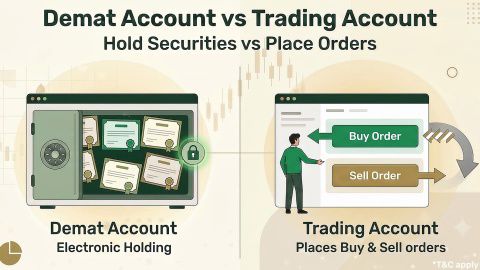
The app is only one part of the investment process. Three accounts perform different functions:
| Account or interface | Main function |
| Stock investment app | Provides a digital interface for account and market functions |
| Trading account | Enables you to place buy and sell orders |
| Demat account | Holds eligible securities electronically |
| Bank account | Handles funds used for securities transactions |
A demat account stores eligible securities after settlement. A trading account is used to place market orders. Your bank account handles the payment or receipt of money connected with transactions.
This distinction matters because installing a share market investment app does not by itself create a trading or demat account.
Show More
Show Less
How does a stock investment app work?
A stock investment app sends your trading instructions through the broker's system to the relevant stock exchange. An order becomes a trade only when it is matched and executed in the market.
A basic equity transaction works in the following way:
- You log in through the application's authentication process.
- You search for the security you want to view.
- You select the transaction type, quantity, and relevant order conditions.
- You submit the order through your trading account.
- The order reaches the relevant exchange through the broker.
- An executed transaction moves through the applicable clearing and settlement process.
- Securities bought for delivery are credited to the linked demat account after settlement.
The stock investment app can also display holdings, funds, orders, positions, market information, watchlists, and transaction reports.
Different categories of stocks can also appear on the platform. These include small-cap stocks and mid-cap stocks. A stock's availability on an app does not indicate that it is suitable for your financial goals or risk tolerance.
Show More
Show Less
Current IPO
Mainboard
SME
What benefits and features does a stock investment app offer?
A stock investment app can combine several account functions in one interface. Its practical value depends on whether those functions match the way you monitor investments or place trades.
Common features include:
| Feature | How it helps you |
| Order placement | Lets you submit eligible buy and sell instructions |
| Portfolio view | Shows securities held in the linked account |
| Watchlists | Lets you organise securities you want to monitor |
| Price alerts | Notifies you when selected price conditions are reached |
| Charts | Shows historical price movements and other market information |
| Order history | Helps you review submitted, executed, cancelled, or rejected orders |
| Account reports | Provides access to eligible statements and transaction records |
| IPO access | Supports IPO-related functions where the broker provides the facility |
For example, you can organise dividend stocks or other securities in a watchlist without placing an order.
You should also check whether the interface clearly identifies trading restrictions. Securities placed under the trade-to-trade framework, commonly called T2T stocks, follow specific trading and settlement requirements.
More app features do not automatically produce better investment decisions. The useful features are those you understand and can relate to your investment process.
Show More
Show Less
How do you verify a stock investment app?
You should verify a stock investment app before entering account credentials or transferring funds. A familiar logo, app-store rating, or professional-looking interface does not establish that an application is authorised.
Check these points:
- Confirm that the stock broker is registered with SEBI.
- Check the application's details through SEBI's investor resources or the relevant stock exchange.
- Match the developer and application details with the authorised listing.
- Download the application only from the official app-store listing linked to the intermediary.
- Avoid APK files and installation links received through unknown messages or social-media groups.
- Never transfer investment funds to an unrelated personal bank account.
- Keep passwords, PINs, OTPs, and TPINs private.
On 25 March 2026, SEBI launched a Verified label on Google Play for stock trading apps associated with SEBI-registered brokers. The measure is designed to help investors distinguish verified applications from impersonation apps. The Google Play label does not replace the need to verify the intermediary and app details.
The National Stock Exchange of India (NSE) also maintains a list of mobile applications disclosed by its trading members.
Sources:
- Securities and Exchange Board of India (SEBI), Verified Label for stock trading apps of brokers registered with SEBI on Google Play Store, Press Release PR No. 20/2026, 25 March 2026;
- National Stock Exchange of India (NSE), List of Mobile Applications of Trading Members, accessed 27 October 2026.
Last updated: 27 October 2026.
Show More
Show Less
What fees apply when using a stock investment app?
Using a stock investment app does not mean every securities transaction is free. Your overall cost depends on the broker's tariff, depository-related charges, transaction type, and statutory levies.
The main cost categories include:
| Charge | What it covers |
| Brokerage | Broker's charge for eligible transactions, according to the applicable tariff |
| Annual Maintenance Charge (AMC) | Demat-account maintenance charge where applicable |
| Depository Participant charges | Charges connected with specified demat-account services |
| Exchange transaction charges | Charges connected with exchange transactions |
| Securities Transaction Tax (STT) | Tax on specified securities transactions |
| Goods and Services Tax (GST) | Tax on specified taxable services and charges |
| Stamp duty | Statutory levy based on the security and transaction |
| SEBI-related charges | Regulatory charges applicable to securities transactions |
Charges differ according to the type of transaction. You should therefore review the current tariff and statutory charge structure rather than compare applications only on brokerage.
For eligible Basic Services Demat Accounts (BSDA), current rules also affect AMC. Eligible BSDA holdings of up to ₹4 lakh carry no AMC. For holdings above ₹4 lakh and up to ₹10 lakh, the maximum AMC is ₹100. A holding value above ₹10 lakh does not remain within the BSDA category.
This means AMC is not automatically unavoidable for every investor.
Statutory charges also change when the applicable law or exchange schedule changes. For example, NSE's levy information was updated on 17 April 2026 to reflect applicable Securities Transaction Tax rates following Finance Act 2026 changes.
Example: why transaction costs and market movement both matter
Suppose Ravi invests ₹25,000 in shares through a stock investment app. If the market value of his investment falls by 8%, his loss before applicable transaction costs is:
Loss = Investment amount × Percentage fall
Loss = ₹25,000 × 8% = ₹2,000
The investment value becomes:
₹25,000 − ₹2,000 = ₹23,000
Applicable taxes, brokerage, and other transaction charges are separate from this market loss.
This example shows an important trade-off. Lower transaction costs can reduce expenses, but they cannot protect you against a fall in the market value of your investment.
Sources:
- Securities and Exchange Board of India (SEBI), Ease of investments and ease of doing business measures – enhancing the Facility for Basic Services Demat Account, Circular No. HO/38/11/11(3)2025-MIRSD-POD/I/1101/2025, 24 December 2025;
- National Stock Exchange of India (NSE), SEBI Turnover Fees, STT and Other Levies, updated 17 April 2026.
Last updated: 27 October 2026.
Show More
Show Less
Start investing today

Open Demat Account
Open Trading Account

Margin Trading Facility
What risks come with a stock investment app?
A stock investment app changes how you access the market. It does not change the underlying risks of investing or trading.
Consider these risks before placing an order:
- Market risk: The price of a security can move against your position.
- Execution risk: The final execution price can differ from the price you saw before submitting an order.
- Technology risk: Device, internet, exchange, broker, or software disruptions can affect access.
- Cybersecurity risk: Fake websites, apps, messages, and calls can be used to obtain account credentials.
- Behavioural risk: Frequent notifications and continuous market access can encourage excessive trading.
- Information risk: Charts, screeners, alerts, and market indicators do not predict future prices.
- Account-security risk: Sharing passwords, OTPs, PINs, or TPINs can expose your account to unauthorised activity.
You should review account statements and transaction information regularly. Report a transaction you do not recognise through the intermediary's grievance mechanism and escalate it through the relevant regulatory process when required.
Do not treat claims of assured or fixed investment returns as evidence that a trading application is legitimate. Securities-market returns depend on the underlying investment and market conditions.
Upcoming IPO
Mainboard
SME
Aarvee Engineering Consultants Limited
Bidding
To
be announced
Price
To be announced
Abakkus Asset Manager Limited
Bidding
To
be announced
Price
To be announced
Absolute Project India Limited
Bidding
To
be announced
Price
To be announced
Advanced SysTek Limited
Bidding
To
be announced
Price
To be announced
Advanta Enterprises Limited
Bidding
To
be announced
Price
To be announced
How do stock investment app account opening and closure work?
A stock investment app can support digital account opening, but securities-market accounts still require the applicable identity and Know Your Customer (KYC) checks.
SEBI explains that you need a demat account, trading account, and bank account for investing in securities through the standard market setup.
A digital account-opening journey can involve:
- Entering your mobile number and email address.
- Completing the required verification.
- Providing your Permanent Account Number (PAN) and personal details.
- Linking the required bank account.
- Providing the documents required for KYC.
- Completing the applicable In-Person Verification (IPV) or digital verification process.
- Reviewing account documents, tariff details, rights, obligations, and risk disclosures.
- Completing the applicable electronic-signature process.
- Submitting the application for verification.
Submitting an application does not guarantee approval. Incomplete KYC information, mismatched records, verification issues, or missing documents can delay processing.
Account closure should also be considered before you choose a platform. Before requesting closure, check for unsettled transactions, open positions, securities that require transfer, outstanding dues, or other account obligations.
If you close a demat account, securities remaining in it need to be handled according to the applicable depository process. Keep the closure acknowledgement and final statements for your records.
Show More
Show Less
Features and Benefits of LAS

Tenure 36 months
Flexible repayment from 7 days to 36 months

1000+ shares
Get 50% value on 1000+ shares

All DP shares available
All companies’ and DPs’ Demat accounts accepted for loans

Customer portal
Handle loans, shares, and statements — all in one place
Pro Tip

Top Investment Options for You





Related Articles

Frequently Asked Questions
What You Need to Know Before Using a Stock investment App OPEN ACCOUNT
How do I invest in stocks through the app?
You need the required trading, demat, and bank-account setup before investing in listed stocks. After logging in, search for the security, select the order type and quantity, review the order details, and submit the instruction. Your order must be executed in the market before it becomes a completed trade. For delivery purchases, securities are credited to the linked demat account according to the applicable settlement process.
How does the stock app work?
A stock app provides the digital interface between you and the broker's trading system. You use it to view securities, submit orders, monitor positions, and access account information. Your trading account handles buy and sell orders, while your demat account holds eligible securities electronically. The application itself does not remove brokerage, statutory charges, settlement requirements, technology risk, or the possibility of investment losses.
How can I check whether a stock investment app is genuine?
Verify the intermediary's SEBI registration and check whether the application appears in the authorised app information available through SEBI or the relevant stock exchange. For Google Play, SEBI introduced a Verified label for stock trading apps associated with registered brokers on 25 March 2026. Do not rely only on logos, reviews, screenshots, social-media messages, or claims about returns when checking an application's legitimacy.
Are stock investment apps free to use?
Downloading an app does not determine the total cost of investing. Depending on your account and transactions, costs can include brokerage, depository charges, AMC, exchange charges, STT, GST, stamp duty, and other applicable levies. Some eligible Basic Services Demat Accounts have no AMC within the prescribed holding-value limit. Review the current tariff and statutory charges before estimating your total transaction cost.
Disclaimer
Investments in the securities market are subject to market risk, read all related documents carefully before investing.
Broking services offered by Bajaj Financial Securities Limited (Bajaj Broking). Reg Office: Bajaj Auto Limited Complex, Mumbai –Pune Road Akurdi Pune 411035. Corporate Office: Bajaj Financial Securities Limited, 1st Floor, Mantri IT Park, Tower B, Unit No 9 & 10, Viman Nagar, Pune, Maharashtra 411014. SEBI Registration No.: INZ000218931 | BSE Cash/F&O/CDS (Member ID:6706) | NSE Cash/F&O/CDS (Member ID: 90177) | MCX (Member ID: 57680) | DP registration No: IN-DP-418-2019 | CDSL DP No.: 12088600 | NSDL DP No. IN304300 | AMFI Registration No.: ARN –163403.
Details of Compliance Officer: Mr. Harinatha Reddy Muthumula (For Broking/DP/Research) | Email: compliance_sec@bajajbroking.in | Contact No.: 020-4857 4486. For any investor grievances write to compliance_sec@bajajbroking.in/ compliance_dp@bajajbroking.in (DP related)
This content is for educational purpose only. Securities quoted are exemplary and not recommendatory.
Research Services are offered by Bajaj Broking as Research Analyst under SEBI Regn: INH000010043.
For more disclaimer, check here: https://www.bajajbroking.in/disclaimer