







Support available Online, on call, or at branches
Get answers instantly without waiting on call:
Enter mobile and OTP · No password needed · No branch visit needed
In Summary
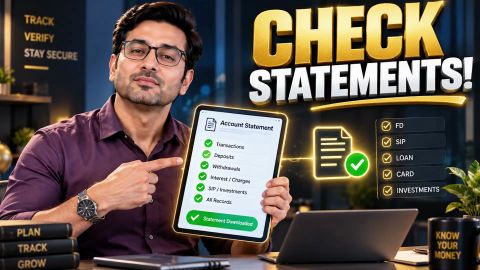
Download statements and report discrepancies seamlessly
A physical Medical Equipment Loan statement provides a printed record of your loan account details, helping you review repayments, transactions and the outstanding balance. You can contact Bajaj Finance through an authorised service channel to check how to request a printed copy or access your statement online.
- Keep your loan account number, registered mobile number and required statement period ready when making a request.
- Sign in to the My Account portal or Bajaj Finance app using your registered mobile number and complete OTP verification to check available digital statements.
- Review payment entries, transaction dates, interest, charges and the statement period against your loan records.
- Confirm any applicable charges, required documents, delivery options and processing time directly with Bajaj Finance.
- If you find an incorrect entry or missing payment, contact customer support with supporting records and retain your request reference.
Check the statement carefully when you receive it and keep your financial documents secure. If you need a printed copy, confirm the available request process and delivery arrangements before proceeding.
What is a physical medical equipment loan statement?
A physical medical equipment loan statement is a printed record of your loan account details. It helps you maintain a paper copy of information related to your loan and refer to it when needed. Depending on the statement issued, it may include your loan account number, outstanding balance, recorded transactions, and repayment details. You can use the statement to review your loan activity, check recorded payments and compare the information with your personal records. Keeping a physical copy may also help you organise important financial documents and refer to previous account details when making enquiries. Before requesting a statement, check which information it includes and whether you need a printed copy or a digital version. The available details and request process may vary depending on your loan account and the service options provided. Review the statement carefully after receiving it and seek clarification if you notice any discrepancies.
How can you request a physical medical equipment loan statement?
Contact Bajaj Finance through an authorised customer support channel to confirm whether you can request a printed statement and how to receive it.
Follow these steps to make your request:
- Keep your loan account number and registered mobile number ready.
- Contact authorised customer support and ask for a physical Medical Equipment Loan statement.
- Specify the period covered by the statement.
- Complete any verification or documentation requirements confirmed by the support team.
- Ask whether collection or delivery is available, whether charges apply, and how long the request may take.
- Retain the request reference, if provided, and check the statement when you receive it.
Confirm the available process before visiting a branch or requesting postal delivery, as the options for physical statements have not been verified for this specific loan product.
Can you get your medical equipment loan statement online?
You can check whether your medical equipment loan statement is available online through the My Account portal or the Bajaj Finance app. A digital statement helps you review your loan details and keep an electronic copy for future reference. If you need a printed copy, confirm the available request and delivery options separately.
Follow these steps to access your statement online:
- Open the official My Account portal or the Bajaj Finance app.
- Sign in using your registered mobile number and complete OTP verification.
- Complete any additional verification requested.
- Open the Service section and select your medical equipment loan under Relations, or use the relevant loan account section available in the app.
- Open the available documents or statements section.
- Select Statement of Account, if available, and follow the on-screen instructions to view or download it.
The menu names and available options may vary. Downloading a digital statement does not mean you have requested or received a printed copy.
What details should you check on your loan statement?
Check the entries on your Medical Equipment Loan statement against your loan records and payment receipts.
| Statement detail | What to verify |
| Loan account details | Confirm that the statement relates to your loan. |
| EMI payments | Compare recorded instalments with your payment receipts. |
| Transaction dates and amounts | Check that the entries match your records. |
| Outstanding balance | Review the remaining amount shown on the statement. |
| Interest and charges | Check the entries and ask about any amount you do not recognise. |
| Statement period | Confirm that the document covers the period you requested. |
The exact fields may vary by statement type. Use your loan agreement and available account records when checking details.
What documents may you need to request a physical statement?
Keep your loan details and supporting records available when you contact customer support. The team can confirm which documents or verification steps your request requires.
You may find these details useful:
- Loan account number.
- Registered mobile number.
- The period for which you need the statement.
- Payment receipts or transaction records, if you need to investigate a discrepancy.
- Identification or other documents, if the support team requests them.
Do not assume that every item is mandatory. Confirm the requirements for your specific request before submitting documents.
What should you do if your statement is missing or incorrect?
If your medical equipment loan statement is missing or contains incorrect information, identify the issue and contact the relevant customer support team for clarification. Keep your loan details and supporting records ready to help explain your request.
Choose the next step that matches your issue:
- You cannot access the statement: Ask how to obtain a copy of your loan statement.
- You need a printed copy: Confirm the available physical statement request and delivery options.
- A payment is missing: Share the payment date, amount, and supporting receipt or transaction record.
- You notice an unfamiliar charge: Request an explanation of the entry and the basis for the charge.
- The statement covers the wrong period: Specify the dates you need and ask how to obtain a statement for the correct period.
Keep your request reference, payment receipts, and related communication until the issue is resolved. Review any updated statement carefully to confirm that the details match your records.
Loan support made easy — Read on
Frequently Asked Questions
Requesting and Receiving a Physical Statement
Charges and Required Documents
When might I need a physical Medical Equipment Loan statement for professional records?
You may need a printed loan statement when organising paper-based financial records, preparing documentation for an accountant or maintaining records for internal review. The exact requirements depend on your purpose. Before requesting the statement, confirm the period and account information needed, and check whether the recipient requires a specific document format.
How should I organise loan statements for different financial years?
Keep statements grouped by financial year and arrange them in chronological order. Store related loan agreements, payment receipts and relevant correspondence alongside the statements. This organisation makes it easier to locate information when reviewing repayment history or responding to an enquiry. Protect printed and digital copies to prevent unauthorised access to your financial information.
What should I do if I need a statement covering the entire loan tenure?
Specify the complete period you need when contacting Bajaj Finance through an authorised service channel. Ask whether a statement covering the entire loan tenure is available or whether you must request separate periods. Confirm the applicable process before submitting your request, and check the dates and account details when you receive the document.
How should I understand a difference between the loan statement and my own repayment records?
Compare the statement entries with your bank transactions, payment confirmations and loan documents. Check the dates and amounts carefully before identifying a discrepancy. If the difference remains, contact Bajaj Finance through an authorised channel and request an explanation. Keep the relevant evidence and request reference until the issue has been clarified.
What should I do if I need clarification about an interest entry on my loan statement?
Identify the entry and compare it with the interest terms in your loan agreement and the repayment information available to you. Contact Bajaj Finance through an authorised service channel and ask for an explanation of the calculation. Keep the response with your loan records so you can refer to it if further clarification becomes necessary.
How can I confirm that a statement belongs to the correct Medical Equipment Loan account?
Check the loan account details and statement period against your loan agreement or other official loan records. Review the information before using the statement for financial documentation or sharing it with an authorised recipient. If the account details do not match, contact Bajaj Finance through an official channel to verify the document.
More Articles

Disclaimer
While care is taken to update the information, products, and services included in or available on our website and related platforms/websites, there may be inadvertent inaccuracies or typographical errors or delays in updating the information. The material contained in this site, and on associated web pages, is for reference and general information purpose and the details mentioned in the respective product/service document shall prevail in case of any inconsistency. Subscribers and users should seek professional advice before acting on the basis of the information contained herein. Please take an informed decision with respect to any product or service after going through the relevant product/service document and applicable terms and conditions. In case any inconsistencies observed, please click on reach us.
*Terms and conditions apply.