







Support available Online, on call, or at branches
Get answers instantly without waiting on call:
Enter mobile and OTP · No password needed · No branch visit needed
In Summary
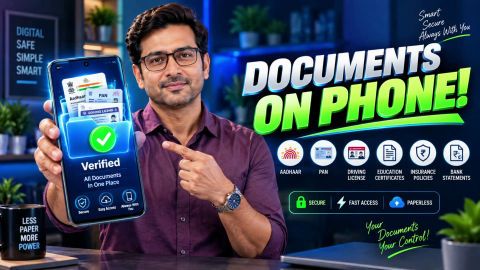
Manage and access verified documents easily on DigiLocker
DigiLocker enables students to securely manage educational documents through a digital platform. From mark sheets and certificates to identity documents, it helps students access and share verified records for admissions, scholarships, examinations, and other academic purposes.
Key points to know:
- DigiLocker is part of the Digital India initiative.
- Students can store and access academic documents digitally.
- Verified documents can be shared with institutions securely.
- Aadhaar-based authentication may be used for account verification.
- Digital records can simplify admission and scholarship processes.
Using DigiLocker can help students keep important academic documents organised and readily accessible.
What is DigiLocker?
DigiLocker is a digital document storage platform introduced by the Government of India.
It enables users to:
- Store documents electronically.
- Access documents online.
- Share records securely.
- Retrieve documents issued by participating organisations.
- Manage important records from a single platform.
Students can use DigiLocker to maintain academic documents and other important records in a secure digital environment.
Why is DigiLocker useful for students?
Students often need to submit documents for admissions, examinations, scholarships, internships, and educational verification.
DigiLocker helps by providing:
- Easy access to academic records.
- Reduced dependence on physical documents.
- Secure document storage.
- Faster document sharing.
- Simplified verification processes.
Having documents available digitally can save time during application and verification procedures.
What documents can students manage through DigiLocker?
The availability of documents depends on participating institutions and issuing authorities.
Common document categories may include:
- Mark sheets
- Academic certificates
- Identity documents
- Address proof documents
- Government-issued records
- Educational credentials
Students should verify which documents are available through the platform and whether their institution participates in DigiLocker services.
How do students access DigiLocker?
The account creation and login process may vary based on platform requirements.
A typical process involves:
- Visit the DigiLocker portal or mobile application.
- Register or sign in using eligible credentials.
- Complete identity verification, if required.
- Access your dashboard.
- View or manage available documents.
Students should follow the instructions provided on the DigiLocker platform during registration and account setup.
What DigiLocker features are available for students?
DigiLocker includes several features that can support academic document management.
Digital document access
Students can access stored and issued documents from a single account.
Document sharing
Documents can be shared electronically when required for educational or verification purposes.
Account security
Identity verification processes help protect access to documents and account information.
Centralised document management
Important educational records can be maintained in one place, making retrieval easier when needed.
These features can help simplify routine academic and administrative activities.
How can DigiLocker help with scholarship applications?
Many scholarship applications require document submission and verification.
DigiLocker can support this process by helping students:
- Access academic records quickly.
- Organise required documents.
- Share digital copies securely.
- Reduce reliance on printed paperwork.
- Maintain a central repository of supporting documents.
Before applying, students should verify the documentation requirements of the scholarship provider.
What should students do before sharing documents?
Before sharing any document:
- Verify document accuracy.
- Ensure records are current.
- Check whether the receiving institution accepts digital submission.
- Review document requirements carefully.
- Share information only through official channels.
Taking these steps can help avoid application delays and document-related issues.
How can students keep their DigiLocker account secure?
Maintaining account security is important when storing personal and academic documents.
Follow these best practices:
- Keep login credentials confidential.
- Use strong passwords where applicable.
- Update mobile number and account details when necessary.
- Monitor account activity regularly.
- Use only official DigiLocker websites and applications.
Protecting account access helps keep personal information secure.
Explore related banking and payment service guides
Frequently Asked Questions
DigiLocker Student Login & Documents
DigiLocker Features & Scholarship Applications
How can educational institutions verify student documents in DigiLocker?
Educational institutions can verify student documents on DigiLocker through the platform’s document verification feature. Institutions need to register with DigiLocker and integrate their
systems to access student records. This ensures the authenticity of the documents and eliminates the need for manual verification.
For students, this feature is beneficial as it speeds up processes like admissions and scholarship applications.
What should I do if my school certificates aren't showing in DigiLocker?
If your school certificates are not visible in DigiLocker, follow these troubleshooting steps:
- Check if your academic institution is registered with DigiLocker.
- Ensure your Aadhaar is linked to your DigiLocker account for seamless access.
- Contact your school or board to verify if they have uploaded your certificates to DigiLocker.
- If the issue persists, reach out to DigiLocker support for assistance.
Taking these steps will help resolve the issue and ensure your certificates are accessible.
How can students log in to DigiLocker using Aadhaar or a registered mobile number?
What's the maximum file size for uploading student documents?
DigiLocker allows users to upload files with a maximum size of 10 MB per document. If your file exceeds this limit, you can compress it using online tools or software. Ensure that the document quality remains intact after compression to avoid any issues during verification.
Can I share my DigiLocker student documents with universities abroad?
Yes, you can share your DigiLocker student documents with universities abroad. However, it is essential to check whether the university accepts DigiLocker-issued digital documents. Many international institutions recognise DigiLocker documents due to their verified status.
Before sharing, contact the university’s admissions office to confirm their requirements. If needed, you can download and print the documents for submission.
How can students use DigiLocker for scholarship applications?
More Articles
Disclaimer
While care is taken to update the information, products, and services included in or available on our website and related platforms/websites, there may be inadvertent inaccuracies or typographical errors or delays in updating the information. The material contained in this site, and on associated web pages, is for reference and general information purpose and the details mentioned in the respective product/service document shall prevail in case of any inconsistency. Subscribers and users should seek professional advice before acting on the basis of the information contained herein. Please take an informed decision with respect to any product or service after going through the relevant product/service document and applicable terms and conditions. In case any inconsistencies observed, please click on reach us.
*Terms and conditions apply.