











An OTP will be sent to this number for verification

You may have a pre-approved offer
Enter required home loan amount
In summary
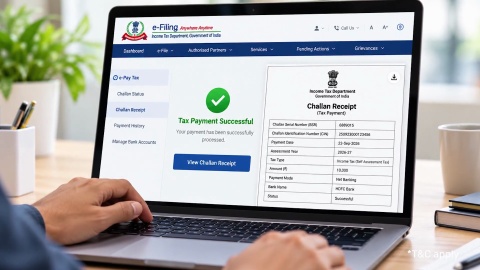
Income Tax Challan - Paying and Downloading Income Tax Challan Online
Last updated: Oct 2026
An income tax challan is the payment form that records tax paid against your Permanent Account Number (PAN). You generate it on the e-Pay Tax service, and a manually filled form is not valid.
- Act choice: Income Tax Act 1961 for assessment year (AY) 2026-27 and earlier, Income Tax Act 2025 for Tax Year 2026-27 onwards
- Heads: advance tax (100), self-assessment tax (300) and regular assessment tax (400)
- Validity: the Challan Reference Number (CRN) lasts 15 days
- Proof: the challan receipt in the Payment History tab
Timing: self-assessment tax for Tax Year 2026-27 opens on 1 April 2027
Pick the Act, the year and the head before you pay. A wrong choice creates a mismatch that you then have to correct.
What is an income tax challan?
An income tax challan is the payment slip that credits tax to your Permanent Account Number (PAN). On e-Pay Tax, each challan carries a Challan Reference Number (CRN), and the paid receipt carries a Challan Identification Number (CIN).
The challan form is ITNS 280 for the Income Tax Act 1961 and ITNS 280N for the Income Tax Act 2025. The portal generates both. Printed or handwritten forms are not accepted for payment.
Show more
Show less
Which type of payment should I choose?
Choose the head that matches when you pay. The 3 heads cover the whole year.
| Payment | Head | When you pay |
|---|---|---|
| Advance tax | 100 | During the year, if tax after Tax Deducted at Source (TDS) is Rs. 10,000 or more |
| Self-assessment tax | 300 | After the year ends, before you file |
| Regular assessment tax | 400 | After a demand from an assessment |
TDS is the tax already deducted from your income. For Tax Year 2026-27, self-assessment tax can be paid from 1 April 2027. Under the 2025 Act, the same heads continue.
Show more
Show less
How do I pay an income tax challan online?
Six steps cover the payment, and you can start before you log in.
- Open e-Pay Tax on the income tax portal and choose New Payment.
- Select the Income Tax tile for individuals.
- Select the Act: Income Tax Act 1961 for AY 2026-27 and earlier, or Income Tax Act 2025 for Tax Year 2026-27 onwards.
- Select the year and the head (100, 300 or 400), and enter the amount.
- Preview the challan and choose a payment mode, such as net banking, debit card or Unified Payments Interface (UPI).
Pay, and save the receipt.
You cannot change the mode after the CRN is generated. Generate a new CRN if you want another mode.
Show more
Show less
How do I download the challan receipt?
Open Payment History on the e-Pay Tax page and download the receipt for the paid CRN. The status shows PAID once the bank confirms.
- A CRN stays valid for 15 days from the day you generate it
- An advance tax CRN generated on or after 16 March stays valid until 31 March
- An expired CRN stays visible under Generated Challans for 30 days
A draft stays editable for 15 days
Download the receipt on the day you pay. You need its CIN details for your return and any later correction.
Show more
Show less
Home loan for professionals
What mistakes cause a mismatch?
Four mistakes cause most mismatches, and each is avoidable.
| Mistake | Result | Prevention |
|---|---|---|
| Wrong head | Payment sits against the wrong year | Check the year before you pay |
| Wrong Act | Tax shows as advance tax instead of self-assessment | Match the head to the timing |
| Handwritten challan | The payment is not valid | Generate the CRN on e-Pay Tax |
| Expired CRN | Payment fails | Generate a new CRN |
If you already paid under the wrong head, write to your Assessing Officer with the receipt. Do not pay again before you check.
Show more
Show less
A worked example: an advance tax instalment
Consider Anita, a 36-year-old freelance designer in Bengaluru with a monthly income of Rs. 1.1 lakh and a CIBIL Score of 747. Her estimated tax for Tax Year 2026-27 is Rs. 2,00,000 after TDS, and she paid Rs. 30,000 on 15 June 2026.
Formula used: Amount due = cumulative percentage × estimated tax − tax paid so far.
| Step | Detail |
|---|---|
| Due date | 15 September 2026, cumulative 45% |
| Cumulative tax due | Rs. 90,000 |
| Already paid | Rs. 30,000 |
| Amount to pay | Rs. 60,000 |
| Act, year and head | Income Tax Act 2025, Tax Year 2026-27, head 100 |
Anita pays on 14 September and saves the receipt. She also notes the CIN. See what a miss costs in the guide to Section 234C.
Show more
Show less
Does paying tax on time help my home loan?
Bajaj Finance reviews income documents, including returns, so tax paid and receipts on file keep your records clean.
| Loan feature | Detail |
|---|---|
| Interest rate | From 7.25% p.a.*, subject to credit assessment |
| Loan amount | Up to Rs. 15 crore* |
| Tenure | Up to 32 years |
Approval timelines can extend where tax payments or returns are missing, and minimum income thresholds can differ by city. Check your home loan eligibility.
Show more
Show less
Frequently Asked Questions
Paying the challan
After you pay
Can I pay without logging in to the portal?
Yes. e-Pay Tax offers a pre-login option, where you enter your PAN and validate it before you generate the challan. Choose the Act, the year and the head as you would after login. After payment, you can also find the receipt under Payment History once you log in, so save it on the day you pay.
Can I pay at a bank branch with a handwritten challan?
No. A manually filled form is not valid. Generate the CRN on e-Pay Tax, print the challan, and pay at an authorised bank branch if you prefer an over-the-counter payment. The CRN must still be valid, which means you pay within 15 days of generating it, so do not print the challan too early.
What if my CRN expires before I pay?
Generate a new CRN. An expired CRN cannot take payment, and you cannot change its mode or amount. The old one stays visible under Generated Challans for 30 days. Check that the Act, year and head on the new challan are correct, and pay within 15 days this time, preferably on the same day.
When does my payment show in my tax credit statement?
It shows after the bank reports the payment to the department. Check the statement before you file, and compare the CIN on your receipt. The statement is Form 26AS for earlier years, and one mapping lists Form 168 under the new rules. If the entry is missing, keep the receipt and write to your Assessing Officer.
Home Loan in Different Cities

Home Loan in Mumbai

Home Loan in Ahmedabad

Home Loan in Bangalore

Home Loan in Chennai

Home Loan in Delhi

Home Loan in Hyderabad

Home Loan in Cochin

Home Loan in Noida

Home Loan in Pune
Home Loan for different budget
Check your pre-approved offer now
Our Calculators






What do our customers say about us
customers
Play Store rating
reviews
Amit Shiva
Reviewed on
Smooth and transparent home loan process. The interest rates were competitive, and documentation was minimal. The team guided me clearly at every step, making my first home purchase stress-free. Highly recommended for quick approvals.
Sandeep Kulkarni
Reviewed on
The loan disbursal was fast, and the customer support team was extremely patient with all my queries. Flexible EMIs helped me manage my monthly expenses easily. A great experience for salaried homebuyers.
Ritika Agarwal
Reviewed on
I had a great experience while transferring my existing home loan. The process was quick, and I saved significantly with the lower interest rate. Customer service was helpful throughout. Highly recommended for balance transfers.
Manoj Verghese
Reviewed on
Clear guidance, quick approval, and flexible repayment options made buying my new house easier than expected. The team handled everything professionally. Very satisfied and would definitely recommend their home loans
Find your nearest branch

More Articles



Watch our videos

Documents required to get a Bajaj Finserv Home Loan

Tips to increase your Home Loan eligibility

Things you need to know about pre-approved home loan

Things you need to know before applying for a Home Loan

How does Repo Rate affect your Home Loan

Download App
Now request money from your friends and family and make instant payments.

- Choose from personal, business, gold loans and more
- Pay utility bills, use UPI, get FASTag and more
- Buy over 1 million products on No Cost EMI
- Buy stocks, mutual funds and invest in FD
Disclaimer
1. Bajaj Finance Limited (“BFL”) is a Non-Banking Finance Company (NBFC) and Prepaid Payment Instrument Issuer offering financial services viz., loans, deposits, Bajaj Pay Wallet, Bajaj Pay UPI, bill payments and third-party wealth management products. The details mentioned in the respective product/ service document shall prevail in case of any inconsistency with respect to the information referring to BFL products and services on this page.
2. All other information, such as, the images, facts, statistics etc. (“information”) that are in addition to the details mentioned in the BFL’s product/ service document and which are being displayed on this page only depicts the summary of the information sourced from the public domain. The said information is neither owned by BFL nor it is to the exclusive knowledge of BFL. There may be inadvertent inaccuracies or typographical errors or delays in updating the said information. Hence, users are advised to independently exercise diligence by verifying complete information, including by consulting experts, if any. Users shall be the sole owner of the decision taken, if any, about suitability of the same.