Published Apr 16, 2026 · 3 min read

Why do you need to reset your induction cooktop?

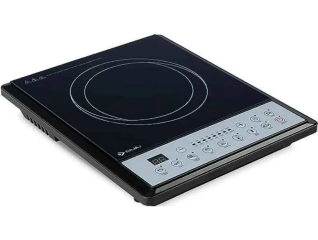
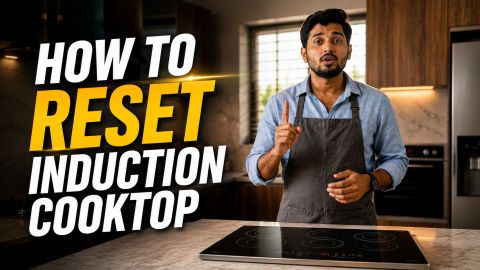
You might need to reset your stove if the touch buttons stop working or if a strange error code pops up on the screen. Small power jumps or software glitches can sometimes confuse the internal computer, making the stove act up or stop heating. A quick reset clears these minor bugs and brings the controls back to normal. It is the easiest way to fix common problems yourself without having to call a repair person or pay for a service visit. Check out this guide to understand the common issues and some easy fixes.


And if you want to buy a new induction, head to any of Bajaj Finserv’s 1.5 lakh partner stores in 4,000 cities in India. Choose your ideal model, pay with Easy EMIs, and enjoy zero down payment on select deals. Simply check your loan eligibility now and bring home your desired product without worrying about overspending.


Also explore: Glen infrared cooktop 

Step-by-step methods to reset an induction cooktop

Using an induction cooktop is one of the safest ways to prepare meals, but following proper guidelines ensures your appliance remains in top condition for years. Here are essential tips for a safer kitchen environment.


  • Ensure you are using induction-compatible cookware with a flat, magnetic base to prevent heating errors or damage to the glass surface.
  • Keep the cooktop surface clean and dry to ensure the touch sensors remain responsive and to prevent burnt-on food residue.
  • Avoid placing credit cards, smartwatches, or other magnetic items near the surface while it is in use to prevent electronic interference.
  • For more detailed advice on preventing accidents, read these induction cooker safety tips to keep your household secure.
  • Always supervise the cooking process and use the built-in timer functions to avoid overheating your pans.


If you are looking to upgrade your kitchen with a reliable and efficient model, explore the top induction stoves in India to find the perfect match for your needs.

Resetting induction cooktops- Brand‑wise guide

The table below outlines the standard reset procedures for popular induction brands. Follow these steps to clear common errors or frozen touch panels:


BrandReset methodRequired wait timeCommon error solution
BajajTurn off the main wall socket and disconnect the power cord.3 to 5 minutesE0 often means no pan is detected so place a magnetic pot on the center.
PrestigePress the cancel button and unplug the unit from the wall.10 minutesEnsure a specific cooking mode is selected after restarting to engage the coil.
PhilipsDisable the child lock or perform a full power disconnection.30 minutesHolding the lock button for three seconds is usually required to wake the panel.
PigeonDry the control surface and cycle the main power switch.2 to 3 minutesMoisture on the buttons can cause the unit to stay offline or unresponsive.
UshaSwitch off the appliance and allow the cooling fan to stop before unplugging.5 minutesEnsure the air intake vent is not blocked to prevent overheating codes.
HavellsUnplug the device and check the underside for dust accumulation.10 minutesOver-voltage errors often clear once the capacitors have fully discharged.

Also explore: 4 burner induction cooktop 

Common induction cooktop error codes and quick fixes

While every brand has its own specific set of codes, most manufacturers use a standard system to communicate common issues. Here is a guide to the most frequent error codes and how to resolve them:


Error codeCommon meaningQuick fix
E0No cookware detectedPlace a compatible induction-ready pan on the cooking zone.
E1 / E2Internal overheatingTurn off the stove and let it cool down for at least 15 minutes.
E3 / E4Voltage fluctuationCheck if your home power supply is too high or too low for the appliance.
E5 / E6Sensor or circuit faultPerform a hard reset by unplugging the unit for 30 minutes.
E7 / E8Fan failure or blockageEnsure the air vents are not blocked by dust or kitchen towels.


Also explore: Orpat induction and Havells induction stoves 

Tips to prevent future induction cooktop issues

Following these simple habits can extend the lifespan of your appliance and prevent the need for frequent resets or repairs.


  • Use only flat-bottomed cookware that matches the size of the heating zone to ensure even energy transfer and prevent sensor errors.
  • Clean the glass surface after every use once it has cooled down to prevent sugar or grease from burning onto the cooktop.
  • Avoid dragging heavy pots across the surface to prevent scratches and cracks that can allow moisture to seep into the internal electronics.
  • Ensure the air intake and exhaust vents under the unit are always clear of dust, cloth, or paper to prevent the system from overheating.
  • Plug the induction stove into a dedicated power socket with a surge protector to shield the sensitive control board from voltage spikes.
  • Let the internal cooling fan finish its cycle completely before you unplug the appliance from the wall after cooking.
  • Keep the control panel dry at all times because moisture on the touch sensors can cause the unit to behave erratically or go offline.
  • Schedule a professional inspection every year if you use the cooktop heavily to ensure the internal wiring and fan remain in good condition.


Get induction cooktops on Easy EMIs with Bajaj Finserv


Upgrading your kitchen with the latest induction cooktops is now easier and more affordable with Bajaj Finserv’s flexible financing options. Follow these steps to get started:


  •  Explore induction cooktops on Bajaj Mall Browse a wide range of induction cooktops from trusted brands. Compare features like wattage, cooking modes, safety settings, and design to choose the right model for your home.
  • Visit a partner store: Once you shortlist a model, step into any of Bajaj Finserv’s 1.5 lakh partner stores across 4,000 cities in India. See the product in person, talk to experts, and make a confident decision.
  • Choose the Easy EMI Loan option: At checkout, select the Bajaj Finserv Easy EMI Loan. Avail financing of up to Rs. 5 lakh and split the cost into convenient monthly instalments. Some products also come with a zero down payment option.
  • Check your loan eligibility online: Plan better by checking your loan eligibility in minutes. Simply enter your mobile number and OTP to know your pre-approved limit.
  • Use the EMI Network Card for purchases up to Rs. 3 lakh: Already own the Bajaj Finserv EMI Network Card? Use it for instant, paperless checkout and convert your purchases of up to Rs. 3 lakh into Easy EMIs.

Frequently asked questions

Can I buy an induction cooktop on EMI?

Yes, you can easily bring home your preferred induction cooktop using Bajaj Finserv’s Easy EMI options. Whether you already have the EMI Network Card or are new to it, here is how to begin:


If you have the Bajaj Finserv EMI Network Card:

  • Explore induction cooktops on Bajaj Mall: Choose from a wide range of the latest and most popular models.
  • Visit a partner store: Check out the product in person at any of Bajaj Finserv’s 1.5 lakh partner stores across 4,000 cities in India.
  • Use your EMI Network Card at checkout: Convert the cost into Easy EMIs that fit your monthly budget.
  • Zero down payment on select models: Take your chosen induction cooktop home without paying anything upfront.


If you do not have an EMI Network Card:

Check your Insta EMI Card eligibility online using your mobile number and OTP. If you are eligible, apply instantly and enjoy a smarter, more affordable way to buy your favourite product on Easy EMIs.

How do I reset my induction cooktop?

To reset an induction cooktop, first switch it off and disconnect it from the power source for a few minutes. This clears temporary glitches and restores default settings. After reconnecting, turn the cooktop back on and check if the error or issue is resolved. Many brands also have a dedicated reset or power button combination. Always refer to the user manual for brand‑specific instructions to avoid damaging the appliance.

Why is my induction cooktop not responding after reset?

If your induction cooktop does not respond after a reset, the issue may be due to faulty wiring, sensor errors, or persistent software glitches. Sometimes, residual heat or locked safety features prevent immediate operation. Ensure the cooktop is properly connected to power and that the child lock is not enabled. If problems persist, consult the brand’s troubleshooting guide or contact customer support, as professional servicing may be required for deeper technical faults.

How do I unlock child lock on an induction stove?

Most induction stoves feature a child lock that disables controls for safety. To unlock it, press and hold the lock symbol or a specific button combination (often + and –together) for a few seconds. The exact method varies by brand, so check your user manual for details. Once unlocked, the cooktop should respond normally. This feature ensures safety at home but can be easily disabled when needed.

What does error code E3 or LOC mean on induction cooktop?

Error code E3 usually indicates voltage issues, such as unstable or excessive power supply, while LOC refers to the child lock being activated. These codes are safety alerts designed to protect the appliance. For E3, check your power connection or consult an electrician. For LOC, simply disable the child lock using the appropriate button combination. Understanding these codes helps you quickly resolve problems and maintain safe operation of your cooktop.

Can I reset induction cooktop without turning off the circuit breaker?

Yes, most induction cooktops can be reset without switching off the circuit breaker. Simply power off the cooktop using its control panel or unplug it from the socket for a few minutes. This clears minor glitches and restores default settings. However, if the issue persists or involves electrical faults, turning off the circuit breaker may be necessary for safety. Always follow brand‑specific instructions to avoid damaging the appliance.

Show More Show Less

Bajaj Finserv app for all your financial needs and goals

Trusted by 50 million+ customers in India, Bajaj Finserv App is a one-stop solution for all your financial needs and goals.

You can use the Bajaj Finserv App to:

  • Apply for loans online, such as Instant Personal Loan, Home Loan, Business Loan, Gold Loan, and more.
  • Invest in fixed deposits and mutual funds on the app.
  • Choose from multiple insurance for your health, motor and even pocket insurance, from various insurance providers.
  • Pay and manage your bills and recharges using the BBPS platform. Use Bajaj Pay and Bajaj Wallet for quick and simple money transfers and transactions.
  • Apply for Insta EMI Card and get a pre-qualified limit on the app. Explore over 1 million products on the app that can be purchased from a partner store on Easy EMIs.
  • Shop from over 100+ brand partners that offer a diverse range of products and services.
  • Use specialised tools like EMI calculators, SIP Calculators
  • Check your credit score, download loan statements and even get quick customer support—all on the app.

Download the Bajaj Finserv App today and experience the convenience of managing your finances on one app.

Disclaimer

1. Bajaj Finance Limited (“BFL”) is a Non-Banking Finance Company (BAJAJ FINANCE) and Prepaid Payment Instrument Issuer offering financial services viz., loans, deposits, Bajaj Pay Wallet, Bajaj Pay UPI, bill payments and third-party wealth management products. The details mentioned in the respective product/ service document shall prevail in case of any inconsistency with respect to the information referring to BFL products and services on this page.

2. All other information, such as, the images, facts, statistics etc. (“information”) that are in addition to the details mentioned in the BFL’s product/ service document and which are being displayed on this page only depicts the summary of the information sourced from the public domain. The said information is neither owned by BFL nor it is to the exclusive knowledge of BFL. There may be inadvertent inaccuracies or typographical errors or delays in updating the said information. Hence, users are advised to independently exercise diligence by verifying complete information, including by consulting experts, if any. Users shall be the sole owner of the decision taken, if any, about suitability of the same.