







Clear your overdue EMI
Clear your overdue EMI today – stop penalties & fix your credit
*Overdue charges include penalty interest and bounce fees as applicable. T&C apply.
In Summary
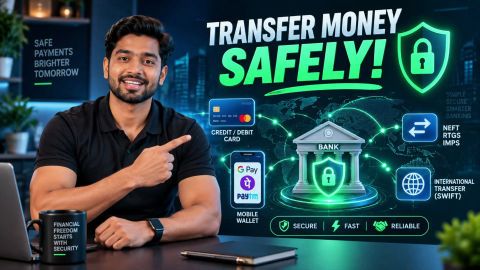
Understand modern payment modes and fund transfer methods
You can repay your Doctor Loan through automatic bank deductions or available online payment methods. Check the options linked to your loan account, verify payment details and retain transaction records to track your repayments.
- Use NACH or ECS for automatic EMI deductions, or UPI, net banking and debit cards for manual payments, subject to availability.
- Access your loan through the My Account portal or Bajaj Finance app and select an available payment method.
- Keep sufficient funds in your registered bank account before the auto-debit date and check your mandate status if the deduction fails.
- If a payment fails or remains pending, verify its status before trying again to avoid duplicate payments.
- Save your payment receipt and transaction reference, and check your latest Statement of Account to confirm the payment.
Review your loan account after payment and contact Bajaj Finance through authorised channels if the transaction does not appear correctly.
Which digital payment modes can you use to repay your doctor loan?
EMI Payment: Pay Overdue EMI Online
Bajaj Finance supports automatic EMI deductions through a NACH mandate and online payments through available digital payment options. You can use the following modes, depending on your loan account and the repayment facility available.
- NACH mandate: Register a National Automated Clearing House (NACH) mandate to authorise automatic EMI deductions from your linked bank account on the scheduled due date.
- ECS: Electronic Clearing Service (ECS) allows your bank to deduct your EMI automatically from your registered account. Check the mandate arrangement applicable to your loan.
- UPI: Select UPI on the online payment screen and complete the transaction through your linked UPI application.
- Net banking: Select your bank and authorise the EMI payment through its internet banking facility.
- Debit card: Enter your eligible debit card details and complete the required verification to make an online payment.
Keep sufficient funds in your linked bank account before the scheduled NACH or ECS deduction. For manual payments, check the available options through the official Bajaj Finance payment facility and retain the transaction confirmation.
How can you pay your doctor loan through Bajaj Finance platforms?
You can use the My Account portal or the Bajaj Finance app to access your Doctor Loan account and make an online repayment. Both platforms allow you to sign in using your registered mobile number and verify your account before proceeding.
Follow these steps:
- Open the My Account portal or the Bajaj Finance app.
- Sign in using your registered mobile number and enter the OTP you receive.
- Complete any additional verification requested, such as your date of birth.
- Go to the Service section and select Relations.
- Choose your Doctor Loan account from the available loan records.
- Select the available loan payment option.
- Review the outstanding amount and choose a payment method displayed for your account.
- Complete the payment and save the transaction confirmation for your records.
Verify your loan account details before making the payment, especially if you have multiple loan accounts. Use the payment methods displayed for your selected Doctor Loan account and retain the confirmation for future reference.
How does auto-debit work for doctor loan EMIs?
Auto-debit allows your EMI to be deducted from your registered bank account according to the repayment mandate linked to your loan. You do not need to initiate each monthly payment manually when the mandate remains active.
To manage this repayment method:
- Keep sufficient funds in your registered bank account before the EMI due date.
- Check that your bank account details remain active and correct.
- Review your mandate status if an automatic deduction does not take place.
- Use an available online payment option if you need to clear a pending instalment.
An active mandate does not remove your responsibility to check whether the EMI was deducted. Review your bank statement and loan account after the scheduled debit.
What should you check before confirming an online payment?
Review the payment details before you authorise a transaction. This helps you avoid selecting the wrong loan account or entering an incorrect amount.
Check the following:
- Your Doctor Loan account number.
- The instalment or outstanding amount displayed.
- The payment method selected.
- The bank or UPI details used for the transaction.
- Any applicable charges displayed on the payment screen.
Complete the payment only after the details match your loan account and repayment requirement. Keep enough funds available in your bank account to complete the transaction.
What should you do if your online doctor loan payment fails?
A failed or pending transaction needs verification before you try again. Check your bank account and payment status to establish whether the amount was debited.
- If the amount was not debited, check the payment details and try again through an available payment option.
- If the amount was debited but the loan account does not show the payment, retain the bank debit entry and transaction reference.
- If the transaction shows as pending, check its status before initiating another payment.
- If the payment remains unresolved, contact customer support through an authorised channel and share the transaction details requested.
Avoid making another payment until you establish the status of the first transaction. This helps you avoid duplicate payments.
How can you confirm and keep a record of your doctor loan payment?
Check your loan account after completing the transaction to confirm that the payment has been recorded. A bank debit or payment confirmation alone may not show how the amount has been adjusted against your loan.
Keep these records for reference:
- The payment confirmation or receipt.
- The transaction reference number.
- The payment date and amount.
- The corresponding bank statement entry, if applicable.
- Your latest Statement of Account.
If the payment does not appear in your loan account, raise a request through an authorised support channel. Share the transaction reference and payment proof so the team can review the discrepancy.
Loan support made easy — Read on
Frequently Asked Questions
Doctor Loan Digital Payment
Overdue & Digital Payment
How does paying your Doctor Loan EMI early affect the next instalment?
Your payment date and the date Bajaj Finance receives and adjusts the amount may differ. If you pay before the scheduled date, ask how the lender will treat the payment and whether your next EMI remains due. Do not assume an early payment automatically covers a future instalment for your account.
How should you update your bank account for Doctor Loan EMI deductions?
If you change your bank account, contact Bajaj Finance through an authorised channel to confirm how to update your repayment details and register a new mandate, if required. Keep your existing repayment arrangement active until the lender confirms the change. Check the next debit date to avoid a missed or unexpected deduction.
What happens if your Doctor Loan EMI due date falls on a bank holiday?
If your EMI due date falls on a bank holiday, check your repayment instructions and confirm the expected deduction date with Bajaj Finance or your bank. Keep sufficient funds in the registered account before the scheduled date. Monitor your loan account afterwards to confirm that the instalment has been recorded.
What should you do if an automatic debit occurs after a manual EMI payment?
If you make a manual payment around the time of an automatic debit, check whether the mandate has already processed the EMI. Review your bank statement and loan account before paying again. If both transactions appear as debits, contact Bajaj Finance with the transaction references and ask it to verify the entries.
What should you confirm before paying your Doctor Loan EMI from another person's bank account?
Before paying from another person's bank account, confirm with Bajaj Finance whether it accepts third-party payments for your Doctor Loan and whether it requires additional details. Do not assume that a successful bank transfer will automatically be matched to your loan. Follow the lender's instructions and retain the payment record.
Which payment credentials should you never share when paying your Doctor Loan EMI?
Never disclose your OTP, UPI PIN, card PIN or internet banking password to anyone claiming to help with your Doctor Loan payment. Enter these details only in your bank's or payment application's authorised payment flow. Bajaj Finance representatives do not need your confidential payment credentials during verification or transaction support.
More Articles


Disclaimer
While care is taken to update the information, products, and services included in or available on our website and related platforms/websites, there may be inadvertent inaccuracies or typographical errors or delays in updating the information. The material contained in this site, and on associated web pages, is for reference and general information purpose and the details mentioned in the respective product/service document shall prevail in case of any inconsistency. Subscribers and users should seek professional advice before acting on the basis of the information contained herein. Please take an informed decision with respect to any product or service after going through the relevant product/service document and applicable terms and conditions. In case any inconsistencies observed, please click on reach us.
*Terms and conditions apply.