Published May 8, 2026 · 3 Min Read

Why should you choose a wireless home theatre for IPL

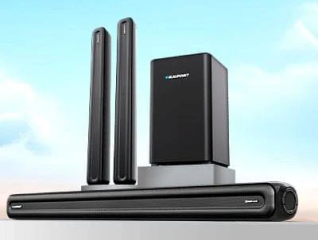
IPL matches are best experienced with powerful, immersive sound that makes you feel like you are in the stadium. A wireless home theatre gives you that experience without the mess of cables running across your living room. With no wires to route through walls or hide under carpets, setup is quick and clean. Whether it is the crack of a bat, the roar of the crowd or the commentary coming through crystal clear, a wireless surround sound system transforms your IPL viewing into a genuinely cinematic experience.


To know more, head to any of Bajaj Finserv’s 1.5 lakh partner stores in 4,000 cities in India. Choose your ideal model, pay with Easy EMIs, and enjoy zero down payment on select deals. Simply check your loan eligibility now and bring home your desired home theatre system without worrying about overspending.

What are the key features of wireless home theatre systems

A good wireless home theatre for IPL needs more than just loudspeakers. These are the features that make the biggest difference to your match-day experience at home.


  • True wireless surround sound: Look for systems with genuinely wireless rear speakers that connect to the soundbar or receiver without any cables. This is the feature that eliminates the biggest pain point of traditional home theatre setups and makes placement flexible in any living room layout.
  • Dolby Atmos and DTS:X support: Dolby Atmos creates a three-dimensional sound field with height effects that make commentary, crowd noise and on-field sounds feel like they are coming from all around and above you, delivering a significantly more immersive IPL experience than standard stereo audio.
  • Powerful subwoofer output: A wireless subwoofer with strong low-frequency output reproduces the deep bass of crowd cheers, fireworks and stadium music in a way that you feel physically as much as hear, adding the missing dimension to live sports audio that standard TV speakers cannot deliver.
  • Low audio latency: For live sports, audio sync with the video is critical. Look for systems that specify low latency wireless transmission to avoid the frustrating lip-sync delay that affects cheaper wireless audio products during live broadcast viewing.
  • Multiple connectivity options: HDMI eARC, optical, Bluetooth and Wi-Fi connectivity ensures the system works with any smart TV, set-top box or streaming device without compatibility issues during setup or daily use.
  • Smart assistant and app control: The ability to adjust volume, switch modes and manage speaker settings through a smartphone app or voice assistant is a practical convenience during a match when you do not want to search for the remote control.

How does a wireless home theatre compare to a wired system for IPL viewing

Understanding the trade-offs between wireless and wired home theatre systems helps you make the right choice for your living room setup and IPL viewing habits.


ParameterWireless home theatreWired home theatre
Setup complexitySimple, no cable routing neededComplex, cables must be routed and hidden
Placement flexibilityHigh, speakers can be placed anywhereLimited by cable length and routing options
Audio latencyLow on quality systemsZero, cables have no latency
Sound qualityExcellent on premium modelsExcellent, consistent across all price points
AestheticsClean, no visible cablesCables can be visible if not routed carefully
Cost at entry levelSlightly higherMore affordable at entry level
Installation time15 to 30 minutesSeveral hours for professional installation
Ideal for rentersYes, no wall modifications neededLess practical, requires permanent cable routes
ExpandabilityLimited by system designHighly expandable with additional speakers
Best for IPL useYes, quick setup and clean lookYes, for permanent dedicated home theatre rooms

Which are the best wireless home theatre systems for IPL matches

For watching IPL matches, the best wireless home theatre systems usually prioritise clear commentary, strong dialogue output, immersive stadium-like surround sound, and punchy bass for crowd noise and match atmosphere.


Wireless home theatre systemAudio outputKey featuresBest suited forApprox. price
Sony HT-S40R600W, 5.1 channelWireless rear speakers, Dolby Digital, sound modes, BluetoothLiving rooms and family TV setupsRs. 24,000 to Rs. 28,000
JBL Bar 800720W, 5.1.2 channelDetachable wireless surround speakers, Dolby Atmos, strong bassPremium sports and movie viewingRs. 45,000 to Rs. 55,000
LG S75Q380W, 3.1.2 channelDolby Atmos, AI sound tuning, wireless subwooferMedium-sized roomsRs. 28,000 to Rs. 35,000
Samsung HW-Q600C360W, 3.1.2 channelAdaptive sound, Dolby Atmos, game and sports audio modesClear commentary and immersive soundRs. 27,000 to Rs. 33,000
Sony HT-S20R400W, 5.1 channelDolby Digital, USB, Bluetooth, wired rear + subwoofer comboBudget buyers wanting surround soundRs. 15,000 to Rs. 18,000
boAt Aavante Bar 5500DA500W, 5.1 channelDolby Audio, wireless subwoofer, BluetoothBudget large-room setupRs. 13,000 to Rs. 16,000


Disclaimer: Each model's features, availability, and pricing are subject to change and may vary. For the most accurate and up-to-date information, please visit the official website.


Before you decide, explore the latest offers. You may find a great deal on a model that matches your needs.


How do you choose the best wireless home theatre for IPL

With several strong wireless home theatre options available in India, the right choice depends on your room size, TV brand, budget and how much setup complexity you are willing to manage. Brands consistently ranked among the best home theatre brands in India are the safest starting point for a quality purchase.


  • Match the system size to your room: A 2.1 soundbar with a wireless subwoofer is adequate for rooms up to 150 sq. ft. For rooms between 150 and 300 sq. ft., a 5.1 or 7.1 system with wireless rear speakers delivers proper surround sound immersion for IPL. For large halls above 300 sq. ft., a full 11.1.4 channel system is worth the investment for a genuinely stadium-like experience.
  • Check HDMI eARC compatibility with your TV: For the best audio quality from a streaming IPL broadcast, connect the system via HDMI eARC rather than optical or Bluetooth. HDMI eARC supports lossless Dolby Atmos and DTS:X signals that optical and Bluetooth connections cannot transmit at full quality.
  • Prioritise low latency for live sports: Some wireless home theatre systems introduce a slight audio delay that is noticeable during live sports when the ball hits the bat a fraction of a second before you hear the sound. Always check user reviews for lip-sync performance specifically during live TV viewing before purchasing for IPL use.
  • Consider ecosystem compatibility: If you already use a Samsung TV, a Samsung soundbar with Q-Symphony delivers the best integration. Sony TV owners benefit most from Sony HT-A series systems with Acoustic Center Sync. Choosing within the same brand ecosystem delivers the most seamless and hassle-free setup and operation experience.

How do you set up a wireless home theatre for IPL

Setting up a wireless home theatre correctly before IPL season makes all the difference to the experience on match day. For a complete guide, refer to the ultimate cricket room home theatre setup guide for more detailed tips and room arrangement advice.


  • Position the soundbar directly below the TV: Place the soundbar centred beneath your television at approximately ear level when seated. Avoid placing it inside a closed TV cabinet, as this significantly reduces sound dispersion and can cause overheating of the unit during long match sessions.
  • Place the wireless subwoofer in a corner for maximum bass impact: A subwoofer positioned in the corner of the room produces the most impactful low-frequency output because the corner reinforces the bass response. Experiment with placement to find the position that delivers the fullest and most natural-sounding bass for your specific room dimensions.
  • Place rear speakers at ear level behind the seating area: Wireless rear speakers should be positioned at ear level or slightly above, angled inward towards the main seating position. This placement creates the most convincing surround effect for crowd noise, atmospheric stadium sounds and off-screen audio during IPL broadcasts.
  • Connect via HDMI eARC for the best audio quality: Use an HDMI eARC cable to connect the soundbar to your TV's HDMI eARC port. Then connect your set-top box or streaming device to any other HDMI input on the TV. Enable HDMI eARC in your TV's audio settings to ensure lossless audio is passed to the soundbar during live broadcast and streaming.
  • Run the auto-calibration before the first match: Most premium wireless home theatre systems include an automatic room calibration feature that uses a microphone to measure your room's acoustics and adjust speaker levels, delays and equalisation accordingly. Always run this calibration after placing all speakers in their final positions for the most accurate and balanced surround sound performance.

Get electronics and appliances on Easy EMIs with Bajaj Finserv

Upgrading your home with the latest electronics and appliances is now easier and more affordable with Bajaj Finserv’s flexible financing options. Follow these steps to get started:
 

  • Explore products on Bajaj Mall: Browse a wide range of electronics and appliances from trusted brands. 
  • Visit a partner store: Once you shortlist a model, step into any of Bajaj Finserv’s 1.5 lakh partner stores across 4,000 cities in India. See the product in person, talk to experts, and make a confident decision.
  • Choose the Easy EMI Loan option: At checkout, select the Bajaj Finserv Easy EMI Loan. Avail financing of up to Rs. 5 lakh and split the cost into convenient monthly instalments. Some products also come with a zero down payment option.
  • Check your loan eligibility online: Plan better by checking your loan eligibility in minutes. Simply enter your mobile number and OTP to know your pre-approved limit.
  • Use the EMI Network Card for purchases up to Rs. 3 lakh: Already own the Bajaj Finserv EMI Network Card? Use it for instant, paperless checkout and convert your purchases of up to Rs. 3 lakh into Easy EMIs.

Frequently asked questions

Can I buy a home theatre on EMI?

Yes, customers can easily bring home their preferred home theatre system using Bajaj Finserv’s Easy EMI options. Whether they already have the EMI Network Card or are new to it, here is how the process works:


  • Explore home theatres: Choose from a wide range of the latest and most popular models on Bajaj Mall.
  • Visit a partner store: Check out the product in person at any of Bajaj Finserv’s 1.5 lakh partner stores across 4,000 cities in India.
  • Use EMI Network Card: Convert the cost into Easy EMIs that fit the monthly budget.
  • Zero down payment: Take the chosen home theatre system home without paying anything upfront on select models.

If you do not have an EMI Network Card:

Check your Insta EMI Card eligibility online using your mobile number and OTP. If you are eligible, apply instantly and enjoy a smarter, more affordable way to buy your favourite product on Easy EMIs.

Which is the best wireless home theatre for IPL in India?

The Sony HT-A9 and Samsung HW-Q990C are the best wireless home theatre systems for IPL in India. Both deliver genuine Dolby Atmos surround sound without rear speaker cables, creating an immersive stadium-like experience at home. The Sony HT-A9 is ideal for audiophiles wanting the most immersive sound field, while the Samsung HW-Q990C suits buyers who want the most powerful output with the widest channel configuration available in a consumer wireless system.

Is wireless home theater good for IPL viewing?

Yes, a wireless home theatre is excellent for IPL viewing. It delivers surround sound that makes you feel like you are in the stadium, with crowd noise, commentary and the crack of the bat coming from multiple directions around the room. The absence of cables makes setup quick and the living room stays clean and organised. A quality wireless system with Dolby Atmos significantly elevates the IPL viewing experience compared to standard TV speakers.

Does wireless home theater require installation?

No, most wireless home theatre systems do not require professional installation. Setup typically takes 15 to 30 minutes. You simply place the speakers, connect the soundbar to your TV via HDMI eARC or optical, power on the wireless speakers and pair them. No wall drilling, cable routing or technician is needed for standard setups. For ceiling speakers or complex multi-room configurations, professional installation may be preferred but is not required for typical living room setups.

What is the difference between a wireless and a wired home theatre?

A wireless home theatre connects rear speakers and the subwoofer to the soundbar or receiver without physical cables, making setup much simpler and the room cleaner. A wired system uses cables between all components, which can be routed through walls for a permanent installation. Wireless systems are more flexible and easier to move, while wired systems have zero audio latency and are more expandable. For most home IPL setups, a wireless system is the more practical and convenient choice.

Can I connect a wireless home theater to my smart TV?

Yes, wireless home theatre systems connect to smart TVs through HDMI eARC, optical audio or Bluetooth. HDMI eARC is the best option as it supports lossless Dolby Atmos and DTS:X audio for the highest quality IPL sound experience. Most modern smart TVs from Samsung, LG, Sony and TCL include an HDMI eARC port. Check your TV's specifications and enable the eARC setting in the audio output menu before connecting for the best possible audio performance.

Do wireless home theater systems support surround sound?

Yes, premium wireless home theatre systems support genuine surround sound including Dolby Atmos and DTS:X. Systems with wireless rear speakers create a true multi-directional sound field that places audio around and above the listener. Entry-level wireless soundbars use virtual surround processing to simulate surround sound through two or three physical speakers. For the most immersive IPL experience, choose a system with genuine wireless rear speakers rather than a single soundbar relying on virtual surround technology alone.

Show More Show Less

Bajaj Finserv app for all your financial needs and goals

Trusted by 50 million+ customers in India, Bajaj Finserv App is a one-stop solution for all your financial needs and goals.

You can use the Bajaj Finserv App to:

  • Apply for loans online, such as Instant Personal Loan, Home Loan, Business Loan, Gold Loan, and more.
  • Invest in fixed deposits and mutual funds on the app.
  • Choose from multiple insurance for your health, motor and even pocket insurance, from various insurance providers.
  • Pay and manage your bills and recharges using the BBPS platform. Use Bajaj Pay and Bajaj Wallet for quick and simple money transfers and transactions.
  • Apply for Insta EMI Card and get a pre-qualified limit on the app. Explore over 1 million products on the app that can be purchased from a partner store on Easy EMIs.
  • Shop from over 100+ brand partners that offer a diverse range of products and services.
  • Use specialised tools like EMI calculators, SIP Calculators
  • Check your credit score, download loan statements and even get quick customer support—all on the app.

Download the Bajaj Finserv App today and experience the convenience of managing your finances on one app.

Disclaimer

1. Bajaj Finance Limited (“BFL”) is a Non-Banking Finance Company (BAJAJ FINANCE) and Prepaid Payment Instrument Issuer offering financial services viz., loans, deposits, Bajaj Pay Wallet, Bajaj Pay UPI, bill payments and third-party wealth management products. The details mentioned in the respective product/ service document shall prevail in case of any inconsistency with respect to the information referring to BFL products and services on this page.

2. All other information, such as, the images, facts, statistics etc. (“information”) that are in addition to the details mentioned in the BFL’s product/ service document and which are being displayed on this page only depicts the summary of the information sourced from the public domain. The said information is neither owned by BFL nor it is to the exclusive knowledge of BFL. There may be inadvertent inaccuracies or typographical errors or delays in updating the said information. Hence, users are advised to independently exercise diligence by verifying complete information, including by consulting experts, if any. Users shall be the sole owner of the decision taken, if any, about suitability of the same.