Full Home Theatre Setup for Cricket Room

Full Home Theatre Setup for Cricket Room

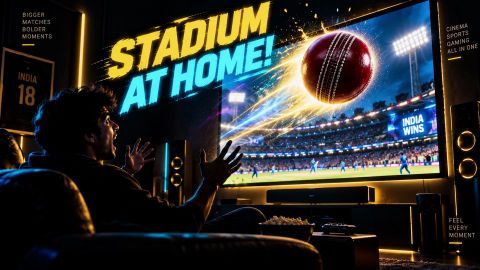
Set up the ultimate cricket home theatre room. Explore TVs, projectors, sound systems, and room acoustics, and buy on Easy EMIs with Bajaj Finance financing options.

Get a loan offer up to Rs. 5 lakh

Quick approval | Flexible tenure options | Zero approval fees

In summary


To set up a complete cricket home theatre room, you need a high-definition TV or projector, a surround sound system, comfortable seating, proper lighting, and simple acoustic management.

Key details for your setup include:

  • 32-inch to 55-inch 4K TVs or 100-inch projectors priced from Rs. 15,000 to Rs. 1,500,000.
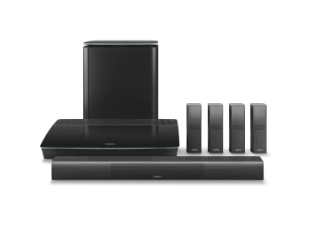
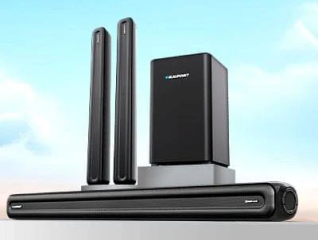
  • 2.1 channel soundbars or 5.1/7.1 channel surround sound systems to catch every stadium cheer.
  • Smart TV operating systems or external streaming sticks to access live match feeds directly.
  • Heavy curtains, floor rugs, and acoustic wall panels to absorb room echo and improve commentary clarity.
  • Proper viewing distances starting from 5 to 8 feet for optimal image clarity and eye comfort.
  • Dimmer lighting control to reduce screen glare during daytime and evening cricket matches.

You can also buy a new home theatre on Easy EMIs at over 1.5 lakh partner stores across 4,000 cities, including Reliance Digital, Croma, and Vijay Sales.

What components do I need for my cricket room home theatre setup?

Setting up a dedicated room for watching cricket gives you a stadium-like experience at home. To build this space, you need to combine the right visual equipment, audio hardware, and seating arrangements. Before purchasing any equipment, it helps to plan your room layout and budget carefully. You can choose individual components based on your room dimensions and preferred viewing distance.


ComponentEssential optionsTypical price rangeKey feature
Display Screen4K Smart TV or Full HD ProjectorRs. 15,000 to Rs. 2,000,000High refresh rate for smooth sports motion
Sound System2.1 Soundbar or 5.1/7.1 Surround SystemRs. 5,000 to Rs. 150,000Clear commentary and stadium atmosphere
Streaming DeviceSmart TV OS or Fire TV StickRs. 3,000 to Rs. 6,000Direct app access for live match streaming
Room AcousticsHeavy curtains, rugs, acoustic panelsRs. 1,000 to Rs. 20,000Echo reduction for sound clarity

If you want to replace your home theatre, visit any of Bajaj Finance's 1.5 lakh partner stores — like Vijay Sales, Croma, Reliance Digital, and more — across 4,000 cities, including Tier 2 cities like Jaipur, Lucknow, Kochi, Bhopal, and more in India. Choose your preferred model, then use the Bajaj Finance Insta EMI Card or Bajaj Finance Easy EMI Loan to finance it. Convert the cost into Easy EMIs that suit your monthly budget and enjoy zero down payment on select models. Check your loan eligibility online in minutes so you know exactly what you can get before you step into the store.

➜ Pro tip: Zero down payment is available on select models, so ask the store executive if your chosen home theatre qualifies before you check out.

Should I choose a TV or a projector for watching cricket?

The central feature of your cricket room is the screen. Selecting between a television and a projector depends on your room size and lighting conditions. Smart LED TVs work best in small to medium rooms with ambient light. They offer high brightness, crisp 4K HDR resolution, and built-in streaming apps for quick match access. Projectors are ideal for large rooms where you want a massive display area. A full HD or 4K projector can display images up to 100 inches or larger for an immersive view.

How do I choose the best sound system for live sports?

Clear commentary and stadium crowd noise are vital for an engaging cricket match experience. Audio setups range from simple compact soundbars to multi-channel surround sound speakers. Soundbars are budget-friendly and easy to install in compact living spaces. Multi-channel setups like 5.1 or 7.1 systems use separate speakers to surround your seating area with sound.


FeatureSoundbar systemMulti-channel surround system (5.1/7.1)
Room SizeBest for small rooms (under 150 sq ft)Best for medium to large rooms (over 200 sq ft)
InstallationCompact, single unit under TVRequires wire management and speaker mounting
Audio QualityClear dialogue and sports commentaryDeep bass and spatial stadium acoustics
Average PriceRs. 5,000 to Rs. 25,000Rs. 15,000 to Rs. 100,000

Soundbar vs full surround system - What is better for cricket?

Selecting the best audio setup for live cricket depends on your room size, layout, and how immersive you want the match experience to be. Both soundbars and multi-channel surround systems offer distinct advantages for sports commentary and stadium crowd effects.

Soundbars are compact, easy to install under your TV, and cost less upfront. They excel at enhancing voice clarity, making match commentary sharp and easy to hear without complex speaker placement.

Full 5.1 or 7.1 surround sound systems use separate speakers placed around the room to replicate an authentic stadium atmosphere. While they require extra wiring and setup, they deliver superior spatial depth and heavy bass for every cheer and boundary hit.


Audio system typeBest room sizeInstallation effortKey advantage for cricketPrice range
Compact Soundbar (2.1 channel)Small to medium (up to 150 sq ft)Plug-and-play, single cableClear commentary, minimal clutterRs. 5,000 to Rs. 25,000
Multi-channel Surround (5.1/7.1)Medium to large (over 200 sq ft)Speaker mounting and cable managementImmersive stadium-like audio effectsRs. 15,000 to Rs. 100,000

While a full surround system offers a richer stadium experience, it requires a higher initial budget and space for multiple speakers. If you want a quick, hassle-free upgrade for a smaller living room, a 2.1 or 3.1 channel soundbar is usually the more practical choice.

Smart connectivity and streaming setup for live cricket matches

Watching live sports without lag requires stable display connections and fast wireless streaming hardware. Having the right smart connectivity setup ensures your 4K TV or projector plays live match feeds smoothly in high resolution. Most modern Smart TVs run on operating systems like Google TV, WebOS, or Tizen with built-in OTT apps. If your TV lacks built-in apps, plugging in a streaming stick via HDMI converts it into a full smart display instantly.


Streaming equipmentConnection typeIdeal internet speedKey feature
Smart TV Built-in AppsWi-Fi / Ethernet25 Mbps+ for 4KDirect navigation using the TV remote
4K Streaming Stick (e.g. Fire TV)HDMI Port25 Mbps+ for 4KFast app loading and voice search
Dual-band Wi-Fi Router5 GHz Wireless50 Mbps+ recommendedReduced latency and buffering during live feeds
High-Speed HDMI 2.1 CableWired HDMIN/ASupports 4K video at high refresh rates

A higher internet speed ensures smooth 4K streaming, but live sports feeds can still buffer if your Wi-Fi signal is weak. Using a wired Ethernet cable or a 5 GHz Wi-Fi band reduces stream delay compared to standard 2.4 GHz connections.

What are my financing options to buy a home theatre?

Bajaj Finance offers two ways to convert an eligible home theatre purchase into monthly payments at 1.5 lakh+ partner stores across 4,000+ cities.


OptionLimitKey features
Bajaj Finance Insta EMI CardCard loan offer up to Rs. 3 lakh3–60 months tenure; 1.5 lakh+ outlets; 1 million+ eligible products; zero annual fee
Bajaj Finance Easy EMI LoanLoan limit up to Rs. 5 lakh3–60 months tenure; basic KYC; suitable for higher-value purchases

Both options require physical presence at a partner store. The Insta EMI Card suits repeat, multi-category shoppers. The Easy EMI Loan suits a single higher-value purchase. A minimum CIBIL score of 650 applies to the Easy EMI Loan. 


Get a Bajaj Finance Easy EMI Loan of up to Rs. 5 lakh on your next home theatre purchase. If you are an existing Bajaj Finance Insta EMI Card holder, you may have a loan limit of up to Rs. 3 lakh. Choose repayment tenures of up to 60 months.

Also explore the latest offers. You may find a great deal on a model that matches your needs.

How do I buy a home theatre on EMI at a Bajaj Finance partner store?

The process is simple and typically takes 10 to 15 minutes once you are at the store.

  1. Browse models on Bajaj Mall: Compare options on Bajaj Mall before visiting a store.
  2. Find a partner store near you: Use the Bajaj Finance store locator to find a nearby partner outlet such as Croma, Vijay Sales, or other authorised retailers.
  3. Check the home theatre in person: Check the key features, specifications, size, and performance to choose the product that best suits your needs and budget.
  4. Choose a suitable EMI option: At checkout, ask the store executive about the Bajaj Finance Insta EMI Card or Easy EMI Loan. Confirm available tenure options and whether your chosen model comes with a zero down payment offer.
  5. Complete payment and schedule installation: The in-store process is quick, and most partner stores offer installation as part of the purchase.

You can also check your loan eligibility online in advance by entering your mobile number and OTP, helping you plan your purchase better before visiting the store.

Save more with Smart Savings Calculator

Combine the best offers, EMI plans, and exclusive vouchers with Smart Savings Calculator to save big.

20k+ people used their offers at the store

Why use the Smart Savings Calculator?

Bajaj Finance’s Smart Savings Calculator helps you unlock maximum savings every time you shop at partner stores. It brings together all available brand, dealer, and scheme offers—so you can see your total savings instantly and shop smarter with Easy EMIs.

  1. Dealer offers - Grab exclusive in-store deals at over 1.5 lakh partner stores across India. Enjoy local discounts and special prices you will not find online.
  2. Brand offers - Access limited-time discounts from top brands across electronics, appliances, and more. Discover brand-specific savings selected just for you.
  3. Bajaj offers - Unlock exclusive Bajaj Finance deals on popular products—available only to our customers. More rewards, more value.­
  4. Scheme offers - Take advantage of time-sensitive offers on select EMI schemes. Get extra benefits after paying just 3 EMIs—visible during EMI selection at checkout.

Calculate your extra savings today!

Frequently asked questions

EMI details

General

Can I get a home theatre on EMIs?

Yes, you can easily bring home your preferred home theatre using Bajaj Finance’s Easy EMI options. Whether you already have the Insta EMI card or are new to it, here is how to begin:


If you have the Bajaj Finance Insta EMI card:

  • Explore products on Bajaj Mall: Choose from a wide range of the latest and most popular models.
  • Visit a partner store: Check out the product in person at any of Bajaj Finance’s 1.5 lakh partner stores across 4,000 cities in India.
  • Use your Insta EMI card at checkout: Convert the cost into Easy EMIs that fit your monthly budget.
  • Zero down payment on select models: Take your chosen product home without paying anything upfront.

If you do not have an Insta EMI card:

Check your Insta EMI Card eligibility online using your mobile number and OTP. If you are eligible, apply instantly and enjoy a smarter, more affordable way to buy your favourite product on Easy EMIs.

Both TVs and projectors have their advantages. TVs are better for smaller rooms and offer excellent picture quality, while projectors are ideal for larger spaces and provide a theatre-like experience. Consider your room size, budget, and preferences when deciding.

If you have a small space, a soundbar is a compact and cost-effective solution. For larger rooms and a more immersive experience, a full surround sound system is recommended.

The ideal screen size depends on your room dimensions. For smaller rooms, a 32-inch or 43-inch TV works well. For larger spaces, consider a projector with a 100-inch or bigger screen.

To reduce echo, use soundproofing materials like acoustic panels, heavy curtains, or rugs. Strategically place your speakers for optimal sound distribution and avoid hard surfaces that reflect sound.

Yes, gaming consoles like PlayStation or Xbox can enhance your cricket-viewing experience. They support live streaming apps and can be paired with VR headsets for an immersive experience.

Show More Show Less

Disclaimer

While care is taken to update the information, products, and services included in or available on our website and related platforms/websites, there may be inadvertent inaccuracies or typographical errors or delays in updating the information. The material contained in this site, and on associated web pages, is for reference and general information purpose and the details mentioned in the respective product/service document shall prevail in case of any inconsistency. Subscribers and users should seek professional advice before acting on the basis of the information contained herein. Please take an informed decision with respect to any product or service after going through the relevant product/service document and applicable terms and conditions. In case any inconsistencies observed, please click on reach us.

*Terms and conditions apply