Published May 5, 2026 · 4 Min Read

Watching IPL on a standard television speaker setup leaves you missing the roar of the stadium crowd, the crack of the bat, and the energy of a six landing in the stands. A home theatre system brings that atmosphere directly into your living room — with surround sound recreating the stadium experience from your sofa. Whether you choose a compact 2.1 soundbar or a full 5.1 channel system, the right setup transforms every IPL match into an event.
 

Buying a new home theatre is now budget friendly. Simply browse the selection of home theatres on Bajaj Mall. Alternatively, visit any of Bajaj Finserv’s 1.5 lakh partner stores in 4,000 cities in India. Choose the product that you like and get Easy EMI and zero down payment offers exclusively with Bajaj Finserv’s financing options. Check your loan eligibility and convert the cost of your new home theatre into Easy EMIs.

Why your IPL experience needs a home theatre

A TV's built-in speakers deliver flat, forward-facing audio that cannot recreate the multi-directional stadium sound of a live match. Here is why a home theatre changes everything.

  • Stadium crowd immersion at home: A 5.1 surround system places crowd noise, commentary, and crowd reactions around you — front, sides, and rear — recreating the directional audio of a live stadium rather than sound coming from a single flat panel.
  • Commentary clarity even at high volume: Dedicated centre channel speakers in a home theatre system keep commentary crisp and intelligible at high listening volumes — preventing the distortion and muddiness that TV speakers produce when pushed beyond moderate levels.
  • Bass impact for boundaries and sixes: A dedicated subwoofer delivers the low-frequency impact of a boundary hit, a roaring crowd surge, or the thump of a stadium firework — sensations that a TV's internal speaker physically cannot reproduce.
  • Wider soundstage for a bigger match feel: Front left and right speakers in a home theatre system create a soundstage wider than the television screen — making the match feel significantly larger and more immersive than audio contained within a 55-inch or 65-inch display.
  • Better experience for group viewing: A home theatre system fills the room with sound — ensuring every seat in a group IPL watch party receives consistent, balanced audio rather than the directional, front-facing sound that only benefits viewers directly in front of the TV.

Home theatre system types for IPL: 2.1 vs 5.1 vs Dolby Atmos — Which fits your room?

Choosing the right system type depends on your room size, cable tolerance, and budget. The table below helps you decide.
 

System typeChannel configurationRoom size suitedIPL experience levelBest for
2.1 channel soundbarSoundbar + subwooferSmall to medium rooms (up to 150 sq ft)Good — wide front soundstage with bassBuyers wanting a clean, minimal setup
3.1 channel soundbarSoundbar + dedicated centre + subwooferMedium rooms (120 to 200 sq ft)Better — clear commentary with bass impactBuyers prioritising voice and commentary clarity
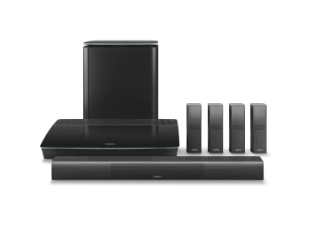
5.1 channel system5 speakers + subwooferMedium to large rooms (150 to 300 sq ft)Excellent — true surround from all directionsBuyers wanting genuine stadium surround sound
5.1 wireless system5 wireless speakers + wireless subwooferMedium to large rooms (150 to 300 sq ft)Excellent — surround without cable runsBuyers wanting 5.1 without drilling or wiring
Dolby Atmos (7.1.4 or above)7+ speakers + overhead channels + subwooferLarge rooms (above 300 sq ft)Stadium-grade — height channels add aerial soundBuyers wanting the ultimate immersive match experience

Also read: 5.1 home theatres

Key features to look for in a home theatre for IPL

Not all home theatre systems perform equally for live sport — these specific features make a meaningful difference to your IPL viewing experience. Here is what to prioritise.

  • Dialogue enhancement or dedicated centre channel: Commentary clarity is non-negotiable for IPL — look for a dedicated centre channel speaker or a soundbar with a dialogue enhancement mode that keeps commentator voices crisp even at stadium-level volume.
  • Minimum 300 W total output for medium rooms: A 300 to 500 W system fills a standard Indian living room of 150 to 250 sq ft effectively — output below 200 W struggles to deliver the dynamic range of crowd surges and boundary celebrations at comfortable listening levels.
  • Dolby Digital or DTS decoding: Star Sports HD and JioHotstar stream IPL in Dolby Digital on compatible devices — a home theatre system with Dolby Digital decoding unlocks the full multichannel audio mix broadcast during live matches.
  • HDMI ARC or eARC input: HDMI ARC connection between your television and soundbar or AV receiver passes digital audio bidirectionally — enabling a single remote to control volume and eliminating the audio sync delays common with optical cable connections.
  • Wireless subwoofer option: A wireless subwoofer eliminates the cable run across the room to the subwoofer — a practical advantage for Indian living rooms where furniture placement makes a wired subwoofer cable awkward or unsafe underfoot.
     

Also read: Wireless home theatres

Price list of the top-selling surround sound systems for IPL (2026)

The systems below deliver the best combination of surround sound performance and value for IPL viewing across different room sizes and budgets.
 

Model nameKey specificationsWhy should you get thisPrice
Zebronics Juke Bar 7450 Pro4.1 channel, 200 W, soundbar + wireless rear satellites, Dolby Audio, HDMI ARC, Bluetooth, opticalBest budget IPL surround system — wireless rear satellites add genuine surround effect at the lowest entry priceRs. 7,499
Sony HT-S20R5.1 channel, 400 W, soundbar + rear speakers + subwoofer, Dolby Audio, Bluetooth, HDMI ARC, opticalBest 5.1 system under Rs. 20,000 — dedicated rear speakers and 400 W output deliver true stadium surround for IPLRs. 17,600
Sony HT-S40R5.1 channel, 600 W, soundbar + rear speakers + subwoofer, Dolby Audio, Bluetooth, HDMI ARC, opticalBest mid-range IPL system — 600 W with true 5.1 surround and Sony's audio processing for clear commentaryRs. 29,990
JBL Bar 5.15.1 channel, 550 W, wireless detachable rear speakers, Dolby Digital, HDMI ARC, 4K passthrough, BluetoothBest wireless 5.1 IPL setup — detachable rear speakers charge in the soundbar and go wireless during matchesRs. 44,999
Samsung HW-Q990D/XL11.1.4 channel, 656 W, wireless rear satellites, Dolby Atmos, DTS:X, HDMI eARC, 4K passthroughBest premium IPL home theatre — 656 W Dolby Atmos with 11.1.4 channels delivers genuine stadium-grade immersionRs. 1,39,900

Disclaimer: Product features, availability, and prices may differ based on location and time. For the latest and most accurate details, visit a partner store. 

How to set up a home theatre for IPL in 5 steps

A correct home theatre setup takes under 30 minutes and makes a significant difference to sound quality. Here is the process step by step.

  • Step 1 — Position your speakers correctly: Place the front left and right speakers at ear level flanking the television, the centre channel directly below or above the screen, and the rear speakers 1 to 2 m behind your main seating position at ear height for true surround.
  • Step 2 — Connect via HDMI ARC or eARC: Use an HDMI ARC cable between your television's ARC port and the soundbar or AV receiver — this delivers the full digital audio signal from your TV and streaming apps without the limitations of an optical cable connection.
  • Step 3 — Place the subwoofer in a corner: Positioning the subwoofer in a front room corner naturally reinforces bass output — delivering more bass impact without increasing the subwoofer's volume setting, which suits boundary celebrations and crowd surges particularly well during IPL matches.
  • Step 4 — Enable Dolby Digital output on your streaming device: Open your JioHotstar app or set-top box audio settings and select Dolby Digital or Dolby Digital Plus as the audio output — this activates the multichannel audio track broadcast during Star Sports HD IPL coverage.
  • Step 5 — Run the auto-calibration if available: Many Sony, Samsung, and JBL systems include a built-in microphone calibration routine — run it from the remote or app to automatically adjust speaker levels and delays for your specific room dimensions and seating position.
     

Also read: Home theatre setup

Home theatre budget guide for IPL: What you get at every price band

IPL home theatre setups are available across a wide price range — here is what each budget delivers for your match-day experience.

  • Under Rs. 10,000 — soundbar with subwoofer: A basic 2.1 soundbar with subwoofer significantly improves on a TV's built-in audio — delivering clear commentary and bass for sixes, though without true surround sound from rear speakers.
  • Rs. 10,000 to Rs. 25,000 — entry 5.1 system: Sony HT-S20R at Rs. 17,600 delivers genuine 5.1 surround sound with rear speakers — the biggest audio upgrade step available for IPL viewers on a mid-range budget.
  • Rs. 25,000 to Rs. 50,000 — mid-range wireless 5.1: Systems like Sony HT-S40R and JBL Bar 5.1 deliver 550 to 600 W with wireless rear speakers, HDMI ARC, and Dolby Digital — the strongest value for serious IPL viewers wanting cable-free surround in a medium to large room.
  • Rs. 50,000 to Rs. 1,50,000 — premium Dolby Atmos: Premium systems add overhead height channels, Dolby Atmos object-based audio, and eARC — delivering the full cinematic surround experience during Dolby Atmos-encoded streaming content alongside IPL matches.
  • Above Rs. 1,50,000 — flagship stadium-grade systems: The Samsung HW-Q990D/XL at Rs. 1,39,900 and equivalent systems deliver 11.1.4 or higher channel configurations — the closest home audio experience to the actual atmosphere of watching IPL at a stadium.
     

Also read: JBL home theatres

How to choose the best home theatre for IPL

Choosing the right IPL home theatre requires matching the system to your room, your cable tolerance, and your primary audio priority. Here is what to evaluate before purchasing.

  • Match speaker configuration to room size: A 2.1 soundbar suits compact rooms under 150 sq ft; a 5.1 system suits medium rooms of 150 to 300 sq ft; a Dolby Atmos system with height channels suits large open-plan spaces above 300 sq ft for full surround coverage.
  • Prioritise HDMI ARC over optical connection: HDMI ARC passes the full Dolby Digital audio signal from your streaming apps — optical cables limit audio to compressed stereo in some configurations, reducing the surround sound quality during IPL broadcasts on JioHotstar and Star Sports HD.
  • Choose wireless rear speakers if cable routing is impractical: Running rear speaker cables across a living room is impractical in most furnished Indian homes — a wireless 5.1 system like the JBL Bar 5.1 with detachable wireless rear speakers solves this without sacrificing surround sound performance.
  • Confirm Dolby Digital decoding for IPL streaming compatibility: JioHotstar and Star Sports HD broadcast IPL in Dolby Digital on compatible devices — confirm your chosen system includes Dolby Digital decoding to access the full multichannel IPL audio mix during live matches.
  • Consider total wattage relative to your room volume: A 200 W system works for a compact bedroom; a 400 to 600 W system fills a standard Indian living room; above 600 W suits large open-plan spaces or group watch-party environments where significant volume is required for immersive audio at all seating positions.
     

Thinking of buying a new home theatre?

Before you do that, explore the latest offers from Bajaj Finserv. You may find a great deal on a model that matches your needs.

Get electronics and appliances on Easy EMIs with Bajaj Finserv

Upgrading your home with the latest electronics and appliances is now easier and more affordable with Bajaj Finserv’s flexible financing options. You can also maximise your savings by using the Maha Bachat Savings Calculator—a smart tool that combines brand offers, dealer offers, and EMI offers, all in one place, helping you lower the overall cost while still paying in small, bite-sized instalments. Follow these steps to get started:

  • Explore products on Bajaj Mall: Browse a wide range of electronics and appliances from trusted brands on Bajaj Mall. Compare features like energy ratings, storage capacity, performance settings, and design to choose the right product for your home.
  • Visit a partner store: Once you shortlist a model, step into any of Bajaj Finserv’s 1.5 lakh partner stores across 4,000 cities in India. See the product in person, talk to experts, and make a confident decision.
  • Choose the Easy EMI Loan option: At checkout, select the Bajaj Finserv Easy EMI Loan. Avail financing of up to Rs. 5 lakh and split the cost into convenient monthly instalments. Some products also come with a zero down payment option.
  • Check your loan eligibility online: Plan better by checking your loan eligibility in minutes. Simply enter your mobile number and OTP to know your pre-approved limit.
  • Use the Insta EMI Card for purchases up to Rs. 3 lakh: Already own the Bajaj Finserv Insta EMI Card? Use it for instant, paperless checkout and convert your purchases of up to Rs. 3 lakh into Easy EMIs.
     

Speakers by brand:

Philips SpeakersPortronics Speakers
Sony SpeakersMarshall Speakers
Zebronics SpeakersLG Speakers
Bang & OlufsenJBL Speakers
Croma SpeakersIntex Speakers
Bose SpeakersboAt Speakers


Why use the Maha Bachat Savings Calculator

Bajaj Finserv’s Maha Bachat Savings Calculator helps you unlock maximum savings every time you shop at partner stores. It brings together all available brand, dealer, and scheme offers—so you can see your total savings instantly and shop smarter with Easy EMIs.
 

1. Dealer offers - Grab exclusive in-store deals at over 1.5 lakh partner stores across India. Enjoy local discounts and special prices you will not find online.

2. Brand offers - Access limited-time discounts from top brands across electronics, appliances, and more. Discover brand-specific savings selected just for you.

3. Bajaj offers - Unlock exclusive Bajaj Finserv deals on popular products—available only to our customers. More rewards, more value.

4. Scheme offers - Take advantage of time-sensitive offers on select EMI schemes. Get extra benefits after paying just 3 EMIs—visible during EMI selection at checkout.
 

Calculate your extra savings today!

Frequently asked questions

Can I buy a new home theatre on EMIs?

Yes, you can easily purchase a new home theatre with Bajaj Finserv's Easy EMI options. Whether you already have the Insta EMI Card or are new to it, here is how you can get started:
 

If you have the Bajaj Finserv Insta EMI Card:

  • Explore home theatres on Bajaj Mall: Choose from top brands offering models with immersive surround sound, rich bass performance, and sleek designs.
  • Visit a partner store: Check out the latest home theatres in person at any of 1.5 lakh partner stores across 4,000 cities.
  • Use your Insta EMI Card at checkout: Convert the total cost into Easy EMIs that fit your monthly budget.
  • Zero down payment on select models: Bring home your home theatre without paying anything upfront.
     

If you do not have an Insta EMI Card:

Check your Insta EMI Card eligibility online using your mobile number and OTP. If eligible, you can apply instantly and start shopping for your preferred home theatre easily and affordably.

What is the best home theatre system for watching IPL?

The Sony HT-S20R at Rs. 17,600 is the best value IPL home theatre — delivering true 5.1 surround sound with rear speakers, 400 W output, HDMI ARC, and Dolby Audio for clear commentary and stadium crowd immersion. For larger rooms or premium setups, the Sony HT-S40R at Rs. 29,990 with 600 W and the JBL Bar 5.1 with wireless rear speakers at Rs. 44,999 are the strongest mid-range and premium IPL options respectively.

How do I connect my home theatre to my TV for IPL streaming?

Connect your home theatre to your TV using an HDMI ARC cable — plug one end into the ARC-labelled HDMI port on your TV and the other into the HDMI ARC input on your soundbar or AV receiver. Enable HDMI ARC in your TV's audio output settings. For streaming IPL on JioHotstar, open audio settings in the app and select Dolby Digital as the output format to activate the full multichannel audio track during live matches.

Is a soundbar or a 5.1 home theatre system better for watching IPL?

A 5.1 home theatre system delivers a significantly better IPL experience than a standard soundbar — placing crowd noise, commentary, and crowd reactions in front, to the sides, and behind you rather than from a single forward-facing source. If cable routing is impractical, a wireless 5.1 system like the JBL Bar 5.1 delivers genuine surround sound without rear cable runs. A soundbar suits buyers prioritising simplicity over immersion for a compact room setup.

What screen size is ideal for watching IPL at home?

A 55-inch to 65-inch television is ideal for most Indian living rooms — providing a sufficiently large viewing area for group IPL watch parties without overwhelming a standard-sized room. For rooms above 15 ft in depth, a 75-inch or larger screen delivers better visibility from the rear seating positions. Pair the screen size with a home theatre system rated for your room's square footage to ensure both visual and audio immersion scale proportionally together.

How can I get 5.1 surround sound for IPL on Star Sports HD?

Star Sports HD broadcasts IPL in Dolby Digital 5.1 on compatible set-top boxes and streaming platforms. To receive it, connect a compatible set-top box or streaming device to a television via HDMI, connect a 5.1 home theatre system via HDMI ARC, and select Dolby Digital as the audio output in both the set-top box and streaming app settings. A home theatre system with Dolby Digital decoding — such as the Sony HT-S20R or Sony HT-S40R — processes the 5.1 signal and routes it to the correct speaker channels automatically.

Does a home theatre system work with JioHotstar for IPL streaming?

Yes — most modern home theatre systems work with JioHotstar for IPL streaming. Connect your smart TV to the home theatre via HDMI ARC, open the JioHotstar app on your TV, and select Dolby Digital or Dolby Digital Plus in the app's audio settings. Compatible home theatre systems with Dolby Digital decoding — including Sony, Samsung, and JBL models — process the multichannel audio track from JioHotstar's IPL stream and deliver it through the correct speaker channels for full surround sound.

Show more Show less

Bajaj Finserv app for all your financial needs and goals

Trusted by 50 million+ customers in India, Bajaj Finserv App is a one-stop solution for all your financial needs and goals.

You can use the Bajaj Finserv App to:

  • Apply for loans online, such as Instant Personal Loan, Home Loan, Business Loan, Gold Loan, and more.
  • Invest in fixed deposits and mutual funds on the app.
  • Choose from multiple insurance for your health, motor and even pocket insurance, from various insurance providers.
  • Pay and manage your bills and recharges using the BBPS platform. Use Bajaj Pay and Bajaj Wallet for quick and simple money transfers and transactions.
  • Apply for Insta EMI Card and get a pre-qualified limit on the app. Explore over 1 million products on the app that can be purchased from a partner store on Easy EMIs.
  • Shop from over 100+ brand partners that offer a diverse range of products and services.
  • Use specialised tools like EMI calculators, SIP Calculators
  • Check your credit score, download loan statements and even get quick customer support—all on the app.

Download the Bajaj Finserv App today and experience the convenience of managing your finances on one app.

Disclaimer

1. Bajaj Finance Limited (“BFL”) is a Non-Banking Finance Company (BAJAJ FINANCE) and Prepaid Payment Instrument Issuer offering financial services viz., loans, deposits, Bajaj Pay Wallet, Bajaj Pay UPI, bill payments and third-party wealth management products. The details mentioned in the respective product/ service document shall prevail in case of any inconsistency with respect to the information referring to BFL products and services on this page.

2. All other information, such as, the images, facts, statistics etc. (“information”) that are in addition to the details mentioned in the BFL’s product/ service document and which are being displayed on this page only depicts the summary of the information sourced from the public domain. The said information is neither owned by BFL nor it is to the exclusive knowledge of BFL. There may be inadvertent inaccuracies or typographical errors or delays in updating the said information. Hence, users are advised to independently exercise diligence by verifying complete information, including by consulting experts, if any. Users shall be the sole owner of the decision taken, if any, about suitability of the same.