













An OTP will be sent to this number for verification

You may have a pre-approved offer
Enter required home loan amount
In summary
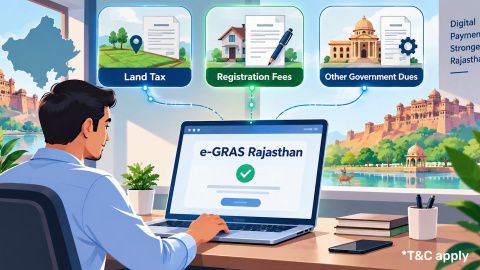
eGras Rajasthan- A comprehensive guide to online land tax payment
- Governing law: Rajasthan Lands and Buildings Tax Act, 1964, covering urban land and buildings in notified municipal/cantonment areas
- Payment portal: e-GRAS Rajasthan (egras.rajasthan.gov.in)
- Land tax is distinct from municipal property tax — different Act, different basis in some cases
- Payment requires the property's assessment details and a valid challan reference
- A digital receipt/ challan is generated instantly on successful payment
- Bajaj Finance verifies land tax payment status as part of standard due diligence before disbursing a home loan against Rajasthan urban property.
What is Rajasthan land tax, and how is it different from property tax?
Rajasthan land tax refers specifically to the tax levied under the Rajasthan Lands and Buildings Tax Act, 1964, applicable to land and buildings within notified municipal or cantonment areas of the state — a distinct levy from the municipal property tax charged separately by local urban bodies.
| Attribute | Detail |
|---|---|
| Governing law | Rajasthan Lands and Buildings Tax Act, 1964 |
| Applies to | Land and buildings in notified municipal/ cantonment areas |
| Valuation basis | Market value of the land or building, as assessed under the Act |
| Payment portal | e-GRAS Rajasthan (egras.rajasthan.gov.in) |
| Distinct from | Municipal property tax (a separate levy by local urban bodies) |
This distinction matters practically: a Rajasthan property owner may need to satisfy both land tax and municipal property tax obligations, to different authorities, rather than assuming a single payment covers everything.
The Act's coverage is specifically tied to notified municipal and cantonment areas — land outside these designated urban zones is governed by a different revenue framework (agricultural land revenue, collected through the district Revenue Department rather than under this specific Act), which is why confirming your property's exact classification before assuming which tax regime applies is a worthwhile first step.
Show more
Show less
What is e-GRAS, and why does Rajasthan use it for land tax?
e-GRAS (Electronic Government Receipt Accounting System) is Rajasthan's online platform for paying a range of government dues electronically, replacing the older system of manual challans and in-person payment at treasury offices.
| Attribute | Detail |
|---|---|
| Full name | Electronic Government Receipt Accounting System |
| Dues covered | Land tax, registration fees, court fees, other state charges |
| Replaces | Manual challans and in-person treasury payment |
| Receipt | Generated instantly on successful payment |
| Other states using this model | Haryana, Assam, Manipur, Tripura, Arunachal Pradesh (each with its own separate implementation) |
For land tax specifically, e-GRAS removes the need to visit a government treasury or bank branch in person to submit a physical challan, and the digital receipt serves as your proof of payment for the specific assessment year and property. A payment reference from Rajasthan's e-GRAS is not interchangeable with another state's system, even though the underlying software model is shared across all six states.
Show more
Show less
How to pay Rajasthan land tax through e-GRAS
- Visit the official e-GRAS Rajasthan portal at egras.rajasthan.gov.in.
- Select the department or category corresponding to land tax (usually under Revenue Department dues).
- Enter your property's assessment details — district, tehsil, and the specific assessment or account reference for your land/building.
- Confirm the tax amount due, as reflected in the system based on your property's assessment.
- Choose your payment method (net banking, debit card, or other available options).
- Complete the payment and wait for confirmation.
- Download and save the digital challan/receipt generated on successful payment.
- Store the challan alongside your other property documents rather than only in your email inbox, so it's accessible even if the email account changes.
Keep the challan reference number and payment date recorded separately from the digital receipt itself, since you may need to quote this reference in future correspondence with the Revenue Department without re-accessing the original document. A simple spreadsheet or note listing each year's reference alongside the payment date is enough for most property owners' needs.
Show more
Show less
What to do if payment is deducted but no receipt is generated
Payment failures where money is deducted but no digital receipt appears are not common, but they do happen, and e-GRAS has a defined process for resolving them rather than leaving the payment status ambiguous. This is a standard reconciliation issue that most electronic government payment systems encounter occasionally, not something specific to Rajasthan's implementation.
- Wait a short period and check the transaction status again on the portal, since some delays resolve automatically within minutes
- If the status remains unresolved, note your transaction reference number and the exact payment time
- Contact e-GRAS support or your payment bank with the transaction details for reconciliation
- Retain your bank statement showing the deduction as supporting evidence until the issue is resolved
Avoid attempting the same payment a second time before resolving an unclear first attempt, since this can create a duplicate payment that then needs its own separate refund process. Screenshotting or saving the transaction summary page before it disappears is also worth doing at the time of a failed or ambiguous payment, since it captures details (timestamp, transaction ID) that can be harder to retrieve after the fact.
Show more
Show less
Home loan for professionals
A worked example: paying land tax before a property sale
Consider Ramesh, a 58-year-old retired government employee in Jodhpur with a CIBIL score of 761, who owns a residential plot subject to land tax under the 1964 Act, planning to sell the property and needing a clear tax-payment history for the buyer's due diligence.
| Step | What Ramesh did |
|---|---|
| Checked assessment | Confirmed his property's current land tax assessment and any pending dues via egras.rajasthan.gov.in |
| Paid outstanding dues | Cleared two pending assessment years through e-GRAS in a single session |
| Saved receipts | Downloaded and filed digital challans for each payment |
| Shared with buyer | Provided the buyer's lawyer with challan references as part of due diligence |
| Follow-up | Kept a simple log noting each assessment year and payment date for fast reference |
Having a complete, verifiable land tax payment history sped up the buyer's own lender's legal verification, since an unresolved tax dues question is a common reason property transactions and loan applications stall partway through. Ramesh also provided the buyer's side with a simple summary sheet listing each assessment year and its corresponding payment date, which made cross-referencing the individual receipts considerably faster for the buyer's lawyer than working through the raw challans alone.
Show more
Show less
Financing your Rajasthan property with Bajaj Finance
| Loan feature | Detail |
|---|---|
| Interest rate | From 7.50% p.a.* |
| Loan amount | Up to Rs. 15 crore* |
| Tenure | Up to 32 years |
Bajaj Finance verifies land tax payment status, alongside standard title and encumbrance checks, before disbursing a home loan against Rajasthan urban property. This check sits alongside the standard verification of the sale deed and encumbrance certificate, since an unresolved land tax dues position — even if unrelated to ownership itself — can still complicate the transfer or the lender's overall risk assessment of the property. Check your home loan eligibility once your property's tax records clear verification.
Frequently Asked Questions
Understanding Rajasthan land tax
Using e-GRAS for payment
Is Rajasthan land tax the same as property tax?
No — they are distinct levies. Land tax under the Rajasthan Lands and Buildings Tax Act, 1964 applies to land and buildings in notified municipal/cantonment areas, while property tax is a separate charge levied by local urban bodies. A Rajasthan property owner may owe both, to different authorities, rather than a single combined bill.
Do I need to pay land tax every year, or is it one-time?
This depends on the specific assessment and property category under the Act — some assessments are recurring, others may be structured differently. Check your specific property's assessment details on e-GRAS or with the local Revenue Department office to confirm your payment obligation and frequency.
Can I pay Rajasthan land tax without registering an account on e-GRAS?
Most e-GRAS payments can be completed without a full account registration, using the relevant department selection and your property's assessment details directly. Confirm the current requirement on the portal at the time of payment, since exact process steps can be refined by the department periodically.
What proof do I need to keep after paying land tax online?
Save and print the digital challan/receipt generated immediately after successful payment — this is your primary proof of payment. Also keep a note of the transaction reference number and payment date separately, since this information is useful for any future correspondence with the Revenue Department, including during a property sale or loan application.
Home Loan in Different Cities

Home Loan in Mumbai

Home Loan in Ahmedabad

Home Loan in Bangalore

Home Loan in Chennai

Home Loan in Delhi

Home Loan in Hyderabad

Home Loan in Cochin

Home Loan in Noida

Home Loan in Pune
Home Loan for different budget
Check your pre-approved offer now
Our Calculators


What do our customers say about us
customers
Play Store rating
reviews
Amit Shiva
Reviewed on
Smooth and transparent home loan process. The interest rates were competitive, and documentation was minimal. The team guided me clearly at every step, making my first home purchase stress-free. Highly recommended for quick approvals.
Sandeep Kulkarni
Reviewed on
The loan disbursal was fast, and the customer support team was extremely patient with all my queries. Flexible EMIs helped me manage my monthly expenses easily. A great experience for salaried homebuyers.
Ritika Agarwal
Reviewed on
I had a great experience while transferring my existing home loan. The process was quick, and I saved significantly with the lower interest rate. Customer service was helpful throughout. Highly recommended for balance transfers.
Manoj Verghese
Reviewed on
Clear guidance, quick approval, and flexible repayment options made buying my new house easier than expected. The team handled everything professionally. Very satisfied and would definitely recommend their home loans
Find your nearest branch

More Articles



Watch our videos
Documents required to get a Bajaj Finserv Home Loan

Tips to increase your Home Loan eligibility
Things you need to know about pre-approved home loan

Things you need to know before applying for a Home Loan
How does Repo Rate affect your Home Loan

Download App
Now request money from your friends and family and make instant payments.

- Choose from personal, business, gold loans and more
- Pay utility bills, use UPI, get FASTag and more
- Buy over 1 million products on No Cost EMI
- Buy stocks, mutual funds and invest in FD
Disclaimer
1. Bajaj Finance Limited (“BFL”) is a Non-Banking Finance Company (NBFC) and Prepaid Payment Instrument Issuer offering financial services viz., loans, deposits, Bajaj Pay Wallet, Bajaj Pay UPI, bill payments and third-party wealth management products. The details mentioned in the respective product/ service document shall prevail in case of any inconsistency with respect to the information referring to BFL products and services on this page.
2. All other information, such as, the images, facts, statistics etc. (“information”) that are in addition to the details mentioned in the BFL’s product/ service document and which are being displayed on this page only depicts the summary of the information sourced from the public domain. The said information is neither owned by BFL nor it is to the exclusive knowledge of BFL. There may be inadvertent inaccuracies or typographical errors or delays in updating the said information. Hence, users are advised to independently exercise diligence by verifying complete information, including by consulting experts, if any. Users shall be the sole owner of the decision taken, if any, about suitability of the same.