







Support available Online, on call, or at branches
Get answers instantly without waiting on call:
Enter mobile and OTP · No password needed · No branch visit needed
In Summary
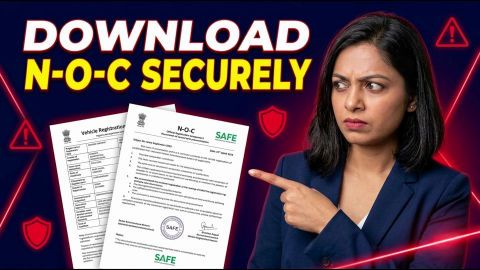
Download Product-specific Loan NOC
Your medical equipment loan No Objection Certificate (NOC) confirms that you have repaid the loan in full and cleared the outstanding dues recorded against your account. You can check its availability through the My Account portal or Bajaj Finance app after confirming your loan closure status.
- Sign in using your registered mobile number and OTP, then select your medical equipment loan account.
- Check the available documents section and download the NOC if it appears.
- Keep your loan account number, final payment receipt and service request reference ready if you need support.
- Verify your name, loan account number and closure details after downloading the certificate.
- If the NOC is unavailable, contact Bajaj Finance through an authorised channel to confirm your loan closure status and the next steps.
Save the NOC with your loan agreement and repayment records for future reference. If you notice incorrect details or a discrepancy in your credit report, contact the relevant support channel for clarification or correction.
What is a medical equipment loan NOC?
A medical equipment loan No Objection Certificate (NOC) confirms that you have repaid your loan in full and cleared the outstanding dues recorded under the loan account. This document serves as evidence of loan closure and helps you maintain accurate financial records. Before requesting or downloading the NOC, review your loan account to confirm that you have paid the outstanding principal, applicable interest and any other dues. Check the document carefully to ensure that the loan details and closure status are correct. Keep the NOC safely with your loan agreement, repayment receipts and other relevant records for future reference. The NOC confirms the loan’s closure, but it may not fulfil separate requirements relating to the financed medical equipment. Where applicable, check with the relevant authority to understand whether you need any additional documents or confirmation.
How can you download your medical equipment loan NOC online?
You can check for your medical equipment loan No Objection Certificate (NOC) through the My Account portal or the Bajaj Finance app after closing your loan. Follow these steps to check the available options for your account.
- Sign in to your account: Open the My Account portal or the Bajaj Finance app and sign in using your registered mobile number and the one-time password (OTP). Complete any additional verification requested.
- Select your loan account: Open Your Relations or the relevant loan section and select your medical equipment loan.
- Check your loan details: Confirm that your loan shows a closed status and that you have cleared all outstanding dues.
- Open the documents section: Look for the Documents, View Statement or a similar option, depending on the available interface.
- Find your NOC: If the No Objection Certificate option appears, open it and download the document.
- Save the document: Keep a copy of the NOC with your loan agreement and repayment records for future reference.
Menu labels and document availability may vary depending on your account and the interface. If you cannot find or download the NOC, contact Bajaj Finance through an authorised customer support channel for assistance.
What details should you keep ready to get your NOC?
Keep your loan account details and relevant repayment records ready when checking your No Objection Certificate (NOC) or contacting customer support. These details help the lender identify your account, verify payments and clarify the loan closure status.
| Information or document | Why you may need it |
| Loan account number | To identify the relevant loan account. |
| Registered mobile number and email address | To verify your registered contact details, if required. |
| Final repayment receipt or bank transaction record | To help verify the final payment, if needed. |
| Existing service request reference | To follow up on an earlier request related to loan closure or NOC access. |
The information required may vary depending on your request and account status. Confirm any additional requirements through an authorised customer support channel before submitting further documents. Share personal or financial information only through authorised channels.
What should you check after downloading your NOC?
After downloading the NOC, verify the loan account details and closure information before saving the document. Contact Bajaj Finance through an official channel if you find an error or cannot match the certificate to your loan.
Complete these checks:
- Confirm that the loan account number matches your medical equipment loan.
- Check your name and the loan closure details shown on the certificate.
- Save the NOC with your repayment receipts and relevant loan correspondence.
- Review your credit report separately if you want to confirm that it reflects the loan closure. If you find an error, raise a dispute through the appropriate official channel.
Keep the NOC for future reference. If you need confirmation about any separate equipment-related registration or lien requirement, check with the relevant authority rather than assuming the NOC completes every such procedure.
What should you do if you cannot find your NOC?
If your medical equipment loan No Objection Certificate (NOC) does not appear in My Account, check your loan account status first. Confirm that the lender has recorded your final repayment and closed the account, as a missing document alone does not confirm that you have outstanding dues.
- Check your loan status: Sign in to the My Account portal or the Bajaj Finance app and review your medical equipment loan details.
- Check document availability: Look for the NOC in the available documents section.
- Raise a service request: If the NOC remains unavailable, use the service request options in My Account or the app.
- Provide your loan details: Share your loan account number and explain that you need the NOC for your medical equipment loan.
- Keep the reference number: Save your service request reference and relevant payment confirmations.
- Resolve any discrepancies: If the lender identifies outstanding dues or an account discrepancy, request a clear explanation and confirm the steps required to resolve it.
Keep your loan and payment records for reference while following up on your request. Once the lender resolves the issue and makes the NOC available, download the document and retain it safely with your loan closure records.
How long does it take to receive your medical equipment loan NOC?
The time required to receive your medical equipment loan No Objection Certificate (NOC) depends on your loan account status and the applicable closure process. A confirmed processing timeline may not be available for every account. After the lender records your loan closure, check the document section in the My Account portal or the Bajaj Finance app to see whether your NOC is available. If you cannot find the document, contact Bajaj Finance through an authorised customer support channel for clarification. Ask whether the lender has recorded your loan closure, whether you need to provide any additional information, and when you should check for the document again. Keep your loan account details and closure records handy when requesting assistance. Avoid relying on an estimated timeline unless the lender confirms it for your account. Retain the NOC safely once you receive it.
Explore more
Frequently Asked Questions
NOC Application and Download
NOC Processing and Status
What should you do if the NOC file will not open after downloading?
Check whether the file has finished downloading and try opening it again using a suitable document reader. If the file still will not open, return to the authorised account portal and check whether another download is available. If the issue continues, contact customer support and explain the problem with the downloaded certificate.
How should you proceed if you need an older copy of your medical equipment loan NOC?
Check your saved loan documents, email records, and available account documents for the earlier certificate. If you cannot find a copy, contact Bajaj Finance through an authorised support channel and explain why you need it. Ask whether the lender can provide a replacement copy or another version of the certificate and follow the required identity-verification instructions to complete your request.
What should you do if your NOC contains an incorrect name or loan account number?
Compare the certificate with your official loan documents and identify the incorrect details. Contact the lender through an authorised service channel and request a review of the certificate. Keep the existing NOC and relevant supporting documents available. Use the corrected certificate once the lender confirms the update and makes it available.
What should you do if you have repaid your loan but cannot find a closure confirmation?
Review your latest loan account details and payment records to check whether the lender has recorded the final repayment. Contact customer support if the closure status remains unclear. Ask the lender to confirm whether any dues remain and whether it has completed the closure process before you follow up on the NOC.
How should you handle a request for your NOC from a third party?
Confirm why the third party needs the certificate and whether sharing it is necessary for your specific purpose. Check the recipient's identity and use a secure, appropriate channel to provide the document. Avoid sharing unrelated financial records or authentication details, and retain a copy of the NOC for your own records.
What should you do if you need your NOC urgently for another financial application?
Check whether the NOC is available in your authorised online account and download it if possible. If you cannot access it, contact the lender, explain your deadline and ask about the available options. Do not assume that the lender can meet a particular timeline unless it confirms this for your account.
More Articles
Disclaimer
While care is taken to update the information, products, and services included in or available on our website and related platforms/websites, there may be inadvertent inaccuracies or typographical errors or delays in updating the information. The material contained in this site, and on associated web pages, is for reference and general information purpose and the details mentioned in the respective product/service document shall prevail in case of any inconsistency. Subscribers and users should seek professional advice before acting on the basis of the information contained herein. Please take an informed decision with respect to any product or service after going through the relevant product/service document and applicable terms and conditions. In case any inconsistencies observed, please click on reach us.
*Terms and conditions apply.