








Features

FAQs
What is Aadhaar card?
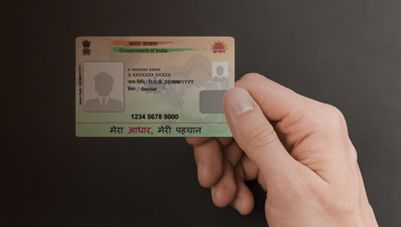
The Aadhaar card is a unique 12-digit identification number issued to residents of India by the UIDAI. It serves as a universal identity proof that links an individual’s biometric and demographic information in a centralised database. Aadhaar has become one of the most widely accepted identification systems in the country and is used across various services such as banking, mobile connections, government subsidies, taxation, and welfare schemes.
The main purpose of Aadhaar is to ensure transparency, eliminate duplication, and provide a secure identity verification system for residents. Over time, it has evolved into multiple formats like e-Aadhaar, PVC Aadhaar card, and mAadhaar, making access more convenient for users. People can easily get aadhaar details, update information, or retrieve lost credentials through UIDAI’s official platforms. With its widespread use, Aadhaar plays a crucial role in digital governance and identity authentication in India, ensuring efficient delivery of services to citizens.
How to download e-Aadhaar card by name and date of birth?
Downloading an e-Aadhaar using name and date of birth is not directly possible without first retrieving your Aadhaar number or Enrolment ID. You must use the services of UIDAI to proceed. Follow these steps:
- Visit the official UIDAI portal and choose “Retrieve Lost UID/EID.”
- Enter your full name, registered mobile number/email, and date of birth.
- Verify OTP sent to your registered contact details.
- Once you receive your Aadhaar number or Enrolment ID, go to the e-Aadhaar download section.
- Enter the details and OTP again to download the PDF.
This process helps you safely get Aadhaar download access even if you don’t remember your number. If you are unsure, you can also learn how to get aadhaar card no through UIDAI’s retrieval service or helpline before downloading the document.
How to get Aadhaar card number?
If you have enrolled for Aadhaar but do not remember your Aadhaar number, you can easily retrieve it through UIDAI services.
Steps to get Aadhaar number:
- Visit the official UIDAI website or go to an Aadhaar Enrolment Centre.
- Click on “Retrieve Lost or Forgotten EID/Aadhaar Number” option.
- Enter your registered mobile number or email ID linked with Aadhaar.
- Fill in your personal details such as full name and security captcha.
- Choose to receive OTP on your registered mobile number.
- Enter the OTP and verify your identity.
- Once verified, your Aadhaar number will be sent via SMS or email.
You can also retrieve it using the mAadhaar mobile app or by calling the UIDAI helpline. The Unique Identification Authority of India UIDAI ensures secure and easy access to Aadhaar details through multiple digital channels.
Aadhaar Card eligibility criteria
Any resident of India is eligible to apply for an Aadhaar Card
- Must have stayed in India for at least 182 days in the last 12 months
- Applicable to all age groups, including newborns and children
- NRIs can apply if they meet the residency requirement
- No minimum or maximum age limit for enrolment
- Requires valid proof of identity and address during application
- Aadhaar is not proof of citizenship but serves as a valid identity document
- Used for accessing government schemes, banking, and other services
Download Aadhaar using Aadhaar number, EID, or VID
- Aadhaar can be downloaded online using Aadhaar Number, Enrolment ID (EID), or Virtual ID (VID)
- Visit the official UIDAI website and select the “Download Aadhaar” option
- Choose the preferred method: Aadhaar Number, EID, or VID
- Enter the selected ID number along with captcha verification
- Provide your registered mobile number to receive an OTP
- Enter the OTP to authenticate your request securely
- After verification, your e-Aadhaar will be available for download in PDF format
- The downloaded file is password-protected for security
- Password usually consists of the first four letters of your name and birth year
- You can print the e-Aadhaar for physical use if required
- This digital Aadhaar is equally valid as the original card
- Ensure your mobile number is linked with Aadhaar for seamless download process
How to get aadhaar number by mobile number?
You cannot directly get your Aadhaar number using only a mobile number due to security and privacy reasons
- However, you can retrieve it if your mobile number is registered with Aadhaar
- Visit the official UIDAI website and select “Retrieve Lost or Forgotten Aadhaar Number”
- Choose whether you want to retrieve Aadhaar Number (UID) or Enrolment ID (EID)
- Enter your full name, registered mobile number, and captcha code
- Verify your identity using the OTP sent to your mobile number
- After successful verification, your Aadhaar number will be sent via SMS
- Alternatively, you can use the mAadhaar mobile app for the same process
- You can also visit the nearest Aadhaar enrolment centre for assistance
- Ensure your mobile number is updated in Aadhaar records for this service to work
- This process is safe, secure, and approved by UIDAI
- Never share OTP or Aadhaar details with unauthorised sources
Common issues while downloading Aadhaar
- Unregistered mobile number prevents OTP-based authentication during Aadhaar download
- Incorrect Aadhaar Number, EID, or VID entry can lead to failed requests
- OTP not received due to network issues or incorrect mobile number
- Delay in OTP delivery during peak hours or server load
- Entering a wrong captcha code multiple times may block the session temporarily
- Aadhaar not yet generated after enrolment can restrict download access
- Browser compatibility issues may affect the download process
- Poor internet connectivity can interrupt the download midway
- PDF not opening due to missing password or incorrect password format
- Outdated details in Aadhaar causing authentication failures
- Multiple failed attempts may temporarily lock access
- Server downtime or maintenance on UIDAI website can delay downloads
Is e-Aadhaar valid as a physical Aadhaar card?
Yes, e-Aadhaar is completely valid and has the same legal status as a physical Aadhaar card issued by the UIDAI. It is a digitally signed PDF version of your Aadhaar that can be downloaded from the UIDAI portal and used for most verification purposes.
- It is equally acceptable for identity proof across India
- Protected with a secure password for safety
- Can be printed and used like a physical card
- Verified through UIDAI’s digital signature
The Unique Identification Authority of India UIDAI ensures its authenticity and legal validity.
Conclusion
Retrieving your Aadhaar number is a simple process through UIDAI’s online portal, mobile app, or helpline services. By using your registered mobile number, you can quickly verify your identity and receive your Aadhaar details securely. Always ensure your contact information is updated to avoid delays. After managing your Aadhaar details, it is also helpful to stay financially aware by learning tools like how to check your CIBIL Score, which helps track your credit health and financial eligibility.
Frequently asked questions
Application & Process
Access & Support
Visit nearest UIDAI enrollment center, fill form, submit biometric details, provide proof documents, receive acknowledgment slip, then Aadhaar card is mailed to your address.
You cannot create Aadhaar fully online. Start application on UIDAI website, book appointment, visit enrollment center, submit biometrics and documents, then receive Aadhaar number after verification process.
Access UIDAI services online or at enrollment centers: register, update details, book appointments, submit biometrics, verify documents, then download or receive Aadhaar after successful processing and verification.
To get an Aadhaar card, you need proof of identity (PAN card, passport), proof of address (utility bill, bank statement), and proof of date of birth (birth certificate, school certificate).
After enrolment, retrieve your Aadhaar card number using the enrolment ID on the UIDAI website, via SMS, or by calling the helpline.
Yes, e-Aadhaar is as valid as the physical Aadhaar card. Issued by UIDAI, it is digitally signed and accepted for all official purposes across India.
If you lose your Aadhaar card, download e-Aadhaar from UIDAI website, retrieve number via enrolment ID, or request reprint online or at enrolment centre.
The password for e-Aadhaar PDF is first four letters of your name (CAPITALS) followed by your birth year. Issued by UIDAI.
Retrieve your Aadhaar card number by visiting UIDAI website, using registered mobile/email to get OTP, or call helpline or visit nearest enrolment centre.
Related articles

Disclaimer
Bajaj Finance Limited has the sole and absolute discretion, without assigning any reason to accept or reject any application. Terms and conditions apply*.
For customer support, call Personal Loan IVR: 7757 000 000