Best Projectors for IPL Viewing: Top Picks and Setup Guide

Best Projectors for IPL Viewing: Top Picks and Setup Guide

Catch every IPL sixer on a big screen with high‑brightness projectors perfect for living‑room cricket nights. Get yours on Easy EMIs with Bajaj Finance.

Get a pre-approved loan offer of up to Rs. 5 lakh

Quick approval | Flexible tenure options | Zero approval fees

Why should you use a projector for IPL matches?

Nothing beats watching IPL on a massive screen, and a projector gives you that experience at half the price of a large television. With screen sizes starting from 100 inches and going up to 300 inches, a projector transforms your living room into a private cricket stadium. Modern 4K projectors deliver sharp, bright and vibrant images that make every boundary, wicket and celebration feel larger than life. Whether you are hosting friends or watching alone, a projector is the most impactful upgrade you can make for IPL season.


Once you decide the brand you wish to buy, visit any of Bajaj Finance's 1.5 lakh partner stores — like Vijay Sales, Croma, Reliance Digital, and more — across 4,000 cities, including Tier 2 cities like Jaipur, Lucknow, Kochi, Bhopal, and more in India. Choose your preferred model, then use the Bajaj Finance Insta EMI Card or Bajaj Finance Easy EMI Loan to finance it. Convert the cost into Easy EMIs that suit your monthly budget and enjoy zero down payment on select models — take it home without any upfront payment. Check your loan eligibility online in minutes so you know exactly what you can get before you step into the store.

Which are the best projectors for IPL matches

For IPL matches, the best projectors should offer high brightness for ambient lighting, Full HD or 4K resolution, large-screen output, and strong speaker support for an immersive stadium-like viewing experience.

Projector modelResolutionBrightnessKey featuresBest suited forApprox. price
Epson CO-FH02Full HD 1080p3,000 lumensAndroid TV, 3LCD tech, vibrant coloursBright living rooms and family viewingRs. 55,000 to Rs. 62,000
BenQ TH575Full HD 1080p3,800 lumensLow input lag, sports mode, bright outputSports and live match viewingRs. 58,000 to Rs. 65,000
XGIMI Horizon Pro4K UHD1,500 ISO lumensAndroid TV, auto keystone, Harman Kardon speakersPremium home entertainmentRs. 1,35,000 to Rs. 1,55,000
ViewSonic PX701-4K4K UHD3,200 lumensHDR support, low latency, large projection sizeLarge rooms and sports screeningsRs. 95,000 to Rs. 1,10,000
Wanbo Mozart 1 ProFull HD 1080p900 ANSI lumensSmart OS, Dolby Audio, compact designBedrooms and smaller dark roomsRs. 28,000 to Rs. 32,000
Xiaomi Smart Projector 2 ProFull HD 1080p1,300 ANSI lumensAndroid TV, autofocus, compact buildCasual sports and streaming usersRs. 48,000 to Rs. 55,000

Disclaimer: Each model's features, availability, and pricing are subject to change and may vary. For the most accurate and up-to-date information, please visit the official website.


Before you decide, explore the latest offers. You may find a great deal on a model that matches your needs.

How does a projector compare to a TV for IPL viewing

Both options deliver a great IPL experience, but they suit different budgets, room setups and viewing preferences. This comparison helps you decide which is the better investment for your home.

ParameterProjectorTV
Screen size100 to 300 inches32 to 98 inches
Image brightnessGood in dark rooms, limited in daylightExcellent in all lighting conditions
Picture qualityExcellent on 4K laser modelsExcellent on OLED and QLED
Setup complexityModerate, needs screen and dark roomSimple, plug in and watch
Cost for 100 inch screenMuch lower than equivalent TVVery high for 85 inch and above
PortabilityCan be moved and used outdoorsFixed once installed
Built-in soundUsually basic, external speakers neededGood on premium models
Ambient light sensitivityHigh, works best in dark roomsNot affected by ambient light
Best forLarge group IPL viewing, movie nightsEveryday viewing, bright living rooms
Lifespan of light source20,000 to 30,000 hours on laser60,000 to 100,000 hours on OLED

What are the best setup tips for watching IPL on a projector

Getting the right setup makes a massive difference to your IPL projector experience. Follow these tips for the best results on match day. For more detailed guidance, refer to the complete projector setup for outdoor sports viewing guide.


  • Darken the room as much as possible: Projectors perform best in controlled lighting. Close curtains or blinds before a daytime match and switch off overhead lights during evening games. Even a small amount of stray light significantly reduces perceived image brightness and contrast on the projection surface.
  • Use a proper projection screen for the best image: While a white wall works adequately, a dedicated projection screen with a gain coating reflects more light back towards the viewer, delivering a noticeably brighter, sharper and more colourful image than a painted wall surface, particularly for bright sports content like IPL.
  • Set the correct throw distance for your room: Standard throw projectors need 2.5 to 4 metres of distance to produce a 100-inch image. Ultra-short throw models need only 20 to 40 cm from the screen. Measure your room before buying and confirm the projector's throw ratio matches your available space and desired screen size.
  • Connect a soundbar or wireless speakers for better audio: Most projectors have basic built-in speakers that are not suitable for the high-energy audio of an IPL match. Connect a Bluetooth soundbar, wireless speakers or a home theatre system to the projector's audio output or Bluetooth for a much more immersive cricket experience.
  • Use HDMI for the best video quality: Connect your set-top box, streaming stick or laptop to the projector via HDMI for the highest quality video signal. Avoid using older VGA or composite connections, which cannot carry HD or 4K video and result in a noticeably lower image quality during fast-moving cricket action.

How do you choose the best projector for IPL viewing

With several projector options available across different technologies and price points, these practical pointers help you identify the most suitable model for your IPL viewing setup. Refer to the best projector brands in India guide for a complete brand comparison before making a final decision.


  • Choose at least 3,000 lumens for IPL viewing: IPL matches are broadcast in bright, vivid colours and often watched in rooms that are not completely dark. A projector with at least 3,000 lumens of brightness ensures the image remains visible and vibrant even with some ambient light in the room during daytime or evening matches.
  • Choose Full HD at minimum, 4K for the best experience: Full HD 1080p is adequate for IPL viewing and is available at more affordable prices. If you want to see the finest detail in player expressions, ball movement and stadium graphics, a 4K projector delivers a noticeable improvement, particularly on screen sizes above 120 inches.
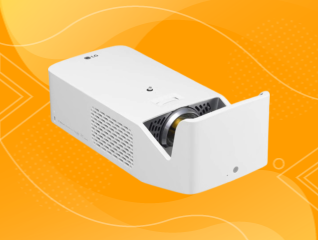
  • Consider an ultra-short throw model for small rooms: If your living room does not have 3 metres of distance between the projector and the screen, an ultra-short throw laser projector is the practical solution. It sits 20 to 40 cm from the wall or screen and produces a 100-inch image, making it ideal for compact Indian living rooms.
  • Choose a laser projector for zero warm-up time and long life: Laser projectors switch on instantly, maintain consistent brightness throughout their lifespan and last 20,000 to 30,000 hours without lamp replacement. For regular IPL and everyday use, the running cost advantage and convenience of a laser projector make it worth the higher upfront investment over a lamp-based model.
  • Check for built-in Android TV or streaming apps: A projector with built-in Android TV or a smart platform allows you to stream IPL directly from JioHotstar or other apps without needing a separate streaming stick or set-top box, simplifying your setup and reducing the number of devices connected to your system.

What are my financing options to buy a projector?

Bajaj Finance offers two financing options for purchasing a projector. Both options are available at over 1.5 lakh partner stores across 4,000 cities in India. Here is how they compare:

OptionLimitKey features
Bajaj Finance Insta EMI CardPre-approved card loan offer up to Rs. 3 lakhZero annual fee; 3 to 60 months tenure; works at 1.5 lakh partner stores; 1 million eligible products
Bajaj Finance Easy EMI LoanLoan limit up to Rs. 5 lakhQuick loan approval; 3 to 60 months tenure; basic KYC documents needed; ideal for higher-value purchases

How to choose? Both options require you to be physically present at a partner store. The Insta EMI Card is ideal for shoppers who want to purchase across multiple categories over time. The Easy EMI Loan suits buyers looking to finance a higher-value purchase in a single transaction.

How do I buy a projector on EMI at a Bajaj Finance partner store?

The process is simple and typically takes 10 to 15 minutes once you are at the store.


  1. Browse projectors on Bajaj Mall: Compare projector models based on resolution, brightness, screen size support, connectivity options, and smart features before visiting a store.
  2. Find a partner store near you: Use the Bajaj Finance store locator to find a nearby partner outlet such as Croma, Vijay Sales, or other authorised retailers.
  3. Check the projector in person: Confirm the projector's brightness level suits your room conditions, check the native resolution, verify HDMI and wireless connectivity options, and assess the projected image quality.
  4. Choose a suitable EMI option: At checkout, ask the store executive about the Bajaj Finance Insta EMI Card or Easy EMI Loan. Confirm available tenure options and whether your chosen model comes with a zero down payment offer.
  5. Complete payment and set up your projector: The in-store process is quick, and many models are available for same-day purchase, allowing you to start enjoying movies, sports, and gaming on a big screen without delay.

You can also check your loan eligibility online in advance by entering your mobile number and OTP, helping you plan your purchase better before visiting the store.

Maximise your savings with Maha Bachat

Combine the best summer offers, EMI plans, and exclusive vouchers with Maha Bachat to save big.

20k+ people used their offers at the store

Why use the Smart Savings Calculator

Bajaj Finance’s Smart Savings Calculator helps you unlock maximum savings every time you shop at partner stores. It brings together all available brand, dealer, and scheme offers—so you can see your total savings instantly and shop smarter with Easy EMIs.


1. Dealer offers - Grab exclusive in-store deals at over 1.5 lakh partner stores across India. Enjoy local discounts and special prices you will not find online.

2. Brand offers - Access limited-time discounts from top brands across electronics, appliances, and more. Discover brand-specific savings selected just for you.

3. Bajaj offers - Unlock exclusive Bajaj Finance deals on popular products—available only to our customers. More rewards, more value.

4. Scheme offers - Take advantage of time-sensitive offers on select EMI schemes. Get extra benefits after paying just 3 EMIs—visible during EMI selection at checkout.


Calculate your extra savings today!

Disclaimer

While care is taken to update the information, products, and services included in or available on our website and related platforms/websites, there may be inadvertent inaccuracies or typographical errors or delays in updating the information. The material contained in this site, and on associated web pages, is for reference and general information purpose and the details mentioned in the respective product/service document shall prevail in case of any inconsistency. Subscribers and users should seek professional advice before acting on the basis of the information contained herein. Please take an informed decision with respect to any product or service after going through the relevant product/service document and applicable terms and conditions. In case any inconsistencies observed, please click on reach us.

*Terms and conditions apply