Published Jun 6, 2026 . 3 min read

Overhead projector - Overview

An overhead projector is a presentation device that projects images, text or diagrams from transparent sheets onto a screen or wall. It uses a bright light source, lenses and mirrors to enlarge and display content for a larger audience, making it a popular tool for classrooms, training sessions and business presentations. Before the widespread use of digital projectors, overhead projectors were commonly used to present educational materials, charts, handwritten notes and visual aids. The content is placed on a transparent film, often called a transparency, which is then illuminated and projected onto a viewing surface.


Explore more projectors at any of Bajaj Finance’s 1.5 lakh partner stores in 4,000 cities in India. Choose your ideal model, pay with Easy EMIs, and enjoy zero down payment on select deals. Simply check your loan eligibility now and bring home your desired product without worrying about overspending.
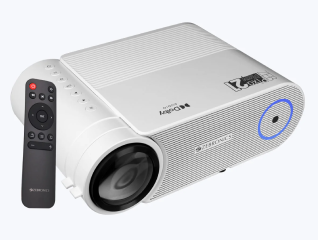
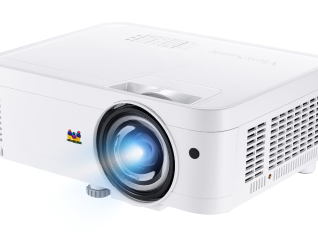
Parts of an overhead projector and how they work

An overhead projector consists of several components that work together to project enlarged images and text onto a screen. Each part plays a specific role in producing a clear and visible presentation for a larger audience.

  • Projection lamp: The lamp provides a powerful light source that illuminates the transparency placed on the projector stage.
  • Projection stage: This is the flat glass surface where transparent sheets or presentation materials are placed for display.
  • Fresnel lens: Located beneath the projection stage, the Fresnel lens helps focus and direct light evenly through the transparency.
  • Projection head: The projection head contains the mirror and lens system responsible for directing and enlarging the image.
  • Mirror: The mirror reflects light and the projected image toward the screen while maintaining image visibility.
  • Projection lens: The lens magnifies and focuses the image to ensure it appears clear on the projection screen.
  • Cooling fan: The fan helps prevent overheating by cooling the projection lamp and internal components during operation.
  • Focus adjustment control: This feature allows users to sharpen the projected image for better readability.
  • Support arm: The arm connects the projection head to the projector base and positions the optical components correctly.
  • Power supply and controls: These components provide electricity to the projector and allow users to operate the device.

Common uses of overhead projectors in education and business

Overhead projectors have long been used as visual presentation tools in educational and professional environments. Their ability to display enlarged text, diagrams and images makes them useful for communicating information to large groups.

  • Classroom teaching: Teachers use overhead projectors to display lessons, diagrams, charts and written notes for students.
  • Training sessions: Trainers use projected materials to explain concepts, procedures and instructional content during workshops and seminars.
  • Business presentations: Companies use overhead projectors to present reports, charts, graphs and meeting materials to teams and clients.
  • Group discussions: Projected visuals help participants follow information and engage more effectively during discussions.
  • Educational demonstrations: Science, mathematics and technical subjects often use overhead projectors to explain complex concepts visually.
  • Conference and seminar presentations: Speakers use overhead projectors to display supporting content during presentations and lectures.
  • Workplace communication: Businesses use projected information for employee briefings, strategy meetings and project updates.
  • Visual learning support: Large projected images help improve understanding and information retention among learners.
  • Document and transparency display: Printed transparencies can be easily shared with an audience without distributing multiple copies.
  • Interactive instruction: Presenters can write directly on transparencies while explaining concepts in real time.

Overhead projector vs digital projector - Key differences

Overhead projectors and digital projectors are both presentation tools, but they use different technologies to display information. Understanding their differences can help users choose the right option for educational, business or training purposes.


FeatureOverhead ProjectorDigital Projector
Display methodProjects images from transparent sheets or transparenciesProjects digital content from computers, laptops, smartphones or media devices
Content sourceRequires printed or handwritten transparency sheetsSupports presentations, videos, images, documents and multimedia files
Technology usedUses lamps, mirrors and lenses to project visualsUses LCD, DLP or laser projection technology
Ease of editing contentContent must be manually prepared or replacedContent can be edited instantly on connected devices
Image qualitySuitable for basic text and diagramsProvides higher resolution, brightness and image clarity
Multimedia supportDoes not support audio or video playbackSupports videos, animations and interactive presentations
PortabilityOften larger and less portableAvailable in compact and portable designs
Setup requirementsRequires transparency sheets and physical presentation materialsRequires digital devices and compatible connectivity options
Maintenance needsInvolves lamp replacement and cleaning of optical componentsRequires firmware updates, filter cleaning and occasional maintenance
Common applicationsTraditional classrooms, training sessions and simple presentationsModern classrooms, offices, conferences and entertainment environments

How to maintain an overhead projector for better performance

Regular maintenance helps keep an overhead projector operating efficiently and ensures clear image projection during presentations. Proper care of the projector's optical and mechanical components can improve display quality and extend the device's lifespan.

  • Clean the projection lens regularly: Dust and fingerprints on the lens can reduce image sharpness and clarity.
  • Wipe the projection stage: Keep the glass stage clean to prevent dirt and marks from appearing in projected images.
  • Clean mirrors carefully: Dust on the mirror can affect brightness and image quality. Use a soft, lint-free cloth for cleaning.
  • Check the projection lamp: Replace dim or worn-out lamps to maintain consistent brightness and visibility.
  • Keep ventilation openings clear: Ensure air vents remain free from dust and obstructions to prevent overheating.
  • Inspect the cooling fan: A properly functioning fan helps protect internal components from excessive heat.
  • Store transparencies properly: Clean and undamaged transparency sheets help maintain clear projections.
  • Protect the projector from dust: Cover the device when not in use to reduce dust accumulation.
  • Check focus and alignment settings: Periodically adjust focus controls to ensure sharp image projection.
  • Handle the projector carefully: Avoid impacts or rough handling that could damage optical components and support structures.
  • Perform routine inspections: Regularly check cables, controls and moving parts for signs of wear or damage.
  • Follow manufacturer maintenance recommendations: Refer to the user manual for specific cleaning and replacement guidelines.

Get electronics and appliances on Easy EMIs with Bajaj Finance

Bringing home your preferred product is now hassle-free with Bajaj Finance's flexible financing options. Follow these steps to get started:

  • Explore products on Bajaj Mall: Browse through a wide selection of products on Bajaj Mall. Compare features to find a model that meets your needs.
  • Visit a partner store: Once you shortlist a model, step into any of Bajaj Finance’s 1.5 lakh partner stores across 4,000 cities in India. See the product in person, talk to experts, and make a confident decision.
  • Choose the Easy EMI Loan option: At checkout, select the Bajaj Finance Easy EMI Loan. Avail financing of up to Rs. 5 lakh and split the cost into convenient monthly instalments. Some products also come with a zero down payment option.
  • Check your loan eligibility online: Plan better by checking your loan eligibility in minutes. Simply enter your mobile number and OTP to know your pre-approved limit.
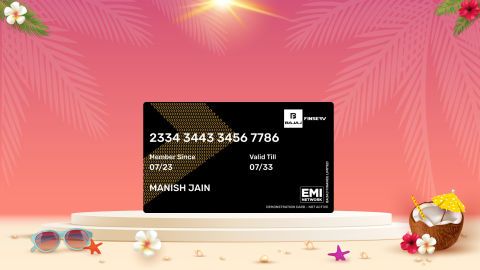
  • Use the Insta EMI Card for purchases up to Rs. 3 lakh: Already own the Bajaj Finance Insta EMI Card? Use it for instant, paperless checkout and convert your purchases of up to Rs. 3 lakh into Easy EMIs.

Why use the Smart Savings Calculator

Bajaj Finance’s Smart Savings Calculator helps you unlock maximum savings every time you shop at partner stores. It brings together all available brand, dealer, and scheme offers—so you can see your total savings instantly and shop smarter with Easy EMIs.

1. Dealer offers - Grab exclusive in-store deals at over 1.5 lakh partner stores across India. Enjoy local discounts and special prices you will not find online.

2. Brand offers - Access limited-time discounts from top brands across electronics, appliances, and more. Discover brand-specific savings selected just for you.

3. Bajaj offers - Unlock exclusive Bajaj Finance deals on popular products—available only to our customers. More rewards, more value.

4. Scheme offers - Take advantage of time-sensitive offers on select EMI schemes. Get extra benefits after paying just 3 EMIs—visible during EMI selection at checkout.

Calculate your extra savings today!

Frequently asked questions

Can I buy a projector on EMI?

Yes, you can easily bring home your preferred projector using Bajaj Finance’s Easy EMI options. Whether you already have the Insta EMI card or are new to it, here is how to begin:


If you have the Bajaj Finance Insta EMI card:

  • Explore products on Bajaj Mall: Choose from a wide range of the latest and most popular models.
  • Visit a partner store: Check out the product in person at any of Bajaj Finance’s 1.5 lakh partner stores across 4,000 cities in India.
  • Use your Insta EMI card at checkout: Convert the cost into Easy EMIs that fit your monthly budget.
  • Zero down payment on select models: Take your chosen product home without paying anything upfront.

If you do not have an Insta EMI card:

Check your Insta EMI Card eligibility online using your mobile number and OTP. If you are eligible, apply instantly and enjoy a smarter, more affordable way to buy your favourite product on Easy EMIs.

What is an overhead projector used for?

An overhead projector is used to display text, diagrams, images and teaching materials from transparent sheets onto a screen or wall for large audiences in classrooms, training sessions and business presentations.

How does overhead projector work?

An overhead projector works by shining a bright light through a transparency placed on the projection stage. The light passes through lenses and mirrors, which enlarge and project the image onto a screen.

What are the parts of overhead projector?

The main parts of an overhead projector include the projection lamp, projection stage, Fresnel lens, projection lens, mirror, projection head, cooling fan, support arm and focus adjustment controls.

Is overhead projector still used today?

Yes, although digital projectors are more common, overhead projectors are still used in some schools, training centers and workplaces where simple visual presentations are sufficient.

What is the difference between overhead projector and digital projector?

An overhead projector displays content from transparency sheets using lamps, lenses and mirrors, while a digital projector displays digital content such as presentations, videos and images from connected electronic devices. Digital projectors generally offer higher image quality and multimedia support.

Can I use a projector instead of a TV at home?

Yes, a projector can replace a TV, especially for large-screen viewing. It is ideal for movies, sports, and gaming. However, you need enough room space and proper lighting control for the best experience in Indian homes.

Show More Show Less

Bajaj Finance app for all your financial needs and goals

Trusted by 50 million+ customers in India, Bajaj Finance App is a one-stop solution for all your financial needs and goals.

You can use the Bajaj Finance App to:

  • Apply for loans online, such as Instant Personal Loan, Home Loan, Business Loan, Gold Loan, and more.
  • Invest in fixed deposits and mutual funds on the app.
  • Choose from multiple insurance for your health, motor and even pocket insurance, from various insurance providers.
  • Pay and manage your bills and recharges using the BBPS platform. Use Bajaj Pay and Bajaj Wallet for quick and simple money transfers and transactions.
  • Apply for Insta EMI Card and get a pre-qualified limit on the app. Explore over 1 million products on the app that can be purchased from a partner store on Easy EMIs.
  • Shop from over 100+ brand partners that offer a diverse range of products and services.
  • Use specialised tools like EMI calculators, SIP Calculators
  • Check your credit score, download loan statements and even get quick customer support—all on the app.

Download the Bajaj Finance App today and experience the convenience of managing your finances on one app.

Disclaimer

1. Bajaj Finance Limited (“BFL”) is a Non-Banking Finance Company (BAJAJ FINANCE) and Prepaid Payment Instrument Issuer offering financial services viz., loans, deposits, Bajaj Pay Wallet, Bajaj Pay UPI, bill payments and third-party wealth management products. The details mentioned in the respective product/ service document shall prevail in case of any inconsistency with respect to the information referring to BFL products and services on this page.

2. All other information, such as, the images, facts, statistics etc. (“information”) that are in addition to the details mentioned in the BFL’s product/ service document and which are being displayed on this page only depicts the summary of the information sourced from the public domain. The said information is neither owned by BFL nor it is to the exclusive knowledge of BFL. There may be inadvertent inaccuracies or typographical errors or delays in updating the said information. Hence, users are advised to independently exercise diligence by verifying complete information, including by consulting experts, if any. Users shall be the sole owner of the decision taken, if any, about suitability of the same.