How to Easily Install a Ceiling Fan Yourself

How to Easily Install a Ceiling Fan Yourself

Ceiling fan installation needs a secure mounting point, correct wiring, balanced blades, and a power-off safety check. Know how to install them, and how to get them on Easy EMIs from Bajaj Finance.

Get a oan offer of up to Rs. 5 lakh

Quick Approval | Flexible Tenure Options | Zero Approval Fees

In summary


Installing a ceiling fan involves isolating the electrical supply, securing the mounting bracket, connecting the wires, attaching the motor and blades, and testing the fan for wobble or noise.


  • Safety first: Switch off the circuit at the distribution board before touching wiring.
  • Mounting: The bracket must be fixed to a ceiling point designed to carry the fan load.
  • Wiring: Connections must follow the fan instructions and local electrical practice.
  • Balance: Blades should be tightened evenly to reduce wobble.
  • Testing: Run the fan at different speeds and stop if there is unusual vibration, noise, or heat.
  • Current prices: Popular ceiling-fan examples start around Rs. 1,349 and extend above Rs. 5,000 for BLDC and smart models.

You can also buy a new appliance on Easy EMIs at over 1.5 lakh partner stores across 4,000 cities, including Reliance Digital, Croma, and Vijay Sales.

What should you check before installing a ceiling fan?

Before installation, confirm that the electrical supply can be fully isolated and that the ceiling has a suitable fan hook, box, or support point. A decorative light fitting box is not automatically strong enough to support a rotating fan. Read the fan manual before assembling parts. Check the downrod, canopy, mounting hardware, blades, remote receiver where applicable, and any light kit before starting.

You can get a range of electronics, and appliances without using a large part of your savings at once. Visit any of Bajaj Finance's 1.5 lakh+ partner stores, including Vijay Sales, Croma, Reliance Digital, and more, across 4,000+ cities, including Jaipur, Lucknow, Kochi, and Bhopal. Choose your preferred fan and use the Bajaj Finance Insta EMI Card or Bajaj Finance Easy EMI Loan of up to Rs. 5 lakh. Convert the cost into Easy EMIs that suit your monthly budget and enjoy zero down payment on select models. You can also check your loan eligibility online in minutes before visiting the store.


Also check: wattage consumption of standing fans


→ Pro tip: If the ceiling support point, wiring, or earthing is uncertain, use a qualified electrician. A ceiling fan is a moving electrical load and should not be mounted to an unsuitable ceiling point.


What are homeowners looking for before installing a ceiling fan?

Before installation, homeowners usually want to know whether the ceiling point is safe, the fan size suits the room, wiring is compatible, and professional help is required.


→ Is the ceiling point strong enough?

The mounting point should be intended for a ceiling fan and securely fixed to the building structure. Do not rely on a weak false-ceiling panel or a light-fixture box unless it is specifically rated for fan support.


→ Do I need an electrician?

Use an electrician when wiring is old, earthing is unclear, the mounting point needs modification, or you are not confident working with mains electricity. Electrical mistakes can cause shock, short circuits, overheating, or an unsafe fan installation.


→ How much clearance should the fan have?

The blades need enough clearance from walls, cupboards, lights, and other fittings. The fan should also be mounted at a suitable height so that it circulates air safely without being within reach.


→ What causes a newly installed fan to wobble?

Common causes include uneven blade tightening, bent blades, loose brackets, an off-centre downrod, or an insecure mounting point. Stop the fan and correct the issue before continued use rather than assuming wobble is normal.


Also check: High-speed fans, ideal for your home

What tools and materials are needed?

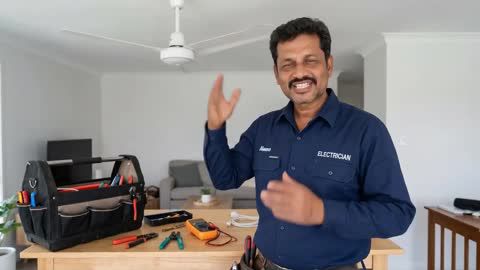
Here are some of the tools that you would require if you want to install a ceiling fan in your home yourself:


Tool or itemUse
Voltage testerConfirms that the circuit is not live
ScrewdriversSecures terminal and mounting screws
Spanner or wrenchTightens nuts and bolts
Wire stripperPrepares wire ends when required
Insulated connectorsSecures electrical joints
Step ladderProvides stable access to the ceiling
Blade balancing kitHelps correct minor blade imbalance
Safety gloves and eye protectionAdds protection during installation work


How do you install a ceiling fan step by step?

Setting up a ceiling fan yourself is actually quire easy if you follow the steps carefully. Here are the steps that you need to follow:


1. Switch off the circuit: Turn off the relevant breaker and confirm the wires are not live with a tester.

2. Remove the old fitting: If replacing an existing fixture, remove it carefully and inspect the ceiling support and wiring.

3. Install the mounting hardware: Secure the approved bracket, hook, or support assembly to the structural mounting point.

4. Assemble the downrod and motor: Follow the manufacturer sequence and secure all locking pins, split pins, screws, and covers.

5. Connect the wiring: Connect live, neutral, earth, and receiver wires exactly as required by the fan instructions.

6. Secure the canopy: Make sure no wire is pinched and the canopy covers the ceiling connection neatly.

7. Attach the blades: Tighten every blade bracket evenly and confirm that all blades sit at the same level.

8. Fit the light kit if supplied: Follow the separate wiring instructions and use the specified lamp type.

9. Restore power and test: Run the fan at low speed first, then test other speeds while watching for wobble, noise, or vibration.


→ Trade-off: DIY installation can save labour cost, but incorrect mounting or wiring creates a much bigger safety risk. Professional installation is the better choice when electrical or structural work is involved.

How do you test and troubleshoot a new installation?

How could you know if you have fixed the ceiling fans in place correctly? Here are some of the checks you need to do after a successful installtion:


  • Fan does not start: Switch off power and recheck the supply, regulator, remote receiver, and wiring connections.
  • Fan wobbles: Check blade alignment, bracket tightness, downrod seating, and mounting stability.
  • Unusual noise: Look for loose screws, rubbing canopies, blade contact, or a poorly seated motor assembly.
  • Remote does not respond: Check batteries, receiver wiring, pairing procedure, and supply.
  • Light kit does not work: Confirm lamp type, connector seating, and the light circuit in the receiver or switch.

→ Pro tip: Test the fan at low speed first. A serious mounting or balance problem is easier to identify before the fan reaches full speed.

What do ceiling fans cost in India?

Below is a list of the popular ceiling fans in the market currently, as of September 2026. The prices are approximate:

ModelApproximate price
Bajaj Frore 1200 mm 1 StarRs. 1,349
Havells Ambrose ES 1200 mmRs. 2,299
Orient Electric Zeno BLDC 1200 mm with remoteRs. 2,999
Atomberg Renesa Enzel 1200 mm BLDCRs. 3,399
Atomberg Renesa 1200 mm BLDC with remoteRs. 5,190


*Prices can change. Standard induction-motor fans often cost less than BLDC, remote-controlled, or smart models.

Save more with Smart Savings Calculator

Combine the best offers, EMI plans, and exclusive vouchers with Smart Savings Calculator to save big.

20k+ people used their offers at the store

What are my financing options for a ceiling fan?

Bajaj Finance offers two ways to convert your purchase into affordable monthly payments, both available at 1.5 lakh+ partner stores across 4,000+ cities.


OptionLimitKey features
Bajaj Finance Insta EMI CardLoan limit up to Rs. 3 lakh3 months to 60 months tenure; 1.5 lakh outlets; 1 million+ eligible products
Bajaj Finance Easy EMI LoanLoan limit up to Rs. 5 lakhQuick approval; 3 months to 60 months tenure; basic KYC; ideal for higher-value purchases

How to choose?

Both options require you to be physically present at a partner store. The Insta EMI Card suits repeat purchases across categories over time. The Easy EMI Loan is better suited to a single higher-value purchase.


Example

Riya, a 29-year-old professional in Lucknow, is replacing an old bedroom fan. She chooses an Atomberg Renesa 1200 mm BLDC model priced around Rs. 5,190 and visits a Reliance Digital partner store. She uses the Insta EMI Card because she expects to make other eligible home-appliance purchases. She needs a minimum CIBIL score of 650 to meet the stated eligibility requirement.


→ Pro tip: If you expect to buy other eligible electronics or appliances later, the Insta EMI Card can be useful for repeat purchases across categories.


How can you buy a ceiling fan on Easy EMIs?

Once you know which a ceiling fan suits your needs, you can compare available models and complete an eligible purchase at a Bajaj Finance partner store.


1. Browse suitable models: Explore a ceiling fan options on Bajaj Mall and compare the features that matter for your use case.

2. Find a partner store: Locate a nearby partner outlet such as Croma, Vijay Sales, Reliance Digital, or another authorised retailer and confirm availability before travelling.

3. Check the product in person: Check sweep size, wattage, air delivery, motor type, remote controls, ceiling height, mounting compatibility, warranty, and installation support.

4. Choose a financing option: Ask about the Bajaj Finance Insta EMI Card or Easy EMI Loan. Confirm the available tenure and whether zero down payment applies to the selected product.

5. Complete the purchase: Finish the required verification and documentation. Once approved, complete the transaction and arrange delivery or installation where required.


You can also explore the latest offers from Bajaj Finance to get value-packed deals and Easy EMIs.

Why use the Smart Savings Calculator

Bajaj Finance’s Smart Savings Calculator helps you unlock maximum savings every time you shop at partner stores. It brings together all available brand, dealer, and scheme offers—so you can see your total savings instantly and shop smarter with Easy EMIs.


1. Dealer offers - Grab exclusive in-store deals at over 1.5 lakh partner stores across India. Enjoy local discounts and special prices you will not find online.

2. Brand offers - Access limited-time discounts from top brands across electronics, appliances, and more. Discover brand-specific savings selected just for you.

3. Bajaj offers - Unlock exclusive Bajaj Finance deals on popular products—available only to our customers. More rewards, more value.

4. Scheme offers - Take advantage of time-sensitive offers on select EMI schemes. Get extra benefits after paying just 3 EMIs—visible during EMI selection at checkout.


Calculate your extra savings today!

FAQs

General

General

Can I buy electrical appliances on Easy EMIs?

Yes, you can easily buy appliances with Bajaj Finance’s Easy EMI options. Whether you already have the Insta EMI Card or are new to it, here is how you can get started:


If you have the Bajaj Finance Insta EMI Card:

  • Explore electronic appliances on Bajaj Mall: Choose from a wide range of appliances from top brands, including televisions, refrigerators, washing machines, air conditioners, kitchen appliances, and more.
  • Visit a partner store: Explore the latest electronic appliances in person at any of 1.5 lakh partner stores across 4,000 cities.
  • Use your Insta EMI Card at checkout: Convert the cost of your chosen appliance into Easy EMIs that suit your monthly budget.
  • Zero down payment on select products: Bring home eligible electronic appliances without paying anything upfront.

Check your Insta EMI Card eligibility online using your mobile number and OTP. If eligible, you can apply instantly and start shopping for your favourite furniture or electronic appliance easily and affordably.

You can assemble and fit a ceiling fan only if you understand mains electrical safety and the ceiling mounting point is already suitable. If wiring, earthing, support strength, or the mounting arrangement is uncertain, use a qualified electrician. The risk from incorrect installation is greater than the labour saving.

Typical tools include a voltage tester, insulated screwdrivers, a spanner, wire stripper, suitable connectors, a stable ladder, and protective equipment. The exact tools depend on the mounting bracket, wiring arrangement, and whether an old fixture must be removed.

Wobble can come from uneven blade tightening, a loose mounting bracket, bent blades, an incorrectly seated downrod, or blade-height differences. Switch the fan off before inspecting it. Persistent or severe wobble should be checked by an electrician or technician.

Not directly on an unsupported false-ceiling panel. The fan needs a structural support point capable of carrying the rotating load. A proper support framework or fan-rated box must connect to the building structure. Ask an installer to confirm the arrangement before mounting.

Show More Show Less

Disclaimer

While care is taken to update the information, products, and services included in or available on our website and related platforms/websites, there may be inadvertent inaccuracies or typographical errors or delays in updating the information. The material contained in this site, and on associated web pages, is for reference and general information purpose and the details mentioned in the respective product/service document shall prevail in case of any inconsistency. Subscribers and users should seek professional advice before acting on the basis of the information contained herein. Please take an informed decision with respect to any product or service after going through the relevant product/service document and applicable terms and conditions. In case any inconsistencies observed, please click on reach us.

*Terms and conditions apply