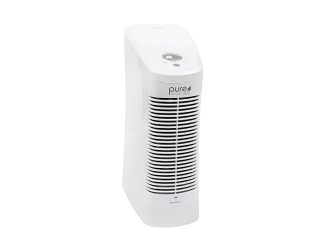
How to Clean Your Philips Air Purifier Filter

How to Clean Your Philips Air Purifier Filter

Learn Philips air purifier filter cleaning, Philips air purifier filter maintenance, and how to wash Philips HEPA filter safely for better air quality and performance.

Get a pre-approved loan offer of up to Rs. 5 lakh.

Quick approval | Flexible tenure options | Zero approval fees

In summary

Air purifiers like Philips air purifiers use filter systems that include HEPA layers and pre-filters to trap dust, smoke, and fine particles for cleaner indoor air. Proper cleaning and maintenance ensure better performance, longer filter life, and improved air quality at home.

  • Pre-filters can be cleaned or vacuumed regularly, while HEPA filters usually need replacement, not washing.
  • Cleaning helps maintain airflow efficiency and prevents dust blockage inside the purifier system.
  • Always follow manufacturer guidelines for safe filter maintenance and performance consistency.
  • Regular upkeep ensures stable purification and healthier indoor breathing conditions over time.

You can also buy a new air purifiers and convert the cost into Easy EMIs using Bajaj Finserv's financing options at 1.5 lakh partner stores. Simply check your loan eligibility now and bring home your desired product without worrying about overspending.

How to clean Philips air purifier filter

Cleaning a Philips air purifier filter is important to maintain strong airflow and effective air purification. The process depends on the filter type used in the device. Pre-filters can usually be cleaned by gentle vacuuming or light washing, while HEPA and activated carbon filters are generally replaced rather than washed. Always switch off and unplug the purifier before handling the filter. Regular maintenance prevents dust buildup, improves filtration efficiency, and ensures cleaner indoor air. Following manufacturer instructions helps extend filter life and keeps the purifier working at its best performance level.

How do you clean the filter of a Philips air purifier

Cleaning the pre-filter of a Philips air purifier helps remove dust and large particles trapped on the surface. Regular cleaning improves airflow, maintains purification efficiency, and supports longer filter life while keeping indoor air quality consistently fresh and healthy.

  • Step 1: Turn off and unplug: Always switch off and unplug the air purifier before starting. This ensures safety and prevents any electrical risk while you remove or handle the pre-filter inside the device.
  • Step 2: Remove pre-filter: Open the purifier cover and carefully take out the pre-filter. Handle it gently to avoid spreading trapped dust back into the air or damaging the filter mesh structure.
  • Step 3: Vacuum or wash lightly: Use a vacuum cleaner or rinse gently with clean water if allowed. Remove visible dust and dirt without using harsh chemicals that may damage the filter surface.
  • Step 4: Dry completely: Let the pre-filter dry fully in a clean, shaded area. Do not reinstall a damp filter, as moisture can reduce performance and cause mould or odour issues.

Regular pre-filter cleaning helps your Philips air purifier work efficiently and ensures consistent airflow. Proper maintenance also reduces strain on internal filters and improves overall indoor air quality.

How do filter cleaning and replacement alerts work on a Philips air purifier

Filter cleaning and replacement alerts on a Philips air purifier indicate when maintenance is required. These alerts help ensure efficient operation by signalling when filters are dirty, clogged, or due for replacement to maintain consistent air purification performance.

  • Filter cleaning alert: The cleaning alert indicates dust buildup on the pre-filter or filter surface. It shows reduced airflow and signals that cleaning is needed to restore normal purification efficiency.
  • Replacement alert: The replacement alert appears when the HEPA or activated carbon filter reaches the end of its service life. At this stage, replacement is required instead of cleaning.
  • Indicator system: Philips air purifiers use lights or digital symbols to display alerts. These indicators make it easy to understand maintenance needs without manually inspecting the filter.
  • Reset function: After cleaning or replacing filters, the system must be reset. This allows the purifier to track filter life accurately and maintain correct alert timing.

Understanding filter alerts helps maintain Philips air purifier performance. Timely maintenance ensures stable airflow, efficient filtration, and improved indoor air quality over time.

How often should air purifier filters be cleaned versus replaced

Air purifier filters require different maintenance cycles depending on usage and environment. Pre-filters need frequent cleaning, while HEPA and carbon filters require periodic replacement to maintain efficiency, airflow, and consistent indoor air purification performance over time.

  • Pre-filter cleaning frequency: Pre-filters generally require cleaning every 2 to 4 weeks, depending on dust levels. Regular cleaning prevents clogging, maintains airflow, and helps the main filters work efficiently for longer periods.
  • HEPA filter replacement cycle: HEPA filters typically need replacement every 6 to 12 months. Replacement frequency depends on air quality, usage hours, and pollution levels in the surrounding indoor and outdoor environment.
  • Carbon filter replacement cycle: Activated carbon filters usually require replacement every 3 to 6 months. These filters absorb odours and gases, and their effectiveness reduces once the absorption capacity becomes fully saturated.
  • Usage-based variation: Cleaning and replacement schedules may change based on daily usage. High pollution areas or continuous operation can shorten filter life and require more frequent maintenance actions.

Following proper cleaning and replacement intervals ensures consistent air purifier performance. Regular maintenance supports better airflow, improved filtration efficiency, and healthier indoor air quality throughout the year.

How to identify when an air purifier filter needs replacement instead of cleaning

Air purifier filters show clear signs when cleaning is no longer effective. Reduced airflow, persistent odours, and poor air quality readings indicate that the filter has reached its limit and needs replacement for proper purification performance.

  • Reduced airflow: Noticeable drop in airflow even after cleaning indicates deep clogging inside the filter. This means particles are trapped beyond the surface level and the filter can no longer function efficiently.
  • Persistent odour: Unpleasant smells continuing after cleaning suggest that the activated carbon layer is saturated. Once absorption capacity is full, odour removal becomes ineffective and replacement is required.
  • High pollution readings: Air quality numbers staying high despite cleaning show reduced filtration efficiency. The filter is no longer capturing fine particles effectively and needs to be replaced.
  • Visible damage or discoloration: Physical damage, dark patches, or heavy discoloration indicate filter wear. At this stage, cleaning cannot restore performance and replacement becomes necessary.

Recognising these signs helps maintain efficient air purification. Timely filter replacement ensures consistent airflow, better particle removal, and improved indoor air quality over time.

How to clean the HEPA or cylindrical filter surface using the vacuum method

Cleaning the HEPA or cylindrical filter surface using a vacuum helps remove dust buildup without damaging the filter structure. This method improves airflow and maintains purifier efficiency when done gently and correctly.

  • Step 1: Switch off purifier: The air purifier must be turned off and unplugged before cleaning. This ensures safety and prevents any electrical issues while handling the HEPA or cylindrical filter inside the unit.
  • Step 2: Remove filter carefully: Open the purifier cover and gently take out the HEPA or cylindrical filter. Handle it with care to avoid shaking loose trapped dust back into the air or damaging the filter mesh.
  • Step 3: Use vacuum cleaner softly: A vacuum cleaner with a soft brush attachment should be used. Gently move it across the filter surface to remove dust without applying pressure that may damage delicate fibres.
  • Step 4: Clean all sides evenly: The vacuum should be used on all accessible sides of the filter. Even cleaning ensures consistent airflow and prevents uneven clogging that can reduce purification performance.
  • Step 5: Reinstall properly: After cleaning, place the filter back into the purifier correctly. Ensure it fits securely so that air flows through the filter system without leakage or reduced efficiency.

Regular vacuum cleaning of HEPA or cylindrical filters helps maintain strong airflow and better air purification. Proper handling ensures longer filter life and consistent indoor air quality.

Get electronics and appliances on Easy EMIs with Bajaj Finance

Bringing home your preferred product is now hassle-free with Bajaj Finance's flexible financing options. Follow these steps to get started:

  • Explore products on Bajaj Mall: Browse through a wide selection of products on Bajaj Mall. Compare features to find a model that meets your needs.
  • Visit a partner store: Once you shortlist a model, step into any of Bajaj Finance’s 1.5 lakh partner stores across 4,000 cities in India. See the product in person, talk to experts, and make a confident decision.
  • Choose the Easy EMI Loan option: At checkout, select the Bajaj Finance Easy EMI Loan. Avail financing of up to Rs. 5 lakh and split the cost into convenient monthly instalments. Some products also come with a zero down payment option.
  • Check your loan eligibility online: Plan better by checking your loan eligibility in minutes. Simply enter your mobile number and OTP to know your pre-approved limit.
  • Use the Insta EMI Card for purchases up to Rs. 3 lakh: Already own the Bajaj Finance Insta EMI Card? Use it for instant, paperless checkout and convert your purchases of up to Rs. 3 lakh into Easy EMIs.

Why use the Smart Savings Calculator

Bajaj Finance’s Smart Savings Calculator helps you unlock maximum savings every time you shop at partner stores. It brings together all available brand, dealer, and scheme offers—so you can see your total savings instantly and shop smarter with Easy EMIs.

  1. Dealer offers - Grab exclusive in-store deals at over 1.5 lakh partner stores across India. Enjoy local discounts and special prices you will not find online.
  2. Brand offers - Access limited-time discounts from top brands across electronics, appliances, and more. Discover brand-specific savings selected just for you.
  3. Bajaj offers - Unlock exclusive Bajaj Finance deals on popular products—available only to our customers. More rewards, more value.­
  4. Scheme offers - Take advantage of time-sensitive offers on select EMI schemes. Get extra benefits after paying just 3 EMIs—visible during EMI selection at checkout.

Calculate your extra savings today!

Maximise your savings with Maha Bachat

Combine the best summer offers, EMI plans, and exclusive vouchers with Maha Bachat to save big.

20k+ people used their offers at the store

Explore more air purifiers:

Disclaimer

While care is taken to update the information, products, and services included in or available on our website and related platforms/websites, there may be inadvertent inaccuracies or typographical errors or delays in updating the information. The material contained in this site, and on associated web pages, is for reference and general information purpose and the details mentioned in the respective product/service document shall prevail in case of any inconsistency. Subscribers and users should seek professional advice before acting on the basis of the information contained herein. Please take an informed decision with respect to any product or service after going through the relevant product/service document and applicable terms and conditions. In case any inconsistencies observed, please click on reach us.

*Terms and conditions apply