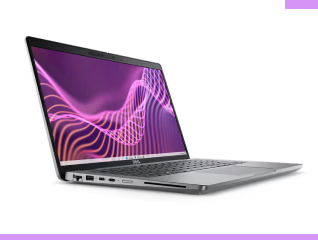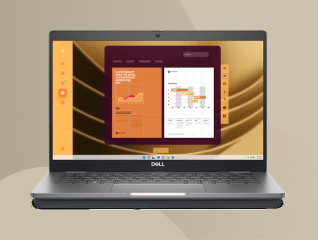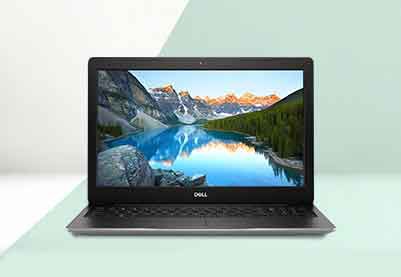






Dell Latitude 5410

The Dell Latitude 5410 laptop combines reliability and performance, featuring a sleek design, powerful processor, and enhanced productivity tools.

EMIs starting from

₹1,709 /month

Check loan offer

Key specifications

  • Display 1366 x 768 pixels Display
  • Storage 500 GB, 1 TB Storage
  • RAM 1 GB RAM
  • OS Free DOS 2.0 OS
  • Processor Name Intel Celeron, AMD A6, Intel Celeron Dual Core, Intel Pentium, Intel Core i3 Processor Name
  • Color Black, Bianco, Orange, Silver Color
  • HDMI And USB Port No HDMI And USB Port

Get a loan offer up to Rs. 12 lakh

Quick approval | Flexible tenure options | Zero approval fees

In summary


The Dell Latitude 5410 was launched in India as a 14-inch business laptop and is now discontinued on Dell India. Published India reference prices start at around Rs. 70,000.

  • Processor options include 10th Gen Intel Core i3, Core i5 and Core i7.
  • Full HD configurations provide 1920 x 1080 pixel resolution at 60Hz.
  • DDR4 memory is expandable up to 32GB.
  • Storage options include hard drives and PCIe NVMe solid-state drives up to 1TB.
  • Selected configurations include optional AMD Radeon RX 640 2GB graphics.
  • Battery choices include 42 WHr, 51 WHr and 68 WHr.
  • Current new-unit availability should be checked before purchase.

With Bajaj Finance, you can convert the cost of your preferred laptop into Easy EMIs at more than 1.5 lakh+ partner stores, including Reliance Digital, Croma, and Vijay Sales, making your purchase easier to manage.
What should you know about Dell Latitude 5410?

The Dell Latitude 5410 is a durable 14-inch enterprise business laptop built for reliable daily productivity, administrative workloads, and hybrid office setups. Powered by 10th Gen Intel Core processors (Core i3 up to Core i7 with vPro) alongside integrated Intel UHD Graphics, it offers fast application performance and dependable multitasking. The 1.47 kg chassis features two SODIMM slots supporting up to 64GB DDR4 RAM and upgradeable M.2 PCIe NVMe SSD storage. Enterprise-focused connectivity includes USB Type-C with DisplayPort, HDMI 1.4b, RJ-45 Ethernet, Wi-Fi 6, and physical security features like TPM 2.0 and optional fingerprint authentication.

You can buy a laptop through Easy EMIs when your preferred model is eligible and available at a partner store, making it simple to upgrade without paying the full amount upfront. Here is what the process looks like.

  • Visit more than 1.5 lakh partner stores across 4,000+ cities, including Jaipur, Lucknow, Kochi, and Bhopal
  • Choose your preferred model and use the Bajaj Finance Insta EMI Card or Easy EMI Loan
  • Convert the purchase cost into Easy EMIs that suit your monthly budget

➜ Pro tip: Zero down payment is available on select models, so ask the store executive if your chosen laptop qualifies before you check out.

What are the full Dell Latitude 5410 specifications?

What are buyers asking about Dell Latitude 5410?

The Dell Latitude 5410 is mainly considered for its durable 14-inch display, 1.47 kg weight, expandable memory and enterprise-grade security.


Is Dell Latitude 5410 suitable for coding and office work?

Yes. A Dell Latitude 5410 with a 10th Gen Core i5 processor, 16GB RAM and PCIe NVMe storage can handle coding tools, browser tabs, office applications and online meetings together.

Its two memory slots also allow upgrades up to 32GB. Buyers running large development environments or virtual machines should prioritise memory and a solid-state drive over the lower-priced hard-drive configurations.


Does Dell Latitude 5410 support dedicated graphics?

Yes, selected Dell Latitude 5410 configurations support an AMD Radeon RX 640 with 2GB GDDR5 dedicated graphics memory. Other versions use integrated Intel UHD Graphics.

The Radeon option provides additional graphics capability for lighter creative tasks and some older games. However, buyers planning modern high-end gaming, three-dimensional rendering or demanding professional video effects should consider a newer laptop with stronger dedicated graphics.


Is the Dell Latitude 5410 still worth considering today?

Dell Latitude 5410 can still cover office work, study, coding and basic business use when configured with enough memory and solid-state storage. However, Dell India now lists the model as discontinued.

If you are considering older stock, check battery condition, warranty, Windows compatibility and the exact configuration. A newer Dell laptop may offer better efficiency, display quality and longer software-support life.

What are my financing options to buy a laptop?

Bajaj Finance offers two ways to convert an eligible laptop purchase into monthly payments at 1.5 lakh+ partner stores across 4,000+ cities.


OptionLimitKey features
Bajaj Finance Insta EMI CardCard loan offer up to Rs. 6 lakh3–60 months tenure; 1.5 lakh+ outlets; 1 million+ eligible products; zero annual fee
Bajaj Finance Easy EMI LoanLoan limit up to Rs. 12 lakh3–60 months tenure; basic KYC; suitable for higher-value purchases

Both options require physical presence at a partner store. The Insta EMI Card suits repeat, multi-category shoppers. The Easy EMI Loan suits a single higher-value purchase. A minimum CIBIL score of 650 applies to the Easy EMI Loan. 


Get a Bajaj Finance Easy EMI Loan of up to Rs. 12 lakh on your next laptop purchase. If you are an existing Bajaj Finance Insta EMI Card holder, you may have a loan limit of up to Rs. 6 lakh. Choose repayment tenures of up to 60 months.

How do I buy a laptop on EMI at a Bajaj Finance partner store?

Upgrading to a new laptop is simple and affordable with Bajaj Finance's in-store financing options. The entire process usually takes just 10–15 minutes. Follow these steps:

  1. Browse models on Bajaj Mall: Explore the range of laptop models on Bajaj Mall. Compare brands, features, and prices before heading to the partner store.
  2. Find a partner store near you: Use the Bajaj Finance store locator to find a nearby partner outlet such as Croma, Vijay Sales, or other authorised retailers.
  3. Check the laptop in person: Visit the partner store and explore available models. Check display, OS, battery, processor, and storage in person to find the one that suits your needs.
  4. Choose a suitable EMI option: At checkout, ask the store executive about the Bajaj Finance Insta EMI Card or Easy EMI Loan. Confirm available tenure options and whether your chosen model comes with a zero down payment offer.
  5. Complete payment and take your laptop home: Once approved, your purchase is processed immediately, and you can walk out with your new laptop right away.

You can also check your loan eligibility online in advance by entering your mobile number and OTP, helping you plan your purchase better.

Save more with Smart Savings Calculator

Combine the best offers, EMI plans, and exclusive vouchers with Smart Savings Calculator to save big.

20k+ people used their offers at the store

Why use the Smart Savings Calculator?

Bajaj Finance’s Smart Savings Calculator helps you unlock maximum savings every time you shop at partner stores. It brings together all available brand, dealer, and scheme offers—so you can see your total savings instantly and shop smarter with Easy EMIs.

1. Dealer offers - Grab exclusive in-store deals at over 1.5 lakh partner stores across India. Enjoy local discounts and special prices you will not find online.

2. Brand offers - Access limited-time discounts from top brands across electronics, appliances, and more. Discover brand-specific savings selected just for you.

3. Bajaj offers - Unlock exclusive Bajaj Finance deals on popular products—available only to our customers. More rewards, more value.

4. Scheme offers - Take advantage of time-sensitive offers on select EMI schemes. Get extra benefits after paying just 3 EMIs—visible during EMI selection at checkout.

Calculate your extra savings today!

Compare with similar products

Dell XPS 13 7390 Intel Core i5 8 GB DDR4 RAM /512 GB SSD  HDD/ Windows 10/(13.3 Inch) Laptop Silver (D560025WIN9S)

Dell XPS 13 7390 Intel Core i5 8 GB DDR4 RAM /512 GB SSD HDD/ Windows 10/(13.3 Inch) Laptop Silver (D560025WIN9S)

Dell XPS 13 Intel Core i7 5th Gen 8 GB RAM/ 256 GB SSD/Windows 8/13 inch Laptop (Silver,Dell XPS 13)

Dell XPS 13 Intel Core i7 5th Gen 8 GB RAM/ 256 GB SSD/Windows 8/13 inch Laptop (Silver,Dell XPS 13)

Dell XPS 14 Intel Core Ultra 7 32 GB RAM/ 1 TB SSD/ Windows 11 Home/ 14.5 inch Laptop (Platinum, CXN9440CTO02RINO)

Dell XPS 14 Intel Core Ultra 7 32 GB RAM/ 1 TB SSD/ Windows 11 Home/ 14.5 inch Laptop (Platinum, CXN9440CTO02RINO)

EMI

₹4,521/ mo

₹5,250/ mo

₹13,790/ mo

Bluetooth

v4.1

-

yes

Operating System

Free DOS 2.0

Windows 8

Windows 11 Home

Ram

1 GB

8 GB

32 GB

Hdmi Port

1

Yes

1

Usb Port

No

1

Yes

Processor Name

Intel Core i5

Core i7

Core Ultra 7

Explore more Dell laptops

Frequently asked questions

Performance

EMI details

What RAM options are available for the Dell Latitude 5410?

Dell Latitude 5410 supports DDR4 memory from 4GB to a maximum official capacity of 32GB. It provides two SODIMM slots, allowing configurations such as 8GB, 16GB and 32GB. On 10th Gen Intel processor models, the 3200 MHz memory modules operate at 2667 MHz. Buyers doing heavier multitasking, development work or large spreadsheet processing may benefit from 16GB or 32GB.

Dell Latitude 5410 supports both hard drives and PCIe NVMe solid-state drives. Hard-drive options include 500GB and 1TB, while M.2 solid-state-drive capacities range from 128GB to 1TB depending on the drive size. A PCIe NVMe solid-state drive is the better choice for faster startup and application loading, while a 1TB configuration gives more local space for business files.

Dell Latitude 5410 supports several Intel processors, including the Core i3-10110U, Core i5-10210U, Core i5-10310U, Core i7-10610U and six-core Core i7-10810U. Integrated Intel UHD Graphics is standard on many configurations. Selected versions also include AMD Radeon RX 640 graphics with 2GB GDDR5 memory, providing more graphics capability for lighter creative work and older games.

Yes, you can easily upgrade to a new laptop with Bajaj Finance's Easy EMI options. Whether you already have the Insta EMI Card or are new to it, here is how you can get started:


If you have the Bajaj Finance Insta EMI Card:

  • Explore laptops on Bajaj Mall: Choose from a wide range of the latest and most popular models.
  • Visit a partner store: Check out the latest phones in person at any of 1.5 lakh partner stores across 4,000 cities.
  • Use your Insta EMI Card at checkout: Convert the total cost into Easy EMIs that fit your monthly budget.
  • Zero down payment on select models: Bring home your laptop without paying anything upfront.


If you do not have an Insta EMI Card:

Check your Insta EMI Card eligibility online using your laptop number and OTP. If eligible, you can apply instantly and start shopping for your favourite laptop easily and affordably.

Show more Show less

Disclaimer

While care is taken to update the information, products, and services included in or available on our website and related platforms/websites, there may be inadvertent inaccuracies or typographical errors or delays in updating the information. The material contained in this site, and on associated web pages, is for reference and general information purpose and the details mentioned in the respective product/service document shall prevail in case of any inconsistency. Subscribers and users should seek professional advice before acting on the basis of the information contained herein. Please take an informed decision with respect to any product or service after going through the relevant product/service document and applicable terms and conditions. In case any inconsistencies observed, please click on reach us.

*Terms and conditions apply