







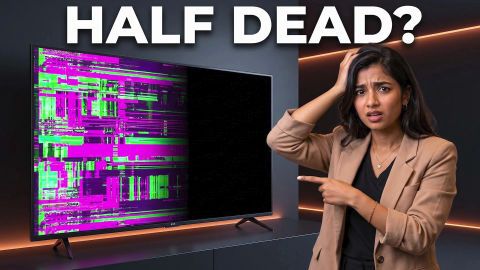
How To Fix Half Screen Display Problems in LED TVs

How To Fix Half Screen Display Problems in LED TVs

Understand why LED TVs show half screen display issues and learn troubleshooting steps. Explore TV options and buy on Easy EMIs from Bajaj Finance.

Get loan offer up to Rs. 5 lakh

Quick approval | Flexible tenure options | Zero approval fees

In summary


Half screen issues on an LED TV can often be linked to cables, input sources, software, or internal hardware.


  • Common causes: Loose cables, software issues, display faults, or physical damage.
  • Quick fixes: Restart the TV, check connections, and try another input source.
  • Maintenance: Keep the screen clean, avoid pressure, and ensure proper ventilation.
  • Replacement: Consider replacement when repair costs are high or hardware problems continue.
  • Smart TV prices: Listed models range from Rs. 17,490 to Rs. 91,900.

You can also buy a new TV on Easy EMIs at over 1.5 lakh partner stores across 4,000 cities, including Reliance Digital, Croma, and Vijay Sales

What causes half screen display issues in LED TVs?

A half screen on an LED TV can result from loose connections, damaged display components, software issues, or internal hardware faults. Checking the cables, restarting the TV, and testing different input sources can help identify whether the issue is related to the connected equipment or the TV itself.


Common causes include:


  • Loose or damaged HDMI cables
  • Faulty input sources or connected devices
  • Software or firmware issues
  • Problems with the TV's display panel
  • Internal connection or circuit faults
  • Physical damage to the screen

Shop for a TV with Easy EMIs from Bajaj Finance when the model is eligible and available at a partner store. Here is how it works:


  • Shop at 1.5 lakh partner stores across 4,000+ cities.
  • Select your preferred model and use your Insta EMI Card or Easy EMI Loan.
  • Split the purchase cost into monthly payments.


Pro tip: Zero down payment is available on select models. Check with the store if your product qualifies.

How can half screen problems in LED TVs be fixed?

Start with simple checks before considering professional repair. These steps can help determine whether the problem is caused by the connection, settings, or TV hardware.


  1. Restart the TV: Switch off the TV, unplug it, wait for a few minutes, and turn it back on.
  2. Check the cables: Disconnect and reconnect the HDMI or other input cables securely.
  3. Try another source: Switch to another HDMI port, app, or input source to check whether the issue continues.
  4. Check the picture settings: Restore the picture settings to their default values.
  5. Update the TV software: Install available firmware or software updates.
  6. Check for physical damage: Look for cracks, pressure marks, or other visible screen damage.
  7. Contact a technician: If half the screen remains affected, professional inspection may be required.

What maintenance tips can help prevent LED TV display issues?

Regular care can help protect the TV screen and reduce avoidable display problems.


Maintenance tipWhat to do
Keep the screen cleanUse a soft, dry microfibre cloth
Avoid screen pressureDo not press or hit the display
Protect from moistureKeep liquids away from the TV
Ensure ventilationLeave sufficient space around the TV
Check cables regularlyReplace damaged or loose cables
Use stable powerConsider a suitable surge protector
Handle carefullyTake extra care when moving or mounting the TV

When should an LED TV with half screen issues be replaced?

A half screen issue does not always require a new TV. Try basic troubleshooting or professional repair first. Replacement may make more sense when the damage is severe, repairs are costly, or the problem keeps returning.


  • Persistent display problems: Replace the TV if the issue continues after repairs.
  • Damaged display panel: A faulty panel can be expensive to replace.
  • Repeated hardware failures: Frequent internal faults may make replacement more practical.
  • High repair costs: Compare the repair cost with the price of a new TV.
  • Need for newer features: A new TV can offer sharper resolution, better smart features, and improved connectivity.

What are the prices of the best LED TVs in India?

Choose an LED TV based on the screen size, resolution, and budget that fit your viewing needs. A 32-inch HD Ready TV can work for everyday viewing, while Full HD and 4K models can offer sharper images on larger screens.


ModelDisplayPrice (Rs.)
Samsung 81.28 cm (32-inch) HD Smart LED TV (32T4350)HD Ready LEDRs. 17,490
LG 80 cm (32-inch) Full HD Smart LED TV (32LR573B6LA)Full HD LEDRs. 18,690
Samsung 108 cm (43-inch) Full HD Smart LED TV (UA43F5500FUXXL)Full HD LEDRs. 26,990
Samsung 108 cm (43-inch) Ultra HD (4K) Smart LED TV (UA43U8100FULXL)4K UHD LEDRs. 33,930
Sony 139 cm (55-inch) Ultra HD (4K) Smart LED TV (K-55S25M2 IN5 12681001)4K UHD LEDRs. 91,900

Updated: Sep, 2026


Disclaimer: Prices are subject to change. Please check the official website for the most accurate and up-to-date information. Explore the latest offers from Bajaj Finance and grab the best deals for a premium shopping experience.

What are my financing options to buy a TV?

Bajaj Finance offers two financing options at over 1.5 lakh partner stores across 4,000 cities in India. Here is how they compare:


OptionLimitKey features
Bajaj Finance Insta EMI CardPre-approved card loan offer up to Rs. 6 lakh3 to 60 months tenure; works at 1.5 lakh partner stores; 1 million eligible products
Bajaj Finance Easy EMI LoanLoan limit up to Rs. 5 lakhQuick loan approval; 3 to 60 months tenure; basic KYC documents needed; ideal for higher-value purchases

How to choose? Both options require you to be physically present at a partner store. The Insta EMI Card is ideal for shoppers who want to purchase across multiple categories over time. The Easy EMI Loan suits buyers looking to finance a higher-value purchase in a single transaction.

How do I buy a TV on EMI at a Bajaj Finance partner store?

The process is simple and typically takes 10 to 15 minutes once you are at the store.


  • Browse models on Bajaj Mall: Compare options on Bajaj Mall before visiting a store.
  • Find a partner store near you: Use the Bajaj Finance store locator to find a nearby partner outlet such as Croma, Vijay Sales, or other authorised retailers.
  • Check the TV in person: Check the key features, specifications, size, and performance to choose the product that best suits your needs and budget.
  • Choose a suitable EMI option: At checkout, ask the store executive about the Bajaj Finance Insta EMI Card or Easy EMI Loan. Confirm available tenure options and

    whether your chosen model comes with a zero-down-payment offer.

  • Complete payment and schedule installation: The in-store process is quick, and most partner stores offer installation as part of the purchase.

You can also check your loan eligibility online in advance by entering your mobile number and OTP, helping you plan your purchase better before visiting the store.

Save more with Smart Savings Calculator

Combine the best offers, EMI plans, and exclusive vouchers with Smart Savings Calculator to save big.

20k+ people used their offers at the store

Why use the Smart Savings Calculator?

Bajaj Finance’s Smart Savings Calculator helps you unlock maximum savings every time you shop at partner stores. It brings together all available brand, dealer, and scheme offers—so you can see your total savings instantly and shop smarter with Easy EMIs.


  1. Dealer offers - Grab exclusive in-store deals at over  1.5 lakh partner stores across India. Enjoy local discounts and special prices you will not find online.
  2. Brand offers - Access limited-time discounts from top brands across electronics, appliances, and more. Discover brand-specific savings selected just for you.
  3. Bajaj offers - Unlock exclusive Bajaj Finance deals on popular products—available only to our customers. More rewards, more value.­
  4. Scheme offers - Take advantage of time-sensitive offers on select EMI schemes. Get extra benefits after paying just 3 EMIs—visible during EMI selection at checkout.

Calculate your extra savings today!

Frequently asked questions

General

EMI details

What causes half screen issues in an LED TV?

Half screen issues in an LED TV are commonly caused by loose HDMI or AV cable connections, incorrect input source settings, software glitches, or faults in internal components such as the T-Con board or display panel. In some cases, connected external devices may also interrupt the display signal. Identifying the exact cause helps determine whether the issue can be resolved through troubleshooting or requires professional repair.

Yes, a half screen LED TV can often be repaired if the issue is caused by loose cables, software problems, or faulty internal components. Simple troubleshooting steps such as checking connections, restarting the TV, or updating the firmware may resolve the problem. If the issue is related to the display panel or internal hardware, professional inspection and repair may be required.

Start by checking that all HDMI, AV, and power cables are securely connected and that the correct input source is selected. Restart the LED TV and install any available software updates to eliminate temporary glitches. If external devices are connected, test the TV without them to identify the source of the problem. If the issue continues, professional servicing may be necessary.

A factory reset may help resolve a half screen issue if it is caused by software glitches, incorrect display settings, or firmware-related problems. However, it is unlikely to fix issues caused by damaged display panels, faulty T-Con boards, or other internal hardware failures. It is recommended to check cable connections, input settings, and software updates before performing a factory reset, as the process restores the TV to its default settings.

Yes, loose or damaged HDMI cables can interrupt the video signal and cause display problems, including a half screen issue. Inspect all HDMI and AV cables for signs of wear and ensure they are securely connected to both the TV and the external device. If the problem continues, try using a different cable or connecting another device to determine whether the cable or the TV is causing the issue.

Yes, you can easily bring home a TV using Bajaj Finance’s Easy EMI options. Whether you already have the EMI Network Card or are new to it, here is how to get started:


If you already have the Bajaj Finance EMI Network Card:


  • Explore TVs on Bajaj Mall: Choose from top brands and models with features like 4K display, HDR, and smart Android functions.
  • Visit a partner store: See your chosen TV in person at any of Bajaj Finance’s 1.5 lakh partner stores across 4,000 cities.
  • Use your EMI Network Card at checkout: Swipe your card and split the cost into Easy EMIs that suit your monthly budget.
  • Take it home without paying upfront: Some models offer zero down payment, so you can enjoy your TV immediately.

If you do not have an EMI Network Card:


  • Check your Insta EMI Card eligibility online using your mobile number and OTP. If eligible, you can apply instantly and shop for your favourite TV in a smarter, more affordable way.
Show More Show Less

Disclaimer

While care is taken to update the information, products, and services included in or available on our website and related platforms/websites, there may be inadvertent inaccuracies or typographical errors or delays in updating the information. The material contained in this site, and on associated web pages, is for reference and general information purpose and the details mentioned in the respective product/service document shall prevail in case of any inconsistency. Subscribers and users should seek professional advice before acting on the basis of the information contained herein. Please take an informed decision with respect to any product or service after going through the relevant product/service document and applicable terms and conditions. In case any inconsistencies observed, please click on reach us.

*Terms and conditions apply









