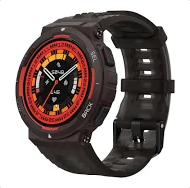

The Noise Force Plus is a versatile and stylish accessory designed for those who prioritize functionality and aesthetics. With advanced features and multiple options, it delivers an exceptional experience for both casual users and professionals. Whether you seek peaceful solitude or immersive listening, Noise Force Plus offers unmatched performance, making it the ultimate choice for modern audio enthusiasts. Ideal for work, travel, or leisure, it ensures a seamless audio experience, setting new standards for sound technology.
Ready to buy the new watch? Use the Maha Bachat savings calculator to combine dealer offers, brand offers, and Bajaj offers to bring down your purchase cost. Calculate your extra savings today!
Also read: How to set up your new smartwatch
Noise Force Plus features
- Display: 1.46" AMOLED display with 466 x 466 pixels resolution, offering vibrant visuals and sharp clarity.
- Design: Rugged and sporty design with a thin bezel for a seamless viewing experience.
- Battery Life: Up to 7 days of battery life, with up to 2 days with Bluetooth calling activated.
- Bluetooth Calling: TruSync Bluetooth calling for faster pairing and longer range with less power consumption.
- Health Monitoring: Heart rate, SpO2, sleep monitoring, and more through the Noise Health Suite.
- Activity Tracking: 130+ sports modes with auto sports detection.
- Water Resistance: IP67 rating, making it suitable for various outdoor activities.
- Compatibility: Works with both Android and iOS devices.
- Additional Features: Always-On Display, 100+ cloud-based watch faces, remote music and camera control, and more.
How to use Noise Force Plus smartwatch (Setup and guide)
- Charge and power on: Before first use, fully charge your watch using the magnetic charger provided. Once charged, press and hold the side button to turn it on.
- Install the NoiseFit App: Download the NoiseFit app from the Google Play Store or Apple App Store. Make sure Bluetooth and Location are turned on in your phone settings.
- Pair your watch: Open the NoiseFit app, log in or create an account, and select Add Device. Choose Noise Force Plus from the list and confirm pairing on both your watch and phone.
- Set up features: Customise your watch face, enable notifications, and set your fitness goals. You can also adjust brightness, vibration, and menu style from the settings.
- Explore sports and fitness modes: The watch supports over 130 sports modes. Select your activity from the sports menu to start tracking your workout.
- Use health tracking tools: Monitor your heart rate, SpO₂, stress levels, and sleep patterns directly from the watch or through the NoiseFit app.
- Adjust time and date: The watch automatically syncs time and date from your phone. If needed, you can change them manually in the settings.
- Manage quick settings: Swipe through the menu to access quick settings like Do Not Disturb, brightness control, and wristwake.
Also explore: Noise smartwatches for men
Noise Force Plus smartwatch in India ((January 2026))
| Model |
Price |
| Noise Force Plus |
Rs. 2,499 |
Disclaimer: The features, availability, and pricing of each model are subject to change and may vary. For the most accurate and up-to-date information, please visit the official website.
Note: You can use Bajaj Finserv’s financing options to split any purchase above Rs. 5,000 into Easy EMIs.
Before you decide, explore the latest offers. You may find a great deal on a model that matches your needs.
Shop for a smartwatch with Bajaj Finserv
Bringing home your preferred smartwatch is now hassle-free with Bajaj Finserv’s flexible financing options. You can also maximise your savings by using the Maha Bachat Savings Calculator—a smart tool that combines brand offers, dealer offers, and EMI offers, all in one place, helping you lower the overall cost while still paying in small, bite-sized instalments. Follow these steps to get started:
- Explore products on Bajaj Mall: Browse through a wide selection of smartwatches on Bajaj Mall. Compare features to find a model that meets your needs.
- Visit a partner store: Once you shortlist a model, step into any of Bajaj Finserv’s 1.5 lakh partner stores across 4,000 cities in India. See the product in person, talk to experts, and make a confident decision.
- Choose the Easy EMI Loan option: At checkout, select the Bajaj Finserv Easy EMI Loan. Avail financing of up to Rs. 5 lakh and split the cost into convenient monthly instalments. Some products also come with a zero down payment option.
- Check your loan eligibility online: Plan better by checking your loan eligibility in minutes. Simply enter your mobile number and OTP to know your pre-approved limit.
- Use the EMI Network Card for purchases up to Rs. 3 lakh: Already own the Bajaj Finserv EMI Network Card? Use it for instant, paperless checkout and convert your purchases of up to Rs. 3 lakh into Easy EMIs.
Smartwatch By Brand: